FabCon is coming to Atlanta
Join us at FabCon Atlanta from March 16 - 20, 2026, for the ultimate Fabric, Power BI, AI and SQL community-led event. Save $200 with code FABCOMM.
Register now!- Power BI forums
- Get Help with Power BI
- Desktop
- Service
- Report Server
- Power Query
- Mobile Apps
- Developer
- DAX Commands and Tips
- Custom Visuals Development Discussion
- Health and Life Sciences
- Power BI Spanish forums
- Translated Spanish Desktop
- Training and Consulting
- Instructor Led Training
- Dashboard in a Day for Women, by Women
- Galleries
- Data Stories Gallery
- Themes Gallery
- Contests Gallery
- Quick Measures Gallery
- Notebook Gallery
- Translytical Task Flow Gallery
- TMDL Gallery
- R Script Showcase
- Webinars and Video Gallery
- Ideas
- Custom Visuals Ideas (read-only)
- Issues
- Issues
- Events
- Upcoming Events
To celebrate FabCon Vienna, we are offering 50% off select exams. Ends October 3rd. Request your discount now.
- Power BI forums
- Forums
- Get Help with Power BI
- Desktop
- Re: Additional Rows Showing in Data Table, but not...
- Subscribe to RSS Feed
- Mark Topic as New
- Mark Topic as Read
- Float this Topic for Current User
- Bookmark
- Subscribe
- Printer Friendly Page

- Mark as New
- Bookmark
- Subscribe
- Mute
- Subscribe to RSS Feed
- Permalink
- Report Inappropriate Content
Additional Rows Showing in Data Table, but not in Querry
Hi Everyone,
I have a querry that got created by appending two tables. Looking at this appended querry in the querry editor, I see total of 25 rows as expected (for a specific item).
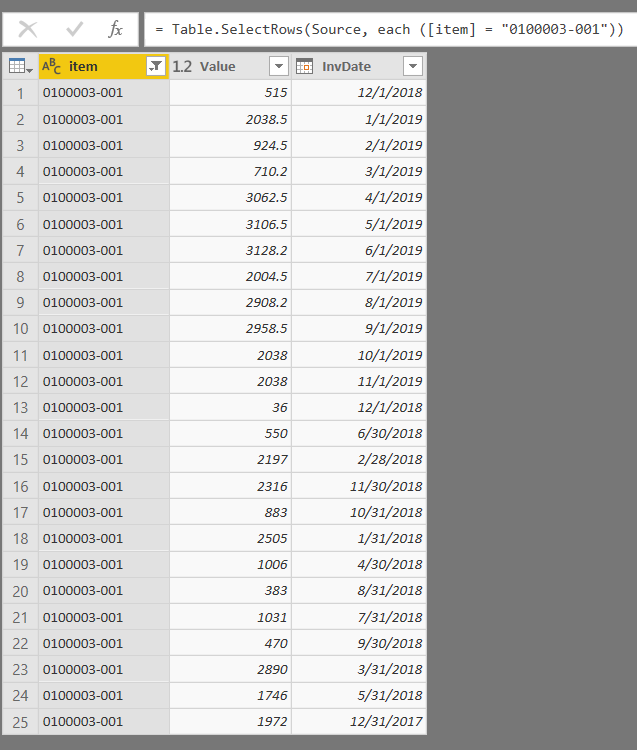
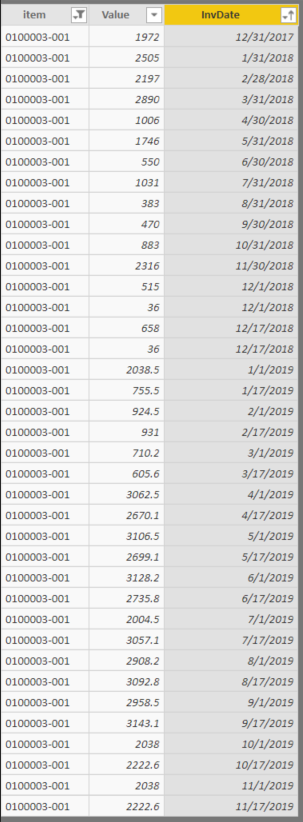
However, when I save this querry and start building my charts off of it, data seems to get added out of nowhere. When I look into the Data tab, and select the appended table, I see total of 38 rows (for the same specific item).
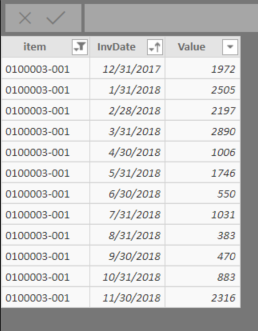
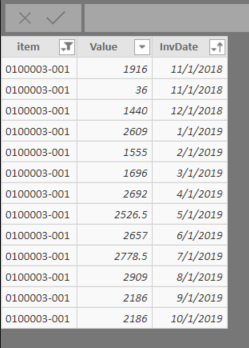
I've also looked at the individual tables that were appended, and see that the data in there looks accurate, adding up to the expected 25 rows.
I am currently at a loss on how to troubleshoot this further. Anyone else experienced something similar, or have thoughts on how I can go about resolving this?
- Mark as New
- Bookmark
- Subscribe
- Mute
- Subscribe to RSS Feed
- Permalink
- Report Inappropriate Content
I hope you applied changes to your query?
- Mark as New
- Bookmark
- Subscribe
- Mute
- Subscribe to RSS Feed
- Permalink
- Report Inappropriate Content
Yup, sure did! Thank you for checking 🙂


- Mark as New
- Bookmark
- Subscribe
- Mute
- Subscribe to RSS Feed
- Permalink
- Report Inappropriate Content
Hi @Anonymous
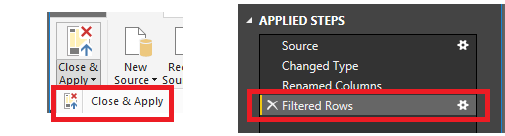
Have you checked the 'filtered rows' is the last step in 'applied steps' ? Then click 'Close&Apply'. If it is not your case, could you share the .pbix file for us to check? You can upload it to OneDrive and post the link here. Do mask sensitive data before uploading.
Regards,
Cherie
If this post helps, then please consider Accept it as the solution to help the other members find it more quickly.
- Mark as New
- Bookmark
- Subscribe
- Mute
- Subscribe to RSS Feed
- Permalink
- Report Inappropriate Content
Hi Cherie,
I have checked the filtered row step and applied the changes, results are still the same.
Here is the pbix file I am using.
- Mark as New
- Bookmark
- Subscribe
- Mute
- Subscribe to RSS Feed
- Permalink
- Report Inappropriate Content
Hi @Anonymous
Do the tables come from a live source (database)? Because if there are constant updates it could be consistently changing.
Regards,
Cherie
If this post helps, then please consider Accept it as the solution to help the other members find it more quickly.
- Mark as New
- Bookmark
- Subscribe
- Mute
- Subscribe to RSS Feed
- Permalink
- Report Inappropriate Content
Hi @v-cherch-msft,
Tables do come from a database. However, these tables are not being updated as it looks at historical and point in time information. I have confirmed that the data shown in the querry results in the pbix file matches the results I get when I directly querry the SQL tables for the database.
For me the odd portion is the fact that querry shows the right information, but the data shown for the charts are where the additional rows come from. These rows do not exists anywhere in the querry results or within the database at all.
- Mark as New
- Bookmark
- Subscribe
- Mute
- Subscribe to RSS Feed
- Permalink
- Report Inappropriate Content
Hi @Anonymous
I cannot reproduce the same issue as you said. I would suggest you may install the latest version of Power BI Desktop.Then re-connect the database and test again. If it is not your case, you may submit a support ticket.
https://powerbi.microsoft.com/en-us/support/
Regards,
Cherie
If this post helps, then please consider Accept it as the solution to help the other members find it more quickly.
Helpful resources

Power BI Monthly Update - September 2025
Check out the September 2025 Power BI update to learn about new features.


