cancel
Showing results for 
Search instead for 
Did you mean: 

The Power BI Data Visualization World Championships is back! Get ahead of the game and start preparing now! Learn more

Reply
maximus1
Frequent Visitor

Adding a new column to compare previous year

Hi Everyone.


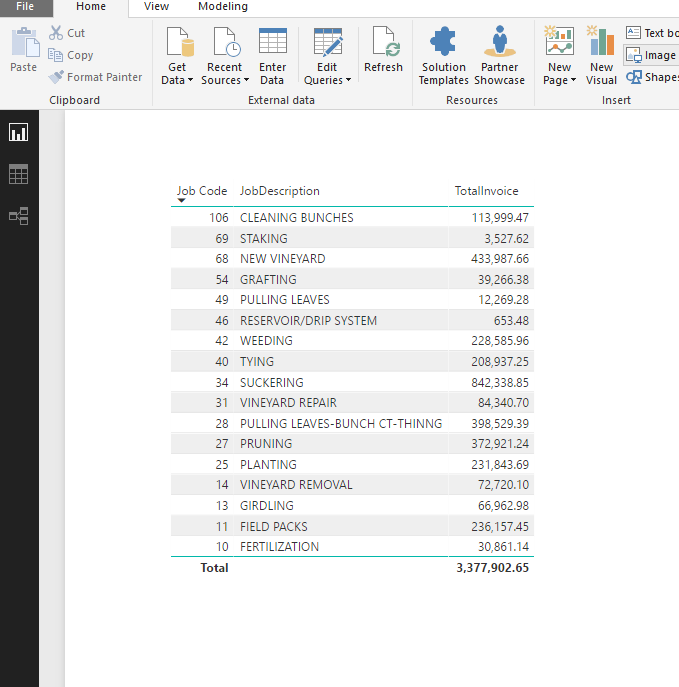
I have this table below. I'd like to create another column similar to Total Invoice with the same data for the previous year. I am not sure if I need to create a date table or simply use a formula for the date range I am looking for?


From what I've read so far, theres a previous year function (DAX) except i think this requires  a unique date table if Im not mistaken. So i am not sure what would be the best approach.


I've tried the following formula with no success as I keep getting an error:

2016 = CALCULATE(SUM('Contractor Expense'[TotalInvoice]), DATESBETWEEN('Contractor Expense'[ToDate],11/28/2015,07/30/2016))


The current Total Invoice column is filtered for 11/29/2016 to 07/30/2017.


Power BI 7.PNG 

3 REPLIES 3
v-ljerr-msft
Microsoft Employee
Microsoft Employee

Hi @maximus1,


Could you try using the formula below to create measure to see if it works in your scenario? Smiley Happy

PY Total Invoice =
VAR maxDate =
    MAX ( 'Contractor Expense'[ToDate] )
VAR minDate =
    MIN ( 'Contractor Expense'[ToDate] )
VAR jobCode =
    MAX ( 'Contractor Expense'[Job Code] )
RETURN
    CALCULATE (
        SUM ( 'Contractor Expense'[TotalInvoice] ),
        FILTER (
            ALL ( 'Contractor Expense' ),
            'Contractor Expense'[Job Code] = jobCode
                && 'Contractor Expense'[ToDate]
                    >= DATE ( YEAR ( minDate ) - 1, MONTH ( minDate ), DAY ( minDate ) )
                && 'Contractor Expense'[ToDate]
                    <= DATE ( YEAR ( maxDate ) - 1, MONTH ( maxDate ), DAY ( maxDate ) )
        )
    )


Regards

Thank you @v-ljerr-msft


bi8.PNG


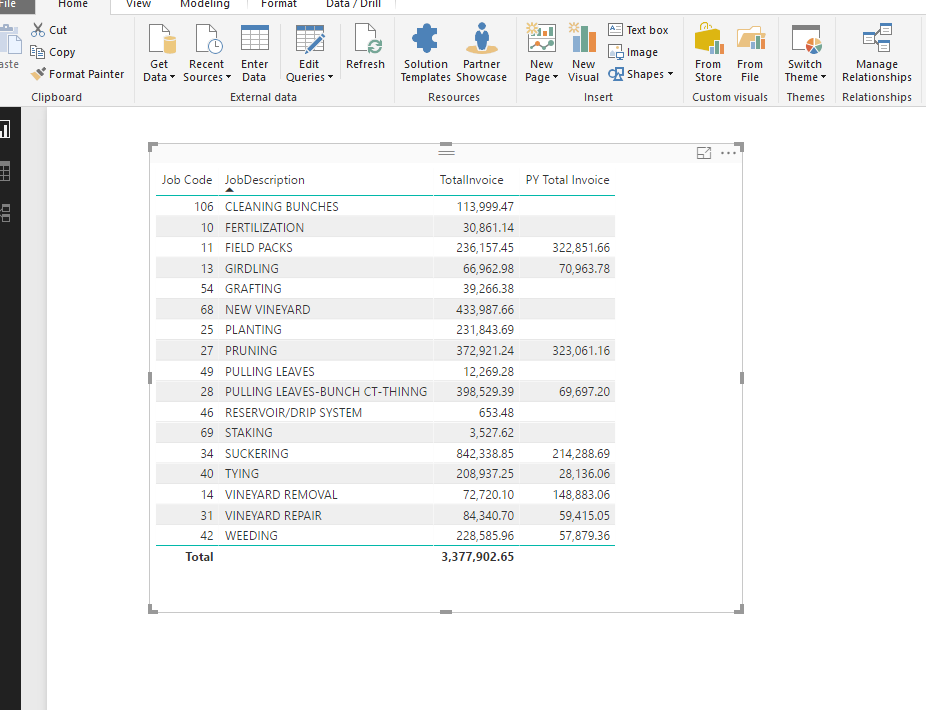
It semi worked. some of the values were spot on while others were a bit off. One of the big issues now is that I know I have values in the PY (for different job descriptions) that I dont have in the Total Invoice (this year), but they are not showing up. I believe these values arent showing up because the formula is only returning prior year values for what is on the existing table. Not sure how to resolve that but I am trying to do some research on creating a date table to see if that will solve my issues. I sincierly appreciate the help, and if you have any other suggestions I am all ears. I am closer today than I was yesterday, so that some progress! 

Hi @maximus1,


Could you share a sample pbix file which can reproduce the issue, so that we can help further investigate on it? You can upload it to OneDrive or Dropbox and post the link here. Do mask sensitive data before uploading. Smiley Happy


Regards

Helpful resources

Announcements
Power BI DataViz World Championships

Power BI Dataviz World Championships

The Power BI Data Visualization World Championships is back! Get ahead of the game and start preparing now!

November Power BI Update Carousel

Power BI Monthly Update - November 2025

Check out the November 2025 Power BI update to learn about new features.

FabCon Atlanta 2026 carousel

FabCon Atlanta 2026

Join us at FabCon Atlanta, March 16-20, for the ultimate Fabric, Power BI, AI and SQL community-led event. Save $200 with code FABCOMM.