
Get certified for free when you join Fabric Data Days 2026 and dive into Fabric, Power BI, SQL, AI, and other essential data skills.
Join nowJuly 7 - July 17 | Round 2 of the Power BI Dataviz World Championships. Don't miss your chance! Learn more
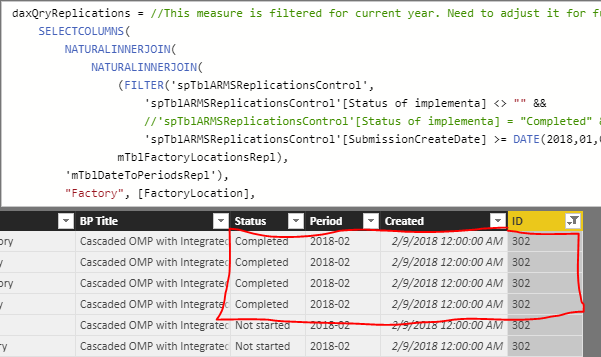
I have a table below and I would like to add another column showing a total from one of the tables listed in the join. For example, I'm trying to add, in the new column drawn in red, the value "4" for BPid #302. In the second screen shot is the detail for the number 4. (ID = 302 and status = Completed)
I'm sure I've been staring at this for too long and the answer is right in front of me but I cannot figure it out! Help!
Solved! Go to Solution.
Hi @lysa
It seems you need to create a calculated column with IF condition like below. If it is not your case, please share some simplified data sample and expected output. You can upload it to OneDrive or Dropbox and post the link here.
Column =
IF (
Table1[Bpid] = 302,
COUNTROWS ( FILTER ( Table2, Table2[Status] = "Completed" && Table2[ID] = 302 ) )
)Regards,
Cherie
Hi @lysa
It seems you need to create a calculated column with IF condition like below. If it is not your case, please share some simplified data sample and expected output. You can upload it to OneDrive or Dropbox and post the link here.
Column =
IF (
Table1[Bpid] = 302,
COUNTROWS ( FILTER ( Table2, Table2[Status] = "Completed" && Table2[ID] = 302 ) )
)Regards,
Cherie
Join us in Barcelona for FabCon and SQLCon, the Fabric, Power BI, SQL, and AI community event. Save €200 with code FABCMTY200.
Join Fabric Data Days 2026: 60 days of free live/on-demand sessions, challenges, study groups, and certification opportunities.
| User | Count |
|---|---|
| 22 | |
| 22 | |
| 18 | |
| 17 | |
| 13 |
| User | Count |
|---|---|
| 63 | |
| 50 | |
| 46 | |
| 41 | |
| 39 |