FabCon is coming to Atlanta
Join us at FabCon Atlanta from March 16 - 20, 2026, for the ultimate Fabric, Power BI, AI and SQL community-led event. Save $200 with code FABCOMM.
Register now!- Power BI forums
- Get Help with Power BI
- Desktop
- Service
- Report Server
- Power Query
- Mobile Apps
- Developer
- DAX Commands and Tips
- Custom Visuals Development Discussion
- Health and Life Sciences
- Power BI Spanish forums
- Translated Spanish Desktop
- Training and Consulting
- Instructor Led Training
- Dashboard in a Day for Women, by Women
- Galleries
- Data Stories Gallery
- Themes Gallery
- Contests Gallery
- QuickViz Gallery
- Quick Measures Gallery
- Visual Calculations Gallery
- Notebook Gallery
- Translytical Task Flow Gallery
- TMDL Gallery
- R Script Showcase
- Webinars and Video Gallery
- Ideas
- Custom Visuals Ideas (read-only)
- Issues
- Issues
- Events
- Upcoming Events
The Power BI Data Visualization World Championships is back! Get ahead of the game and start preparing now! Learn more
- Power BI forums
- Forums
- Get Help with Power BI
- Desktop
- Re: Add target value to other table
- Subscribe to RSS Feed
- Mark Topic as New
- Mark Topic as Read
- Float this Topic for Current User
- Bookmark
- Subscribe
- Printer Friendly Page

- Mark as New
- Bookmark
- Subscribe
- Mute
- Subscribe to RSS Feed
- Permalink
- Report Inappropriate Content
Add target value to other table
Hi guys,
I have following source table:
| ID | USER_ID | # ORD |
| 1 | U1 | 5 |
| 2 | U1 | 10 |
| 3 | U1 | 5 |
| 4 | U2 | 50 |
| 5 | U3 | 1 |
Then I also have additional table with target values:
| USER_ID | Target |
| U1 | 25 |
| U2 | 50 |
What I'd like to do is following:
| USER_ID | SUM ORD | Target |
| U1 | 20 | 25 |
| U2 | 51 | 50 |
Could you please advise me how to add target value (for each USER_ID) to my visualisation (based on source table data).
Thanks in advance
Solved! Go to Solution.


- Mark as New
- Bookmark
- Subscribe
- Mute
- Subscribe to RSS Feed
- Permalink
- Report Inappropriate Content
@Anonymous ,
So if the USER_ID does not exist in Source table, it can be also understanded as the max(lastest) USER_ID in additional table, right? If so, you can create a new USER_ID column in Source table using DAX below:
New USER_ID = IF('Source Table'[USER_ID] = RELATED('Additional Table'[USER_ID]), RELATED('Additional Table'[USER_ID]), MAX('Additional Table'[USER_ID]))

Then you can create a measure based on the new USER_ID column to achieve the total result.
SUM #ORD = CALCULATE(SUM('Source Table'[# ORD]), ALLEXCEPT('Source Table', 'Source Table'[New USER_ID]))

Community Support Team _ Jimmy Tao
If this post helps, then please consider Accept it as the solution to help the other members find it more quickly.
- Mark as New
- Bookmark
- Subscribe
- Mute
- Subscribe to RSS Feed
- Permalink
- Report Inappropriate Content
@Anonymous ,
So if the USER_ID does not exist in Source table, it can be also understanded as the max(lastest) USER_ID in additional table, right? If so, you can create a new USER_ID column in Source table using DAX below:
New USER_ID = IF('Source Table'[USER_ID] = RELATED('Additional Table'[USER_ID]), RELATED('Additional Table'[USER_ID]), MAX('Additional Table'[USER_ID]))
Then you can create a measure based on the new USER_ID column to achieve the total result.
SUM #ORD = CALCULATE(SUM('Source Table'[# ORD]), ALLEXCEPT('Source Table', 'Source Table'[New USER_ID]))
Community Support Team _ Jimmy Tao
If this post helps, then please consider Accept it as the solution to help the other members find it more quickly.


- Mark as New
- Bookmark
- Subscribe
- Mute
- Subscribe to RSS Feed
- Permalink
- Report Inappropriate Content
If I understand correct you should just add relationship between tables, then add to visual fields USER_ID, Sum of #ORD and average (or max, or min, whatever) Target
- Mark as New
- Bookmark
- Subscribe
- Mute
- Subscribe to RSS Feed
- Permalink
- Report Inappropriate Content
Yes, you're right. That's the easiest solution. But what can happen is that I have in target table USER1, USER2, but in source table records for USER1, USER2, USER3, USER4. Then if I use USER_ID from source table, relation doesn't work correctly and if I take it from target, it works, but shows only USER1, USER2 and rest is shown as blank.
- Mark as New
- Bookmark
- Subscribe
- Mute
- Subscribe to RSS Feed
- Permalink
- Report Inappropriate Content
For your example from start post it will look like this
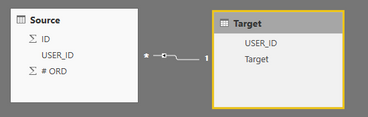
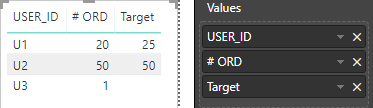
you have no target for U3 in target table, so, you have a blank target in visual

- Mark as New
- Bookmark
- Subscribe
- Mute
- Subscribe to RSS Feed
- Permalink
- Report Inappropriate Content
@Anonymous Could you please confirm - how your final expected has 51 for USER_ID U2. Is it you are adding U2 and U3 data ? If yes, what is your SUM ORD field logic....
Did I answer your question? Mark my post as a solution!
Proud to be a PBI Community Champion
- Mark as New
- Bookmark
- Subscribe
- Mute
- Subscribe to RSS Feed
- Permalink
- Report Inappropriate Content
Hi, Target values are defined by me (hardcoded). Of course, in reality I have much more USERs.
SUM ORD is basic calculation of values from source table (column # ORD) = In souce table we have 5 records, 3 out of them for U1, so SUM of column '# ORD' is 5+10+5 = 20.
thanks
Helpful resources

Power BI Dataviz World Championships
The Power BI Data Visualization World Championships is back! Get ahead of the game and start preparing now!

Power BI Monthly Update - November 2025
Check out the November 2025 Power BI update to learn about new features.

FabCon Atlanta 2026
Join us at FabCon Atlanta, March 16-20, for the ultimate Fabric, Power BI, AI and SQL community-led event. Save $200 with code FABCOMM.

| User | Count |
|---|---|
| 59 | |
| 46 | |
| 42 | |
| 23 | |
| 18 |


| User | Count |
|---|---|
| 192 | |
| 125 | |
| 99 | |
| 67 | |
| 48 |


