Join us at FabCon Atlanta from March 16 - 20, 2026, for the ultimate Fabric, Power BI, AI and SQL community-led event. Save $200 with code FABCOMM.
Register now!Get Fabric Certified for FREE during Fabric Data Days. Don't miss your chance! Request now
Is it possible to add spacing between legend on y axis in a stacked column chart.
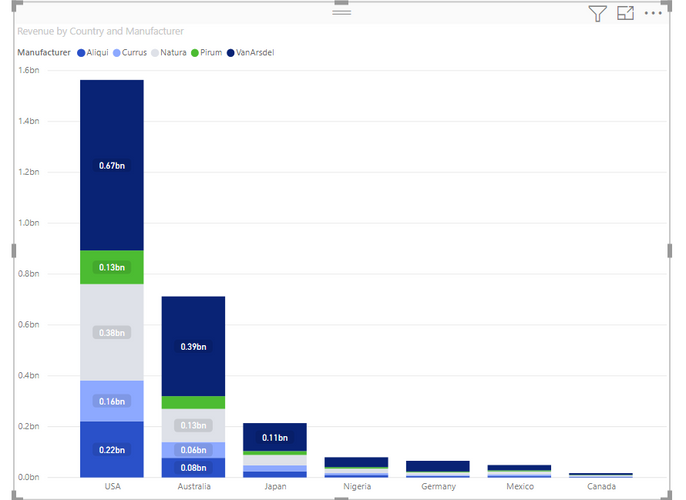
As an example i have the Van Ardsel data and just created a simple chart with country on the axis, manufacturer on the legend and revenue as my value
Is it possible to add some spacing between the manufactures on each bar?
I know you can add spacing and change width on the x axis, but could not find anything on the y axis.
Thanks!
Solved! Go to Solution.
@Anonymous ,
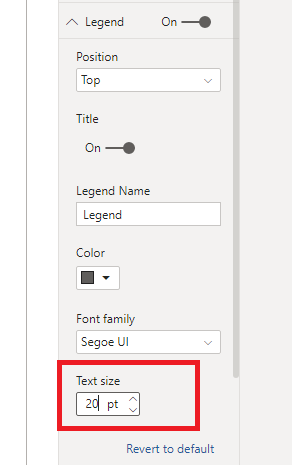
I'm afraid there's no such option like "Inner padding" in Legend section. You may try changing the Text size as a workaround.
Community Support Team _ Jimmy Tao
If this post helps, then please consider Accept it as the solution to help the other members find it more quickly.
Rename the field for the visual and add a couple of spaces at the end of the name. That adds spacing in the legend.
@Anonymous ,
I'm afraid there's no such option like "Inner padding" in Legend section. You may try changing the Text size as a workaround.
Community Support Team _ Jimmy Tao
If this post helps, then please consider Accept it as the solution to help the other members find it more quickly.
Check out the November 2025 Power BI update to learn about new features.
Advance your Data & AI career with 50 days of live learning, contests, hands-on challenges, study groups & certifications and more!