Hi all,
I have a data set which shows certain cycles and their startdate & enddate. The time between them is seen as "out of cycle time".
On some days there aren't any cycles, which makes the "out of cycle time" longer than 24h. Also these days aren't registered. See screenshot below. 14-06 to 17-06 (62h).
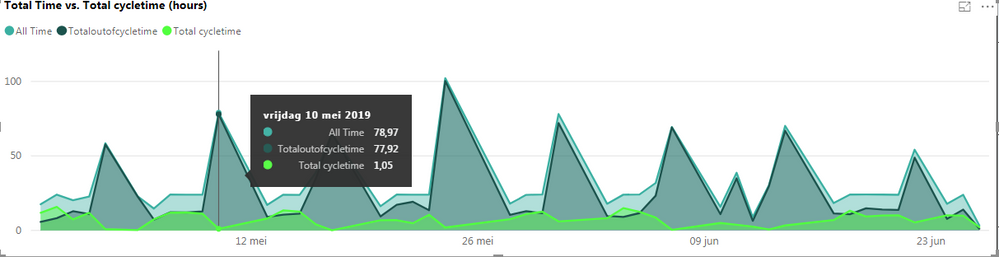
Now my struggle is that I want to show per day the outofcycletime and the cycletime, both SUM duration. When graphing this it will show certain days of more than 24h. (like 14-06) and 15-06 and 16-06 will not been shown. I would want them also to be shown, with 24h outofcycletime. See screenshot for graph.
How can I solve this? Help much appreciated. 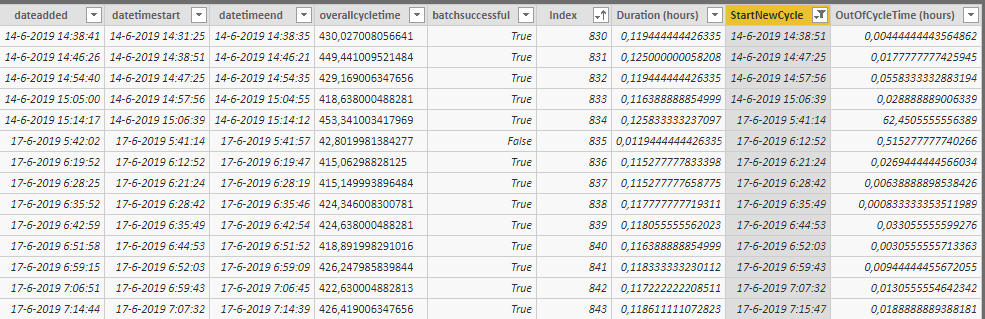
dateaddeddatetimestartdatetimeendoverallcycletimebatchsuccessfulIndexDuration (hours)StartNewCycleOutOfCycleTime (hours)
| 14-6-2019 14:38:41 | 14-6-2019 14:31:25 | 14-6-2019 14:38:35 | 430,027008056641 | True | 830 | 0,119444444426335 | 14-6-2019 14:38:51 | 0,00444444443564862 |
| 14-6-2019 14:46:26 | 14-6-2019 14:38:51 | 14-6-2019 14:46:21 | 449,441009521484 | True | 831 | 0,125000000058208 | 14-6-2019 14:47:25 | 0,0177777777425945 |
| 14-6-2019 14:54:40 | 14-6-2019 14:47:25 | 14-6-2019 14:54:35 | 429,169006347656 | True | 832 | 0,119444444426335 | 14-6-2019 14:57:56 | 0,0558333332883194 |
| 14-6-2019 15:05:00 | 14-6-2019 14:57:56 | 14-6-2019 15:04:55 | 418,638000488281 | True | 833 | 0,116388888854999 | 14-6-2019 15:06:39 | 0,028888889006339 |
| 14-6-2019 15:14:17 | 14-6-2019 15:06:39 | 14-6-2019 15:14:12 | 453,341003417969 | True | 834 | 0,125833333237097 | 17-6-2019 5:41:14 | 62,4505555556389 |
| 17-6-2019 5:42:02 | 17-6-2019 5:41:14 | 17-6-2019 5:41:57 | 42,8019981384277 | False | 835 | 0,0119444444426335 | 17-6-2019 6:12:52 | 0,515277777740266 |
| 17-6-2019 6:19:52 | 17-6-2019 6:12:52 | 17-6-2019 6:19:47 | 415,06298828125 | True | 836 | 0,115277777833398 | 17-6-2019 6:21:24 | 0,0269444444566034 |
| 17-6-2019 6:28:25 | 17-6-2019 6:21:24 | 17-6-2019 6:28:19 | 415,149993896484 | True | 837 | 0,115277777658775 | 17-6-2019 6:28:42 | 0,00638888898538426 |
| 17-6-2019 6:35:52 | 17-6-2019 6:28:42 | 17-6-2019 6:35:46 | 424,346008300781 | True | 838 | 0,117777777719311 | 17-6-2019 6:35:49 | 0,000833333353511989 |
| 17-6-2019 6:42:59 | 17-6-2019 6:35:49 | 17-6-2019 6:42:54 | 424,638000488281 | True | 839 | 0,118055555562023 | 17-6-2019 6:44:53 | 0,033055555599276 |
| 17-6-2019 6:51:58 | 17-6-2019 6:44:53 | 17-6-2019 6:51:52 | 418,891998291016 | True | 840 | 0,116388888854999 | 17-6-2019 6:52:03 | 0,0030555555713363 |
| 17-6-2019 6:59:15 | 17-6-2019 6:52:03 | 17-6-2019 6:59:09 | 426,247985839844 | True | 841 | 0,118333333230112 | 17-6-2019 6:59:43 | 0,00944444455672055 |
| 17-6-2019 7:06:51 | 17-6-2019 6:59:43 | 17-6-2019 7:06:45 | 422,630004882813 | True | 842 | 0,117222222208511 | 17-6-2019 7:07:32 | 0,0130555554642342 |
| 17-6-2019 7:14:44 | 17-6-2019 7:07:32 | 17-6-2019 7:14:39 | 426,419006347656 | True | 843 | 0,118611111072823 | 17-6-2019 7:15:47 | 0,0188888889388181 |


