Join us at FabCon Atlanta from March 16 - 20, 2026, for the ultimate Fabric, Power BI, AI and SQL community-led event. Save $200 with code FABCOMM.
Register now!Get Fabric Certified for FREE during Fabric Data Days. Don't miss your chance! Request now
Hi,
I would like to know if it is possible to add a percentage axis on a barplot ?
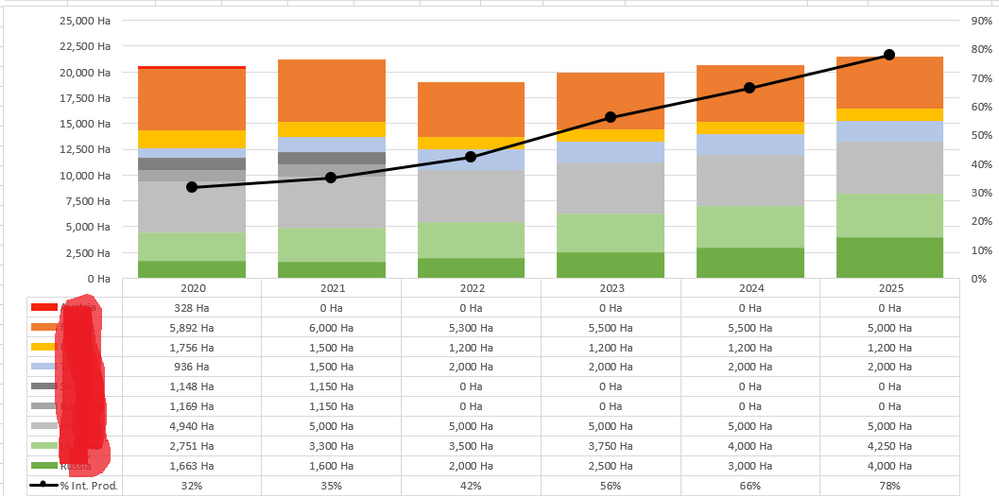
Like this graph (in excel) :
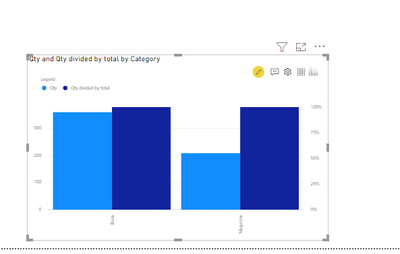
I have the barplot on Power BI but I failed to add the percentage evolution
Thanks 🙂
Solved! Go to Solution.
Please try "Multiple Axes Chart – XViz".
In the Power BI Visuals dialog, click on MARKETPLACE, select Multiple Axes Chart – XViz and then click on Add .
https://exceleratorbi.com.au/dual-axis-line-chart-in-power-bi/
Please try "Multiple Axes Chart – XViz".
In the Power BI Visuals dialog, click on MARKETPLACE, select Multiple Axes Chart – XViz and then click on Add .
https://exceleratorbi.com.au/dual-axis-line-chart-in-power-bi/
Just use a Line and stacked column chart visualisation and put your "% Int. Prod." column or measure on the Line values box. As long as you have that column/measure formatted as a percentage (up the top in "Column Tools" / "Measure Tools" there's a % sign for conventience) the axis will reflect this data type.
Check out the November 2025 Power BI update to learn about new features.
Advance your Data & AI career with 50 days of live learning, contests, hands-on challenges, study groups & certifications and more!