cancel
Showing results for 
Search instead for 
Did you mean: 

We've captured the moments from FabCon & SQLCon that everyone is talking about, and we are bringing them to the community, live and on-demand. Starts on April 14th. Register now

Reply
Let
Frequent Visitor

Add a custom total column (custom query), with "See records" option

Hi,


I want a matrix like this in my dashboard, but I can't figure out how to achieve it.


        |   XXX   |   YYY   |   ZZZ
----------------------------------------
Total   |   832   |   438   |   255
----------------------------------------


For the column XXX, the equivalent query in Excel would be: COUNTIF(AX = Complete and AY = Done)


Any ideas?


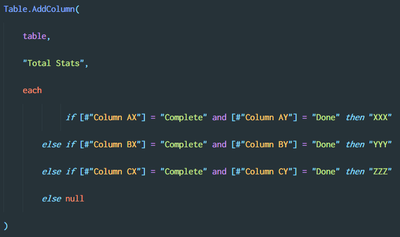
My first try:
 

Screenshot_1.png

With this code, my table has a new column named Total Stats, and tells if the current row is XXX, YYY or ZZZ. The matrix visualization does all the rest.

The only problem of this is that a row can't be XXX and YYY the same time, however, I need it to be so (I want a row to be considered as XXX and YYY for example).


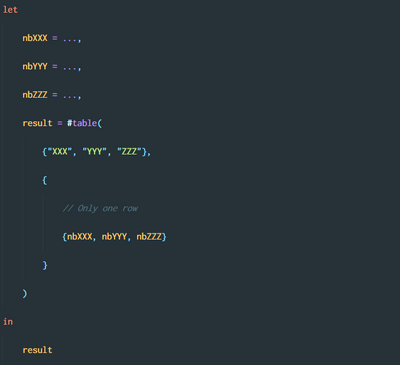
My second try:
 

Screenshot_2.png


I created a new static table using #table(...) with 3 columns XXX, YYY and ZZZ and then display it in the dashboard.

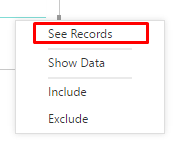
The only problem of this one is the unability to right-click a cell to see the matching records (this is a required feature):
 

Screenshot_3.png

2 REPLIES 2
v-sihou-msft
Microsoft Employee
Microsoft Employee

@Let


To get your expected result, you must have records like: 


Total   XXX   832
Total   YYY   438
Total   ZZZ   255


in your source table. 


So you may add a Total column first, then unpivot it to make this Total column appended as rows. 


Regards,


DAX0110
Resolver V
Resolver V

Hi @Let, you may want to consider unpivoting your source table.

Helpful resources

Announcements
New to Fabric survey Carousel

New to Fabric Survey

If you have recently started exploring Fabric, we'd love to hear how it's going. Your feedback can help with product improvements.

Power BI DataViz World Championships carousel

Power BI DataViz World Championships - June 2026

A new Power BI DataViz World Championship is coming this June! Don't miss out on submitting your entry.

Join our Fabric User Panel

Join our Fabric User Panel

Share feedback directly with Fabric product managers, participate in targeted research studies and influence the Fabric roadmap.

March Power BI Update Carousel

Power BI Community Update - March 2026

Check out the March 2026 Power BI update to learn about new features.