- Power BI forums
- Updates
- News & Announcements
- Get Help with Power BI
- Desktop
- Service
- Report Server
- Power Query
- Mobile Apps
- Developer
- DAX Commands and Tips
- Custom Visuals Development Discussion
- Health and Life Sciences
- Power BI Spanish forums
- Translated Spanish Desktop
- Power Platform Integration - Better Together!
- Power Platform Integrations (Read-only)
- Power Platform and Dynamics 365 Integrations (Read-only)
- Training and Consulting
- Instructor Led Training
- Dashboard in a Day for Women, by Women
- Galleries
- Community Connections & How-To Videos
- COVID-19 Data Stories Gallery
- Themes Gallery
- Data Stories Gallery
- R Script Showcase
- Webinars and Video Gallery
- Quick Measures Gallery
- 2021 MSBizAppsSummit Gallery
- 2020 MSBizAppsSummit Gallery
- 2019 MSBizAppsSummit Gallery
- Events
- Ideas
- Custom Visuals Ideas
- Issues
- Issues
- Events
- Upcoming Events
- Community Blog
- Power BI Community Blog
- Custom Visuals Community Blog
- Community Support
- Community Accounts & Registration
- Using the Community
- Community Feedback
Earn a 50% discount on the DP-600 certification exam by completing the Fabric 30 Days to Learn It challenge.
- Power BI forums
- Forums
- Get Help with Power BI
- Desktop
- Re: Add a animated gif to powerbi
- Subscribe to RSS Feed
- Mark Topic as New
- Mark Topic as Read
- Float this Topic for Current User
- Bookmark
- Subscribe
- Printer Friendly Page

- Mark as New
- Bookmark
- Subscribe
- Mute
- Subscribe to RSS Feed
- Permalink
- Report Inappropriate Content
Add a animated gif to powerbi
Hi Its a sales drive and I have developed a leaderboard.
I am wanting to add some animated gifs of champagne bottles but cannot figure out how to get them to animate ive added them but they just seem a static image?
Solved! Go to Solution.


- Mark as New
- Bookmark
- Subscribe
- Mute
- Subscribe to RSS Feed
- Permalink
- Report Inappropriate Content
Hi @Anonymous,
I don't think there is an option to add an animated gif on Power BI Desktop currently.
Based on my test, you should be able to add an animate gif by adding it as Web Content on a Dashboard in Power BI Service. 
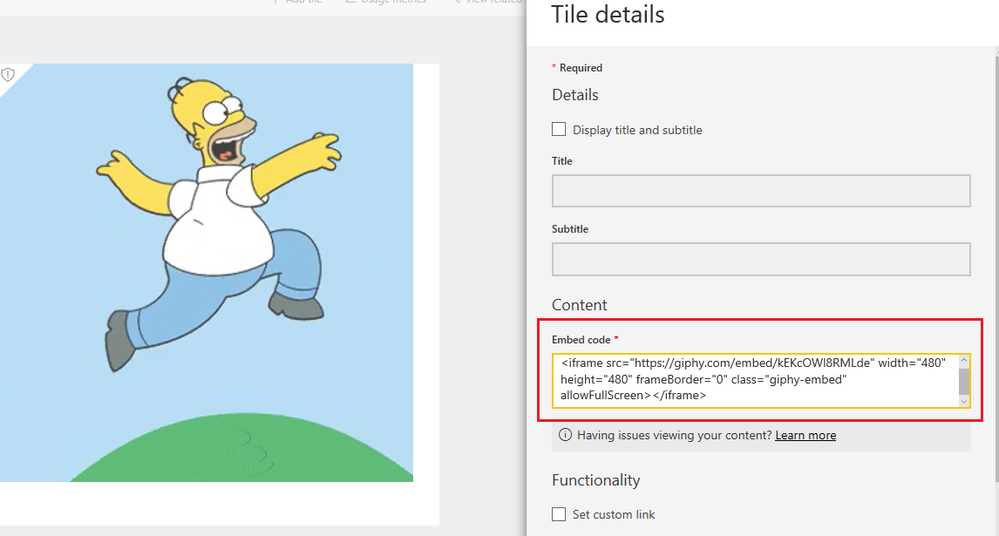
Regards
- Mark as New
- Bookmark
- Subscribe
- Mute
- Subscribe to RSS Feed
- Permalink
- Report Inappropriate Content
Hi @Anonymous,
I don't think there is an option to add an animated gif on Power BI Desktop currently.
Based on my test, you should be able to add an animate gif by adding it as Web Content on a Dashboard in Power BI Service.
Regards


- Mark as New
- Bookmark
- Subscribe
- Mute
- Subscribe to RSS Feed
- Permalink
- Report Inappropriate Content
Sorry, old topic but at Data Insights I learned that GIFs could be added to a report by using the plot area of an empty chart. Just add one value to the axis of a Line chart visualization and hide the title. A workaround clearly but it works.

- Mark as New
- Bookmark
- Subscribe
- Mute
- Subscribe to RSS Feed
- Permalink
- Report Inappropriate Content
Do you have any examples you could share please?
- Mark as New
- Bookmark
- Subscribe
- Mute
- Subscribe to RSS Feed
- Permalink
- Report Inappropriate Content
Here is an example of how to do this. Thanks @Markcgraff for the idea.
Step 1: Add line chart to report. Add a single column to the line chart

Step 2:Change the plot area in the formatting tab to your .gif image. Set transparency to 0%. Hide the title
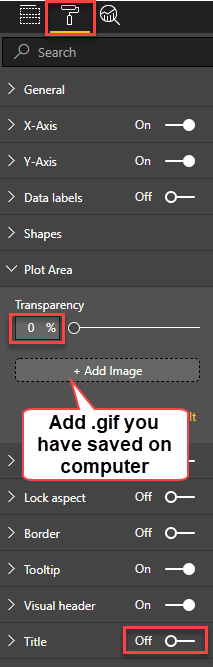
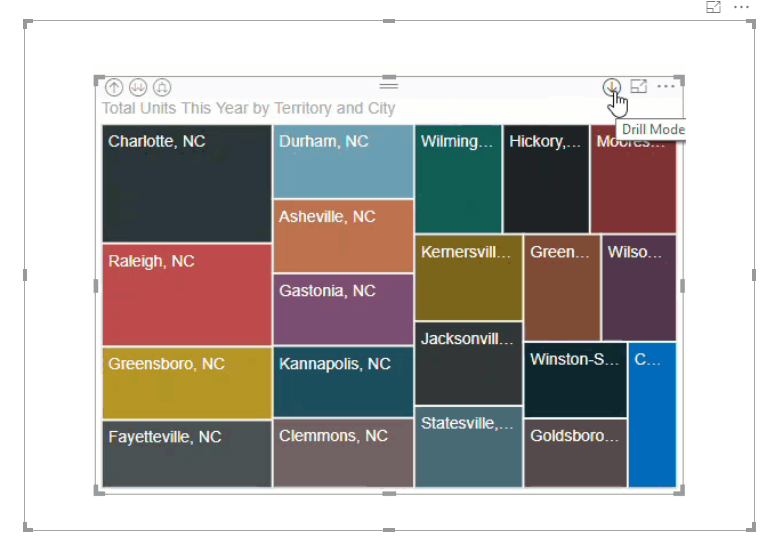
Step 3: Resize the visual so the entire gif shows. It should now show the animated .gif
- Mark as New
- Bookmark
- Subscribe
- Mute
- Subscribe to RSS Feed
- Permalink
- Report Inappropriate Content
Exactly what I needed😌

- Mark as New
- Bookmark
- Subscribe
- Mute
- Subscribe to RSS Feed
- Permalink
- Report Inappropriate Content
This is the bees knees. This is exactly what I was after. I wanted to insert a really quick gif to guide new users on my landing page.
You are a legend.
Thanks
Chris.
- Mark as New
- Bookmark
- Subscribe
- Mute
- Subscribe to RSS Feed
- Permalink
- Report Inappropriate Content
Also to use the gifs transparency?


- Mark as New
- Bookmark
- Subscribe
- Mute
- Subscribe to RSS Feed
- Permalink
- Report Inappropriate Content
Not sure you can add GIFs specifically, but you can add video. Have you tried adding the GIFs as video? Cna't test myself due to restrictions.
https://powerbi.microsoft.com/en-us/documentation/powerbi-service-add-a-widget-to-a-dashboard/
Helpful resources

Power BI Monthly Update - April 2024
Check out the April 2024 Power BI update to learn about new features.

| User | Count |
|---|---|
| 103 | |
| 91 | |
| 79 | |
| 72 | |
| 68 |


| User | Count |
|---|---|
| 108 | |
| 96 | |
| 95 | |
| 73 | |
| 71 |


