cancel
Showing results for 
Search instead for 
Did you mean: 

The Power BI Data Visualization World Championships is back! Get ahead of the game and start preparing now! Learn more

Reply
elinevans
Helper I
Helper I

Active Client ID

elinevans_0-1627030797811.png


Here is an example of the type the data I'm using. Each client can have more than 1 service and I want to find clients active in a service within a time period (say between date x and date y) defined by a slicer on the report. The slicer is based off a date table created by using CALENDARAUTO(). So essentially I wanted to find how many clients have a start date before y AND end date after x. Where x and y can be altered by a date slicer. I ended up doing this using the following formula: 

Active Client Count =
CALCULATE( COUNTROWS(DISTINCT(ServiceInfo[Client ref])), FILTER(ServiceInfo, ServiceInfo[StartDate] <= MAX(DateTable[Date]) && ServiceInfo[EndDate] >= MIN(DateTable[Date])))


The next step is how do I find what are the client references of the clients within that count?

In this example if the date slicer was between 1st May 2020 and 3rd June 2020 the list would be 1,4,5 but how do I find that automatically? 


Thanks


1 ACCEPTED SOLUTION
Samarth_18
Community Champion
Community Champion

Hi @elinevans ,


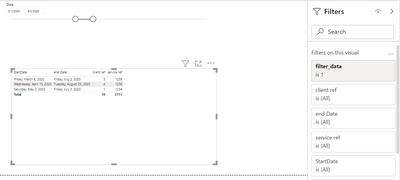
You can create a measure with  below code and use it as filter on your visual

filter_data = IF(MAX(ServiceInfo[StartDate]) <= MAX(date_table[Date]) && MAX(ServiceInfo[EndDate]) >= MIN(Date_Table[Date]),1,0)

Output:-

Samarth_18_0-1627035460303.png

Thanks

Best Regards,
Samarth

If this post helps, please consider accepting it as the solution to help the other members find it more quickly.
Appreciate your Kudos!!
Connect on Linkedin

View solution in original post

3 REPLIES 3
Samarth_18
Community Champion
Community Champion

Hi @elinevans ,


You can create a measure with  below code and use it as filter on your visual

filter_data = IF(MAX(ServiceInfo[StartDate]) <= MAX(date_table[Date]) && MAX(ServiceInfo[EndDate]) >= MIN(Date_Table[Date]),1,0)

Output:-

Samarth_18_0-1627035460303.png

Thanks

Best Regards,
Samarth

If this post helps, please consider accepting it as the solution to help the other members find it more quickly.
Appreciate your Kudos!!
Connect on Linkedin

Thank you for your help @Samarth_18 


In addition to this, if I wanted to report on these active clients e.g genders, could I apply this filter to all pages on the report so that only the gender data for the active clients show? 


At the moment I'm filtering by each individual gender type (and for other classifications) using the following (for a different data set)

genderanotherway = CALCULATE(count(Client[Gender]),filter(Client, Client[Gender]="Another Way"), FILTER(ServiceInfo, ServiceInfo[StartDate] <= MAX(DateTable[Date]) && ServiceInfo[EndDate] >= MIN(DateTable[Date])))
 
Thanks
Elin
 

Yes, either you can add gender condition into that filter measure or you can explicitly add gender column in the filter pane on your required visual.

Best Regards,
Samarth

If this post helps, please consider accepting it as the solution to help the other members find it more quickly.
Appreciate your Kudos!!
Connect on Linkedin

Helpful resources

Announcements
Power BI DataViz World Championships

Power BI Dataviz World Championships

The Power BI Data Visualization World Championships is back! Get ahead of the game and start preparing now!

December 2025 Power BI Update Carousel

Power BI Monthly Update - December 2025

Check out the December 2025 Power BI Holiday Recap!

FabCon Atlanta 2026 carousel

FabCon Atlanta 2026

Join us at FabCon Atlanta, March 16-20, for the ultimate Fabric, Power BI, AI and SQL community-led event. Save $200 with code FABCOMM.