cancel
Showing results for 
Search instead for 
Did you mean: 

View all the Fabric Data Days sessions on demand. View schedule

Reply
Johan
Advocate II
Advocate II

Accumulated value based on ranking DAX

Hi,


I'm looking for a dax formula to show the value accumulated based on it's ranking


Prod A = 3 (euro, dollar, kg, ..)

Prod B = 1

Prod C = 7


Ranking of products:

Prod A = rank 2

Prod B = rank 3

Proc C = rank 1


Now I want to present a graph:

X axis = rank 1, rank 2, rank 3

Y axis = value 7, 10, 11


I found the dax for the rank: RANKX(all(table[prod]);[value]).


Thanks for your support.

Johan

1 ACCEPTED SOLUTION

Hi @Johan,


@Greg_Deckler is right.  Perhaps try adding the following calculated columns to your table


Rank = CALCULATE(COUNTROWS('Table1'),ALL('Table1'),'Table1'[Value] > EARLIER('Table1'[Value]))+1
Cumulative = CALCULATE(SUM('Table1'[Value]),ALL('Table1'),'Table1'[Rank]<= EARLIER('Table1'[Rank]))

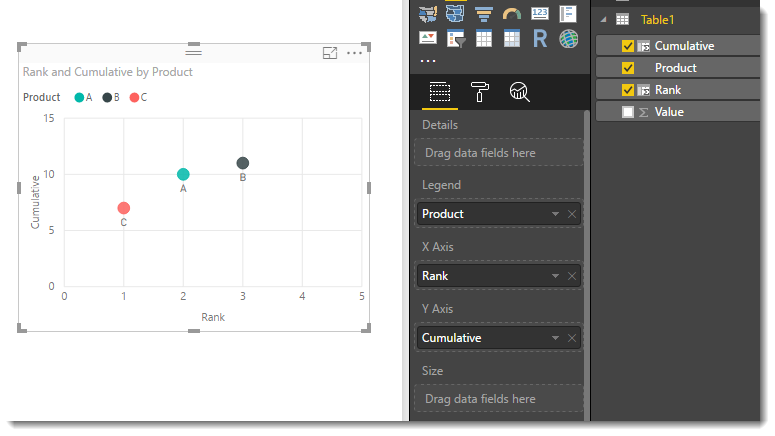
You can then plot these two columns on the axis of a scatter as follows


rank v cumulative.png


To learn more about DAX visit : aka.ms/practicalDAX

Proud to be a Datanaut!

View solution in original post

4 REPLIES 4
Greg_Deckler
Community Champion
Community Champion

Perhaps a cumulative measure that does a SUM of any lower RANK?


Follow on LinkedIn
@ me in replies or I'll lose your thread!!!
Instead of a Kudo, please vote for this idea
Become an expert!: Enterprise DNA
External Tools: MSHGQM
YouTube Channel!: Microsoft Hates Greg
Latest book!:
DAX For Humans

DAX is easy, CALCULATE makes DAX hard...

Thanks for you comment, would you have an example of how to do that?


Hi @Johan,


@Greg_Deckler is right.  Perhaps try adding the following calculated columns to your table


Rank = CALCULATE(COUNTROWS('Table1'),ALL('Table1'),'Table1'[Value] > EARLIER('Table1'[Value]))+1
Cumulative = CALCULATE(SUM('Table1'[Value]),ALL('Table1'),'Table1'[Rank]<= EARLIER('Table1'[Rank]))

You can then plot these two columns on the axis of a scatter as follows


rank v cumulative.png


To learn more about DAX visit : aka.ms/practicalDAX

Proud to be a Datanaut!

Thanks. That worked.

Helpful resources

Announcements
November Power BI Update Carousel

Power BI Monthly Update - November 2025

Check out the November 2025 Power BI update to learn about new features.

Fabric Data Days Carousel

Fabric Data Days

Advance your Data & AI career with 50 days of live learning, contests, hands-on challenges, study groups & certifications and more!

FabCon Atlanta 2026 carousel

FabCon Atlanta 2026

Join us at FabCon Atlanta, March 16-20, for the ultimate Fabric, Power BI, AI and SQL community-led event. Save $200 with code FABCOMM.

Top Solution Authors
Top Kudoed Authors