cancel
Showing results for 
Search instead for 
Did you mean: 

Next up in the FabCon + SQLCon recap series: The roadmap for Microsoft SQL and Maximizing Developer experiences in Fabric. All sessions are available on-demand after the live show. Register now

Reply
Anonymous
Not applicable

Access problem

Hello,

Could someone help me understand what can cause the problem below? I am trying to access Google Analytics and my access is blocked.

How could I solve this?


Screenshot (165).png


1 ACCEPTED SOLUTION
Anonymous
Not applicable

Hi @Anonymous 

If it is the first time you connect to Google Analytics ,make sure the credentials you enter in are correct and can access the datasource .

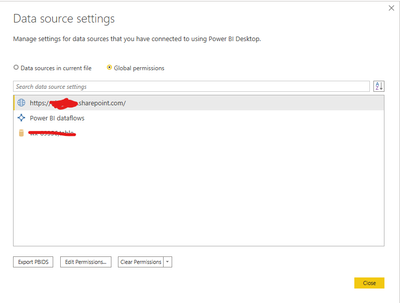
If you have connected before , you need to edit/clear your credentials for that source in Data source settings and try again .

Ailsa-msft_0-1623294451537.png

Best Regards

Community Support Team _ Ailsa Tao


If this post helps, then please consider Accept it as the solution to help the other members find it more quickly.

View solution in original post

3 REPLIES 3
ReportMaster
Post Partisan
Post Partisan

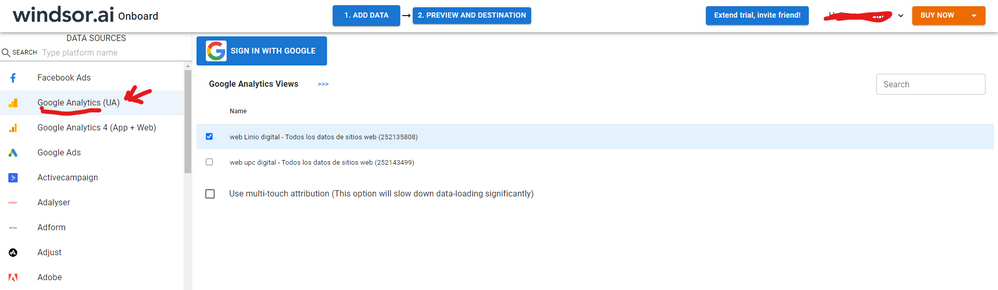
Hi, were you able to find a solution? I used the GA native connector but had some issues with my data sometimes. As a workaround, maybe you can try to test your connection with a 3rd party connector. I've tried windsor.ai, supemetrics and funnel.io. I stayed with windsor because it is much cheaper so just to let you know other options. In case you wonder, to make the connection first search for the GA connector in the data sources list:


GA-1.png


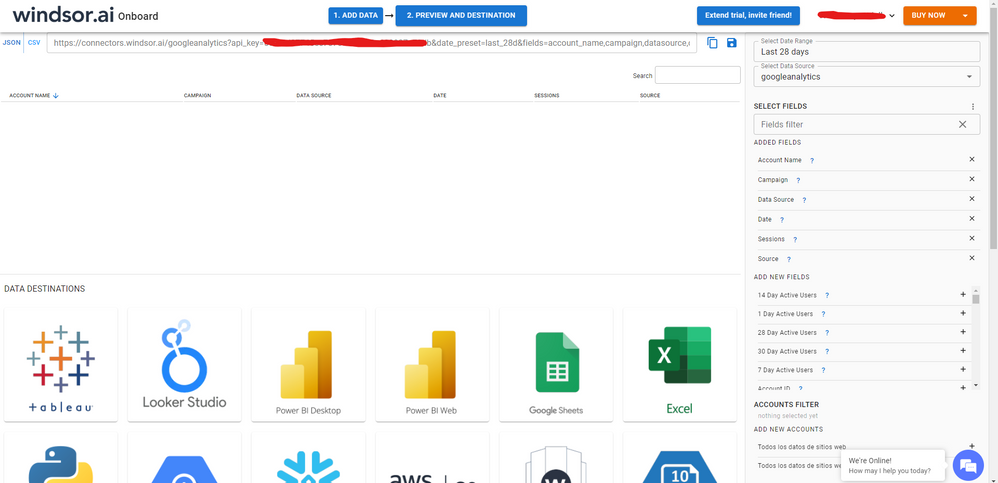
After that, just grant access to your GA account using your credentials, then on preview and destination page you will see a preview of your GA fields:


GA-2.png


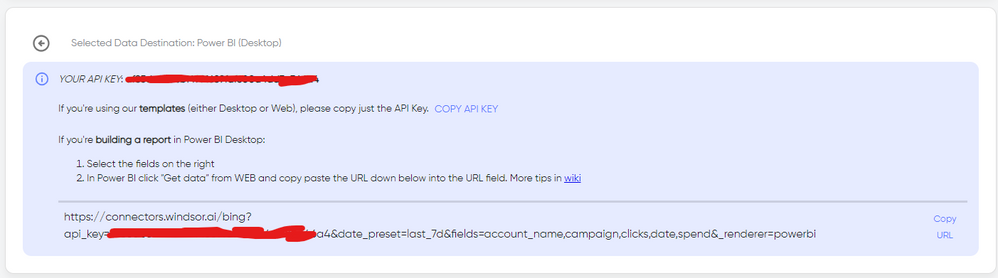
There just select the fields you need. Finally, just select PBI as your data destination and finally just copy and paste the url on PBI --> Get Data --> Web --> Paste the url.


SELECT_DESTINATION_NEW.png

Anonymous
Not applicable

Hi @Anonymous 

If it is the first time you connect to Google Analytics ,make sure the credentials you enter in are correct and can access the datasource .

If you have connected before , you need to edit/clear your credentials for that source in Data source settings and try again .

Ailsa-msft_0-1623294451537.png

Best Regards

Community Support Team _ Ailsa Tao


If this post helps, then please consider Accept it as the solution to help the other members find it more quickly.

mahoneypat
Microsoft Employee
Microsoft Employee

Go to your Data Source settings and edit/clear your credentials for that source.  If it is the first time you are connecting, you'll need to do it from the query editor in a blank query with the Google analytics function (to get prompted to edit your credentials).


Pat


Did I answer your question? Mark my post as a solution! Kudos are also appreciated!

To learn more about Power BI, follow me on Twitter or subscribe on YouTube.


@mahoneypa HoosierBI on YouTube


Helpful resources

Announcements
New to Fabric survey Carousel

New to Fabric Survey

If you have recently started exploring Fabric, we'd love to hear how it's going. Your feedback can help with product improvements.

Power BI DataViz World Championships carousel

Power BI DataViz World Championships - June 2026

A new Power BI DataViz World Championship is coming this June! Don't miss out on submitting your entry.

March Power BI Update Carousel

Power BI Community Update - March 2026

Check out the March 2026 Power BI update to learn about new features.