cancel
Showing results for 
Search instead for 
Did you mean: 

The Power BI Data Visualization World Championships is back! Get ahead of the game and start preparing now! Learn more

Reply
Michalison
Helper II
Helper II

Absence KPIs

I am doing a dashboard that has 2 tables the personnel table which has a staff number column and Absence table which also has a staff number column - I have created a realtionship from personnel table to absence  table using the staff number on a 1 to many as there is only 1 staff number per person on the personnel table and many absences per employee on the absence table. 


I need to do a chart with the calculation count of total absence days from absence table ( sliced by year and department) divided by personnel table count of employees but also based on the year and department sliced currently on the absence table.   So lets say resouces department has 113 people in 2021 (personnel table ) and resources department had 400 days absence in 2021 the calculation would be 400 divded by 113.  when I try this the numbers are all wrong because instead of 113 its calcualting on all the staff in the personnel table 800 as the slicers work for the absence table and not the personnel table - how do I get round this.  Many Thanks

2 ACCEPTED SOLUTIONS
Anonymous
Not applicable

Hi @Michalison ,


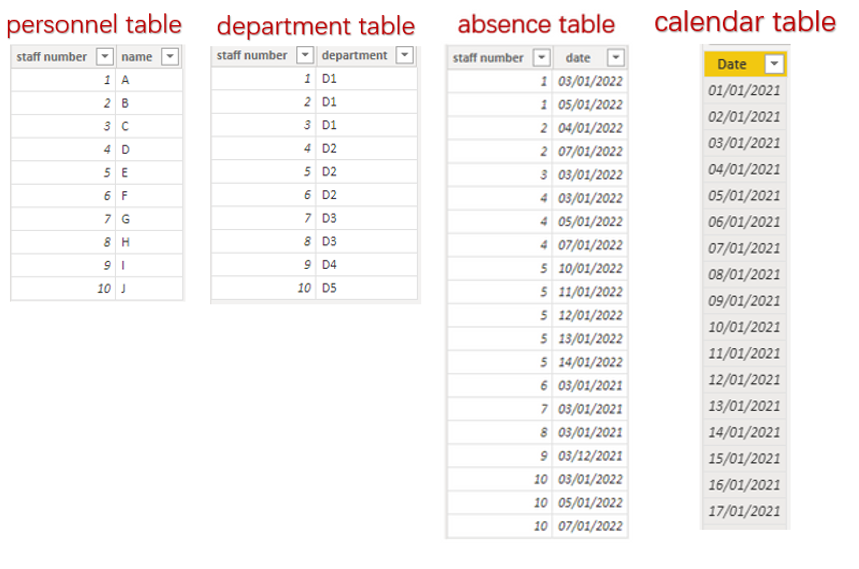
I made a sample according to the description with four tables which are personnel table,department table,absence table and calendar table.

vcgaomsft_5-1643261660280.png

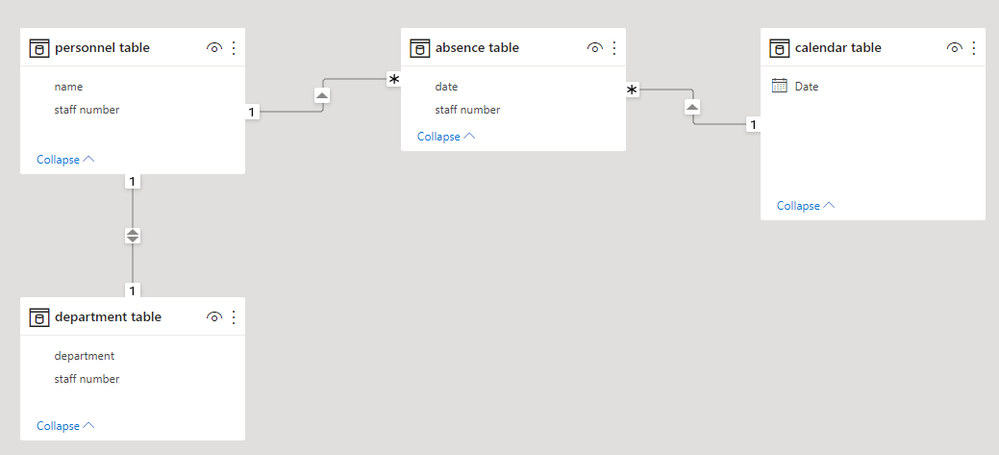
Relationship.

vcgaomsft_0-1643331898104.png

Then try this measure.


Absence KPIs = 
VAR _KPIS = COUNTROWS ( 'absence table' ) / COUNTROWS ( 'personnel table' )
RETURN
IF(_KPIS = BLANK(),0,_KPIS)


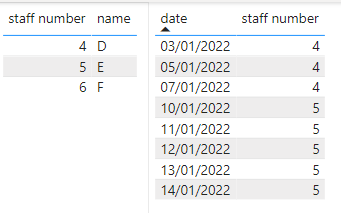
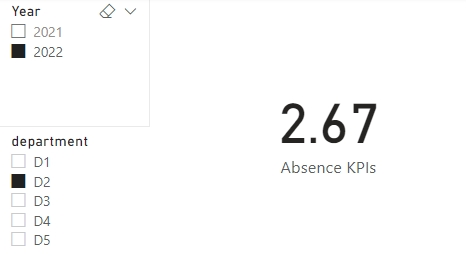
The result should be like this and slicer also works fine.

vcgaomsft_7-1643261929466.png


vcgaomsft_6-1643261889674.png

Also, attached the pbix file as the reference.


Best Regards,

Community Support Team_Gao


If there is any post helps, then please consider Accept it as the solution to help the other members find it more quickly. If I misunderstand your needs or you still have problems on it, please feel free to let us know. Thanks a lot!

View solution in original post

Thank you so much for your help this has worked

View solution in original post

2 REPLIES 2
Anonymous
Not applicable

Hi @Michalison ,


I made a sample according to the description with four tables which are personnel table,department table,absence table and calendar table.

vcgaomsft_5-1643261660280.png

Relationship.

vcgaomsft_0-1643331898104.png

Then try this measure.


Absence KPIs = 
VAR _KPIS = COUNTROWS ( 'absence table' ) / COUNTROWS ( 'personnel table' )
RETURN
IF(_KPIS = BLANK(),0,_KPIS)


The result should be like this and slicer also works fine.

vcgaomsft_7-1643261929466.png


vcgaomsft_6-1643261889674.png

Also, attached the pbix file as the reference.


Best Regards,

Community Support Team_Gao


If there is any post helps, then please consider Accept it as the solution to help the other members find it more quickly. If I misunderstand your needs or you still have problems on it, please feel free to let us know. Thanks a lot!

Thank you so much for your help this has worked

Helpful resources

Announcements
Power BI DataViz World Championships

Power BI Dataviz World Championships

The Power BI Data Visualization World Championships is back! Get ahead of the game and start preparing now!

December 2025 Power BI Update Carousel

Power BI Monthly Update - December 2025

Check out the December 2025 Power BI Holiday Recap!

FabCon Atlanta 2026 carousel

FabCon Atlanta 2026

Join us at FabCon Atlanta, March 16-20, for the ultimate Fabric, Power BI, AI and SQL community-led event. Save $200 with code FABCOMM.