Join us at FabCon Atlanta from March 16 - 20, 2026, for the ultimate Fabric, Power BI, AI and SQL community-led event. Save $200 with code FABCOMM.
Register now!The Power BI Data Visualization World Championships is back! Get ahead of the game and start preparing now! Learn more
Hi maybe I am just stupid, but I try to solve this since hours.
So here is what I am doing:
I query a list that is called allrepos (already available as a function but I am stuck)
Allrepos gives me back the uids (unified identifiers) , that I want to use in my API calls (multiple)
= Json.Document(Web.Contents("http://80.XXX.XX.XXX:3000/api/v1/repositories/""&uid&""/trends/ratings", [Headers=[Authorization="Bearer eXXXXXXXXXXXXXXXXXXXXXXXXXXXXXXXXXXXXXs"]]))So I already have from a previous call the values for the new calls
uid
| b40909083e1a671f8a9a16f51a2fffa1 |
| b90a7ac3118f6ecfa4537f1ab359bc5b |
| 7a85ba7f87011d452677ec51686f0e2c |
| 7918f57464e4595884652054b12f1735 |
| f0498d40214513effa4c415c83a161c6 |
| b5b06cbae1ecb58dc86bcebcf99bb8bf |
| 287505f3cf5bbb213de83cd54f76a5be |
| 56c65bdac0fd8f8797d3e0ae7bf261e0 |
59316bad6ca2c1874312a351ef418413 |
What in general should then create me mulitple API calls that gget append in another column so i can expand it later.
The result I seek is:
= Json.Document(Web.Contents("http://80.XXX.XX.XXX:3000/api/v1/repositories/b40909083e1a671f8a9a16f51a2fffa1/trends/ratings", [Headers=[Authorization="Bearer eXXXXXXXXXXXXXXXXXXXXXXXXXXXXXXXXXXXXXs"]]))
= Json.Document(Web.Contents("http://80.XXX.XX.XXX:3000/api/v1/repositories/b90a7ac3118f6ecfa4537f1ab359bc5b/trends/ratings", [Headers=[Authorization="Bearer eXXXXXXXXXXXXXXXXXXXXXXXXXXXXXXXXXXXXXs"]]))
= Json.Document(Web.Contents("http://80.XXX.XX.XXX:3000/api/v1/repositories/7a85ba7f87011d452677ec51686f0e2c/trends/ratings", [Headers=[Authorization="Bearer eXXXXXXXXXXXXXXXXXXXXXXXXXXXXXXXXXXXXXs"]]))
....expanding the table like
uid
| b40909083e1a671f8a9a16f51a2fffa1 | 2,45 | 15.05.2019 |
| b40909083e1a671f8a9a16f51a2fffa1 | 2,7 | 17.05.2019 |
| b90a7ac3118f6ecfa4537f1ab359bc5b | -4 | 16.05.2019 |
| 7a85ba7f87011d452677ec51686f0e2c | ... | ... |
Edit:
I got as far as
= Table.AddColumn(Quelle, "Overall", each Json.Document(Web.Contents("http://80.158.34.203:3000/api/v1/repositories/"& [uid] & "/trends/ratings", "authorization = Bearer xxxxxxxxxxxxxxxxxxxxxxxxxxxxxxxxxxxxxxxxx")))But it throws me still the error
Expression.Error:The Value ""authorization=Bearer..."" cannot be converted into the type "Record".
I have to find out how to iterate through a list and let it append columns for me with power query.
Thanks for your help.
Solved! Go to Solution.
Hi @TeigeGao thanks for your answer.
Sorry that I just post now.
= Table.AddColumn(Quelle, "Ratings", each Json.Document(Web.Contents("http://80.158.34.203:3000/api/v1/repositories/"& [uid] & "/trends/ratings", [Headers=[Authorization="Bearer xxxxxxxxxxxxxxxxxxxxxxxx"]])))I resolved the issue myself a few minutes ago. (Morning coffee wonders, yeah!) The problem was that my call did not comply with the https://docs.microsoft.com/de-de/powerquery-m/web-contents documentation. RTFM to myself!
The Header part of the query was missing, so it did not understand was the Authorization part was and the error message was a bit misleading.
Then it worked like a charm.
The next problem I ran into was after expanding the table that it did not have a unique primary key anymore.
The trick is to ignore the error and create an n-to-1 connection in the data modeling view.
Really start to like power bi.
Low Code BI wonder 😄
Thanks for your detailed help, I really appreciate it.
Hi @Riddler ,
The error message "Expression.Error:The Value ""authorization=Bearer..."" cannot be converted into the type "Record". " indicates that the uid column cannot be added to the string directly.
Actually, if we want to use variable in a table to a string, we cna use the following method:
First, we can create a function like below:
(id as text) =>
let
Source = Csv.Document(File.Contents("C:\Users\teigeg\Desktop\" & id & ".csv"),[Delimiter=",", Columns=3, Encoding=1252, QuoteStyle=QuoteStyle.None]),
#"Changed Type" = Table.TransformColumnTypes(Source,{{"Column1", Int64.Type}, {"Column2", Int64.Type}, {"Column3", Int64.Type}})
in
#"Changed Type"In your scenario, it should be, you can get a query from one Json file import then add the (uid as text) and & [uid] & to it.
(uid as text)=
let Source = Json.Document(Web.Contents("http://80.158.34.203:3000/api/v1/repositories/"& [uid] & "/trends/ratings", "authorization = Bearer xxxxxxxxxxxxxxxxxxxxxxxxxxxxxxxxxxxxxxxxx")))
in
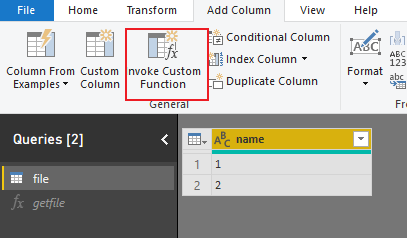
SourceThen go to your variable table, click 'Invoke custom function' like below:
Then expand the table:
Best Regards,
Teige
Hi @TeigeGao thanks for your answer.
Sorry that I just post now.
= Table.AddColumn(Quelle, "Ratings", each Json.Document(Web.Contents("http://80.158.34.203:3000/api/v1/repositories/"& [uid] & "/trends/ratings", [Headers=[Authorization="Bearer xxxxxxxxxxxxxxxxxxxxxxxx"]])))I resolved the issue myself a few minutes ago. (Morning coffee wonders, yeah!) The problem was that my call did not comply with the https://docs.microsoft.com/de-de/powerquery-m/web-contents documentation. RTFM to myself!
The Header part of the query was missing, so it did not understand was the Authorization part was and the error message was a bit misleading.
Then it worked like a charm.
The next problem I ran into was after expanding the table that it did not have a unique primary key anymore.
The trick is to ignore the error and create an n-to-1 connection in the data modeling view.
Really start to like power bi.
Low Code BI wonder 😄
Thanks for your detailed help, I really appreciate it.
The Power BI Data Visualization World Championships is back! Get ahead of the game and start preparing now!
Check out the November 2025 Power BI update to learn about new features.
| User | Count |
|---|---|
| 65 | |
| 47 | |
| 43 | |
| 26 | |
| 19 |
| User | Count |
|---|---|
| 198 | |
| 126 | |
| 102 | |
| 68 | |
| 51 |