Join us at FabCon Atlanta from March 16 - 20, 2026, for the ultimate Fabric, Power BI, AI and SQL community-led event. Save $200 with code FABCOMM.
Register now!The Power BI Data Visualization World Championships is back! Get ahead of the game and start preparing now! Learn more
Hi All,
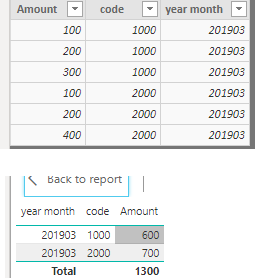
I am facing a unique issue.. i have pulled a table from sql server into tabular model.this includes a amount column as well.but when i use this amount column in power BI with Sum as projection ,amount gets doubled.. when i use dont sum in projection the amount shows correct value..what could be the reason .. in order to replicate the issue pls find the dummy data.
| detail data from Sql server | ||
| Amount | code | year month |
| 100 | 1000 | 201903 |
| 200 | 1000 | 201903 |
| 300 | 1000 | 201903 |
| 100 | 2000 | 201903 |
| 200 | 2000 | 201903 |
| 400 | 2000 | 201903 |
| In power BI,its showing | ||
| Amount(sum) | code | Year month |
| 1200 | 1000 | 201903 |
| 1400 | 2000 | 201903 |
| In Power BI it should show | ||
| Amount(sum) | code | Year month |
| 600 | 1000 | 201903 |
| 700 | 2000 | 201903 |
Any suggestion or help is appreciated !
Thanks
Shash
Solved! Go to Solution.
Hi @Anonymous
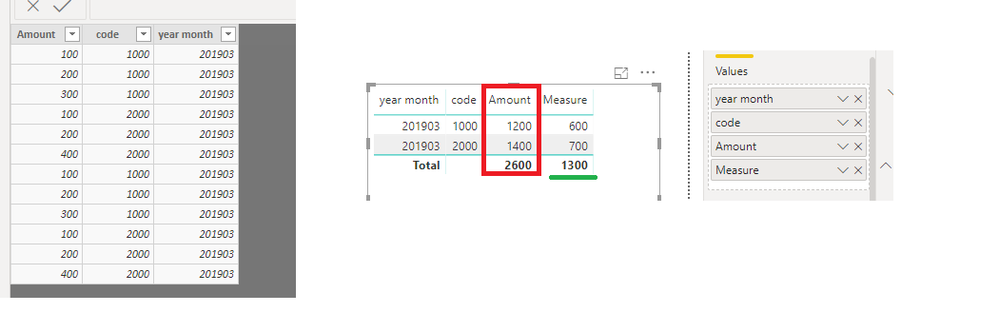
Please check the table in data view.if they are distinct rows,it would not double the values.For example:
If the table is like below,please try to use below measure or remove duplicates in query editor.
Measure = SUMX(DISTINCT('Table'),'Table'[Amount])
Regards,
Thanks Cherie Chen it was of great help ! ..it worked!! thanks alot!
Hi @Anonymous
Please check the table in data view.if they are distinct rows,it would not double the values.For example:
If the table is like below,please try to use below measure or remove duplicates in query editor.
Measure = SUMX(DISTINCT('Table'),'Table'[Amount])
Regards,
Thanks Cherie Chen it was of great help ! ..it worked!! thanks alot!
Hi @Anonymous
Glad to hear the reply is helpful, please accept my reply as solution, that way, other community members will easily find the solution when they get same issue.
Regards,
The Power BI Data Visualization World Championships is back! Get ahead of the game and start preparing now!
Check out the November 2025 Power BI update to learn about new features.
| User | Count |
|---|---|
| 59 | |
| 43 | |
| 42 | |
| 23 | |
| 17 |
| User | Count |
|---|---|
| 190 | |
| 122 | |
| 96 | |
| 66 | |
| 47 |