This is best Fabric, Power BI, SQL and AI community event. How do we know? The last event sold out! Save €200 with code FABCMTY200.
Register nowA new Data Days event is coming soon! This time we’re going bigger than ever. Fabric, Power BI, SQL, AI and more. Don't miss out.
Hello
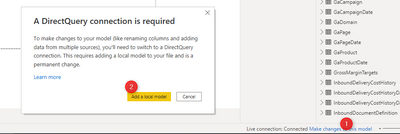
I have a PBI Desktop file connected to an AAS tabular database instance. Recently I wanted to convert the storage mode to "composite" in order to extend the data model by local sources. Unfortunately I'm getting the following error when following this combination of clicks:
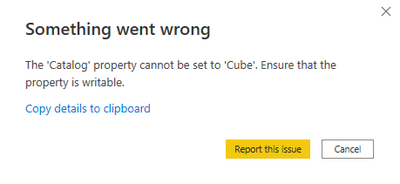
The error:
Did any of you face the similar issue and know how to solve it?
Solved! Go to Solution.
Hi @Anonymous ,
As far as I know using DirectQuery for Power BI datasets and AAS is a preview future in Power BI.
Could you succeed to convert the connection mode from live connection to Direct Query in other database in AAS? Or all database in AAS will give you this error when you add a local model.
I think you may refer to the offical blogs to learn more details about how to use DirectQuery for Power BI datasets and Analysis Services.
For refernece:
Using DirectQuery for Power BI datasets and Analysis Services (preview)
Dataset connectivity with the XMLA endpoint
Best Regards,
Rico Zhou
If this post helps, then please consider Accept it as the solution to help the other members find it more quickly.
Hi @Anonymous ,
As far as I know using DirectQuery for Power BI datasets and AAS is a preview future in Power BI.
Could you succeed to convert the connection mode from live connection to Direct Query in other database in AAS? Or all database in AAS will give you this error when you add a local model.
I think you may refer to the offical blogs to learn more details about how to use DirectQuery for Power BI datasets and Analysis Services.
For refernece:
Using DirectQuery for Power BI datasets and Analysis Services (preview)
Dataset connectivity with the XMLA endpoint
Best Regards,
Rico Zhou
If this post helps, then please consider Accept it as the solution to help the other members find it more quickly.
Check out the May 2026 Power BI update to learn about new features.
Sign up to receive a private message when registration opens and key events begin.
If you have recently started exploring Fabric, we'd love to hear how it's going. Your feedback can help with product improvements.
| User | Count |
|---|---|
| 29 | |
| 28 | |
| 25 | |
| 20 | |
| 14 |
| User | Count |
|---|---|
| 53 | |
| 47 | |
| 29 | |
| 20 | |
| 19 |