FabCon is coming to Atlanta
Join us at FabCon Atlanta from March 16 - 20, 2026, for the ultimate Fabric, Power BI, AI and SQL community-led event. Save $200 with code FABCOMM.
Register now!- Power BI forums
- Get Help with Power BI
- Desktop
- Service
- Report Server
- Power Query
- Mobile Apps
- Developer
- DAX Commands and Tips
- Custom Visuals Development Discussion
- Health and Life Sciences
- Power BI Spanish forums
- Translated Spanish Desktop
- Training and Consulting
- Instructor Led Training
- Dashboard in a Day for Women, by Women
- Galleries
- Data Stories Gallery
- Themes Gallery
- Contests Gallery
- QuickViz Gallery
- Quick Measures Gallery
- Visual Calculations Gallery
- Notebook Gallery
- Translytical Task Flow Gallery
- TMDL Gallery
- R Script Showcase
- Webinars and Video Gallery
- Ideas
- Custom Visuals Ideas (read-only)
- Issues
- Issues
- Events
- Upcoming Events
The Power BI Data Visualization World Championships is back! Get ahead of the game and start preparing now! Learn more
- Power BI forums
- Forums
- Get Help with Power BI
- Desktop
- 2 Periods - Items in wrong column, total is OK
- Subscribe to RSS Feed
- Mark Topic as New
- Mark Topic as Read
- Float this Topic for Current User
- Bookmark
- Subscribe
- Printer Friendly Page

- Mark as New
- Bookmark
- Subscribe
- Mute
- Subscribe to RSS Feed
- Permalink
- Report Inappropriate Content
2 Periods - Items in wrong column, total is OK
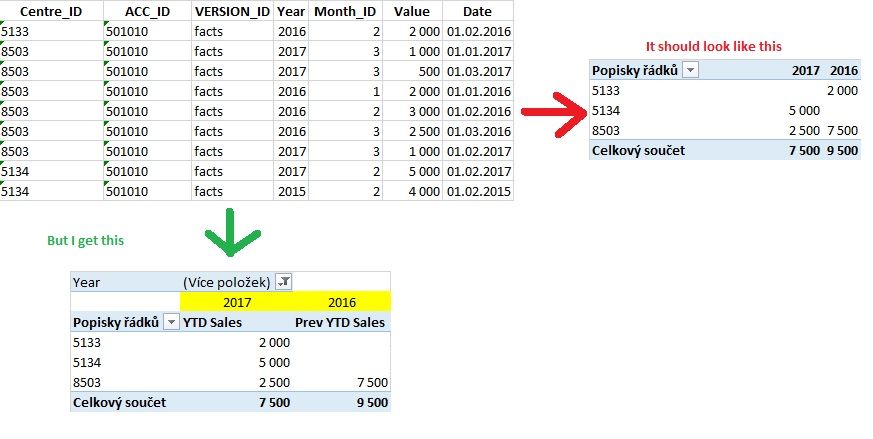
Hi, I have source table from accounting. I did 2 mesures YTD(2017) and Prev.YTD(2016)
Problem is, when there is no value item in year 2017 - it put the value from 2016 in column 2017 (value 2000,-).
But total (sum of the year) is right, so 2017 without this 2000,- and year 2016 with it.
My Mesures:
YTD Sales:=CALCULATE([Součet Sales];DATESYTD(List2[Date]))
Prev YTD Sales:=CALCULATE([Součet Sales];DATEADD(DATESYTD(List2[Date]);-1;YEAR))
Could anybody help me please?
Thanks
Suri
Solved! Go to Solution.
- Mark as New
- Bookmark
- Subscribe
- Mute
- Subscribe to RSS Feed
- Permalink
- Report Inappropriate Content
I have probably found the solution !!!!!
Actual year:=CALCULATE([Součet Sales];FILTER(ALL(List2[Year]);List2[Year]=CALCULATE(Max(List1[rok]);ALLSELECTED(List1[rok]))))
Year 2016:=CALCULATE([Součet Sales];FILTER(ALL(List2[Year]);List2[Year]=CALCULATE(Max(List1[rok])-1;ALLSELECTED(List1[rok]))))
Thank to all you wanted to help me...

- Mark as New
- Bookmark
- Subscribe
- Mute
- Subscribe to RSS Feed
- Permalink
- Report Inappropriate Content
Hi @Suri
How is your third measure [Součet Sales] defined? Sum(List2[Values])?
Your model has no date dimension. With one, it is easier to achieve your goal.
1. create a date dimension in the Query Editor (Power Query), derived from your Fact table:
let
    Source = List2[Date],
    #"Converted to Table1" = Table.FromList(Source, Splitter.SplitByNothing(), null, null, ExtraValues.Error),
    #"Changed Type2" = Table.TransformColumnTypes(#"Converted to Table1",{{"Column1", type date}}),
    #"Renamed Columns" = Table.RenameColumns(#"Changed Type2",{{"Column1", "Date"}}),
    #"Inserted Year" = Table.AddColumn(#"Renamed Columns", "Year", each Date.Year([Date]), type number),
    #"Removed Duplicates" = Table.Distinct(#"Inserted Year", {"Date"})
in
    #"Removed Duplicates
2. replace your measures with:
Prev YTD Sales =
CALCULATE(sum(List2[Value]);
	SAMEPERIODLASTYEAR('Date'[Date]))
YTD Sales = CALCULATE(
sum(List2[Value]);
DATESYTD('Date'[Date]))
Hope this helps.
- Mark as New
- Bookmark
- Subscribe
- Mute
- Subscribe to RSS Feed
- Permalink
- Report Inappropriate Content
I am sorry but I dont know, where and what I should to do with Powerquery (Step 1).
This is my original powerquery source table, but where should I write your:
"let Source = List2[Date], #"Converted to Table1" = Table.FromList(Source, Splitter.SplitByNothing(), null, null, ExtraValues.Error), #"Changed Type2" = Table.TransformColumnTypes(#"Converted to Table1",{{"Column1", type date}}), #"Renamed Columns" = Table.RenameColumns(#"Changed Type2",{{"Column1", "Date"}}), #"Inserted Year" = Table.AddColumn(#"Renamed Columns", "Year", each Date.Year([Date]), type number), #"Removed Duplicates" = Table.Distinct(#"Inserted Year", {"Date"}) in #"Removed Duplicates"

- Mark as New
- Bookmark
- Subscribe
- Mute
- Subscribe to RSS Feed
- Permalink
- Report Inappropriate Content
ok.
You have to create a new query and use the code I sent you. Name the query Date.
- Mark as New
- Bookmark
- Subscribe
- Mute
- Subscribe to RSS Feed
- Permalink
- Report Inappropriate Content
1) I connected my source table (from excel file or sql...) as a new data source in power query.
2) And then I dont know, where should I put your code...? Or I slould to copy your code to excel and connect it as a new source table too?
Could you send it to me as a file? (suri@post.cz)?
- Mark as New
- Bookmark
- Subscribe
- Mute
- Subscribe to RSS Feed
- Permalink
- Report Inappropriate Content
I have probably found the solution !!!!!
Actual year:=CALCULATE([Součet Sales];FILTER(ALL(List2[Year]);List2[Year]=CALCULATE(Max(List1[rok]);ALLSELECTED(List1[rok]))))
Year 2016:=CALCULATE([Součet Sales];FILTER(ALL(List2[Year]);List2[Year]=CALCULATE(Max(List1[rok])-1;ALLSELECTED(List1[rok]))))
Thank to all you wanted to help me...


- Mark as New
- Bookmark
- Subscribe
- Mute
- Subscribe to RSS Feed
- Permalink
- Report Inappropriate Content
- Mark as New
- Bookmark
- Subscribe
- Mute
- Subscribe to RSS Feed
- Permalink
- Report Inappropriate Content
It is the same: Item 2000,- from year 2016 apears in column 2017 😞
| Section | YTD Sales | Prev YTD Sales | YTD |
| 5133 | 2 000 | 2 000 | |
| 5134 | 5 000 | 5 000 | |
| 8503 | 2 500 | 7 500 | 2 500 |
| Total | 7 500 | 9 500 | 7 500 |
- Mark as New
- Bookmark
- Subscribe
- Mute
- Subscribe to RSS Feed
- Permalink
- Report Inappropriate Content
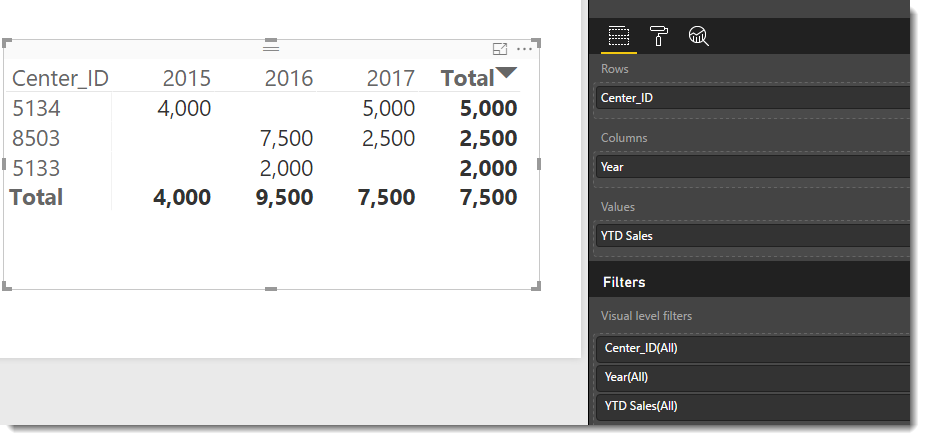
Replace the number 2016 and 2017 in your matrix with YEAR from the new date dimension. The result looks like this:

- Mark as New
- Bookmark
- Subscribe
- Mute
- Subscribe to RSS Feed
- Permalink
- Report Inappropriate Content
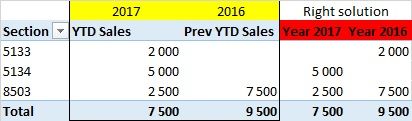
One more thing - I cannot use year as a dimension in columns. Result should seems like this:

I want then only to switch periods from (2016 x 2015) to (2017 x 2016)....
This measures make it right, but I need it common, so without the definite year in formula:
Year 2017:=CALCULATE([Součet Sales];FILTER(List2;List2[Year]=2017))
Year 2016:=CALCULATE([Součet Sales];FILTER(List2;List2[Year]=2016))
Helpful resources

Power BI Dataviz World Championships
The Power BI Data Visualization World Championships is back! Get ahead of the game and start preparing now!

Power BI Monthly Update - December 2025
Check out the December 2025 Power BI Holiday Recap!

FabCon Atlanta 2026
Join us at FabCon Atlanta, March 16-20, for the ultimate Fabric, Power BI, AI and SQL community-led event. Save $200 with code FABCOMM.

| User | Count |
|---|---|
| 38 | |
| 38 | |
| 37 | |
| 28 | |
| 28 |


| User | Count |
|---|---|
| 124 | |
| 89 | |
| 73 | |
| 66 | |
| 65 |


