Don't miss your chance to take the Fabric Data Engineer (DP-600) exam for FREE! Find out how by attending the DP-600 session on April 23rd (pacific time), live or on-demand.
Learn moreNext up in the FabCon + SQLCon recap series: The roadmap for Microsoft SQL and Maximizing Developer experiences in Fabric. All sessions are available on-demand after the live show. Register now
Hi there,
Does anyone know if it is possible to filter out an entire bar for a 100% stacked bar graph using visual level filters, rather than have it filter out each individual segment?
Thanks
@Anonymous ,
@Anonymous wrote:
Hi there,
Does anyone know if it is possible to filter out an entire bar for a 100% stacked bar graph using visual level filters, rather than have it filter out each individual segment?
Thanks
Could you please explain "entire bar" amd "individual segment"?
Regards,
Jimmy Tao
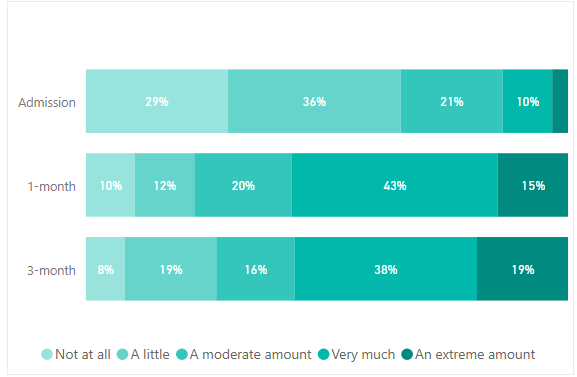
@v-yuta-msft the entire bar would be the entire time point (admission, 1-month, or 3-month) and individual segment would be the legend categories (not at all, a little, a moderate amount etc.), as shown in the graph below.
Right now, when i have a visual level filter to show only if the count is greater than 20, but it is filtering for each individual segment. So if the count is less than 20 in an extreme amount at 3-months, it will just remove that value from the calculation and the percentages will all change which is not what i want. I want if the value in the entire bar is less than 20, then for the entire bar to disappear.
If you have recently started exploring Fabric, we'd love to hear how it's going. Your feedback can help with product improvements.
A new Power BI DataViz World Championship is coming this June! Don't miss out on submitting your entry.
Share feedback directly with Fabric product managers, participate in targeted research studies and influence the Fabric roadmap.
| User | Count |
|---|---|
| 48 | |
| 45 | |
| 41 | |
| 20 | |
| 17 |
| User | Count |
|---|---|
| 69 | |
| 64 | |
| 32 | |
| 31 | |
| 27 |