Join us at FabCon Atlanta from March 16 - 20, 2026, for the ultimate Fabric, Power BI, AI and SQL community-led event. Save $200 with code FABCOMM.
Register now!The Power BI Data Visualization World Championships is back! Get ahead of the game and start preparing now! Learn more
Hello, i was having some difficulties to get the DAX formula for monthly rank.
i would like to summarize my table that shows only the top rank per each month with respect to region category as shown below table.
anyone could assist me to achieve this. Thanks.
| Month | Region | Cost | Rank | |
| Jan | CR | 2153098 | ||
| Jan | ER | 1832120 | ||
| Jan | WR | 1419893 | ||
| Feb | CR | 2093887 | ||
| Feb | ER | 1254795 | ||
| Feb | WR | 2932801 | ||
| Mar | CR | 3843352 | ||
| Mar | ER | 2167873 | ||
| Mar | WR | 4185748 | ||
| Apr | CR | 5245395 | ||
| Apr | ER | 3301028 | ||
| Apr | WR | 7426182 |
The result table, that i could put graph
| Month | Region | Cost | Rank | |
| Jan | CR | 2153098 | 1 | |
| Feb | WR | 2932801 | 1 | |
| Mar | WR | 4185748 | 1 | |
| Apr | WR | 7426182 | 1 |
Solved! Go to Solution.
Hi @Anonymous ,
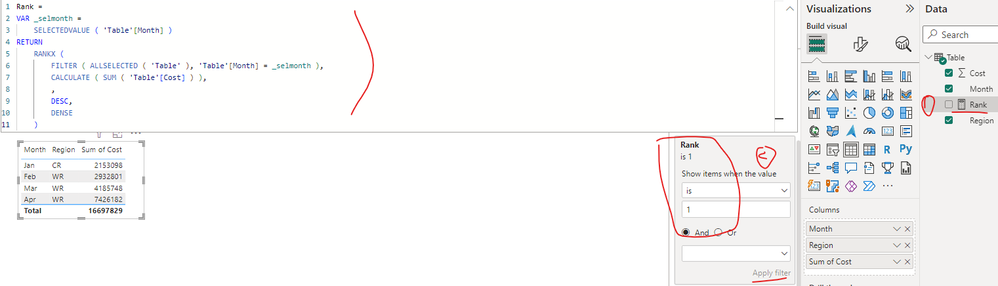
I created a sample pbix file(see the attachment), please check if that is what you want.
1. Create a measure as below
Rank =
VAR _selmonth =
SELECTEDVALUE ( 'Table'[Month] )
RETURN
RANKX (
FILTER ( ALLSELECTED ( 'Table' ), 'Table'[Month] = _selmonth ),
CALCULATE ( SUM ( 'Table'[Cost] ) ),
,
DESC,
DENSE
)
2. Create a table visual and apply a visual-level filter with the condition (Rank is 1)
Best Regards
Hi @Anonymous ,
I created a sample pbix file(see the attachment), please check if that is what you want.
1. Create a measure as below
Rank =
VAR _selmonth =
SELECTEDVALUE ( 'Table'[Month] )
RETURN
RANKX (
FILTER ( ALLSELECTED ( 'Table' ), 'Table'[Month] = _selmonth ),
CALCULATE ( SUM ( 'Table'[Cost] ) ),
,
DESC,
DENSE
)
2. Create a table visual and apply a visual-level filter with the condition (Rank is 1)
Best Regards
Create a calculated column and use 'RANKX' with a filter using the earlier function ie 'table'[month]=earlier('table'[month]). This ensure cost ranking is grouped by month. Here's a rough sketch:
i have an error using the EARLIER Formula, show parameter is not correct.
My month column is from a calculated column
Check out the November 2025 Power BI update to learn about new features.
Advance your Data & AI career with 50 days of live learning, contests, hands-on challenges, study groups & certifications and more!
| User | Count |
|---|---|
| 21 | |
| 10 | |
| 9 | |
| 4 | |
| 4 |
| User | Count |
|---|---|
| 34 | |
| 31 | |
| 20 | |
| 13 | |
| 12 |