cancel
Showing results for 
Search instead for 
Did you mean: 

Try your skills in the Power BI Dataviz World Championship! Round one ends June 26. Join now

Reply
bmz545
Regular Visitor

need measure not syncronised with calendar slicer

hi all,


I created a report where we have number of tickets and number of requests created from these tickets. More requests can be created from a tciket and on different days. I created the measure, used instersect dax to connect requests came from the tickets and now have calendar slicer where I can filter tickets created ex on 1st of april but the requests measure should ignor calendar slicer, as request can be created on later days.

edit: here is my measure:

digital requests for tickets =


VAR _ticketswithdigitalrequests
CALCULATETABLE (
VALUES (f_request[ticket]
FILTER (f_request, f_request[nb_created_digital] <> 0),
)

VAR _digitalticket
CALCULATETABLE (
VALUES (f_ticket [ticket_id]),
FILTER ( f_ticket, f_ticket [is_eligible]= TRUE ( ) ),
FILTER (d_channel, d_channel [digital] = TEUE ( ) ),

RETURN
COUNTROWS ( INTERSECT ( _digitalticket, _ticketswithdigitalrequests ) ) + 0


- in the table I have number of tickets and number of request measures, only number of requests measure should ignore the calendar slicer

how it can be done?

thanks in advance and have a nice day ahead.

1 ACCEPTED SOLUTION
bmz545
Regular Visitor

VAR _ticketswithdigitalrequests
CALCULATETABLE (
VALUES (f_request[ticket]
FILTER (ALL(f_request), f_request[nb_created_digital] <> 0),
)

Added ALL after the Filter and it fied the issue

View solution in original post

5 REPLIES 5
bmz545
Regular Visitor

VAR _ticketswithdigitalrequests
CALCULATETABLE (
VALUES (f_request[ticket]
FILTER (ALL(f_request), f_request[nb_created_digital] <> 0),
)

Added ALL after the Filter and it fied the issue

AnalyticPulse
Solution Sage
Solution Sage

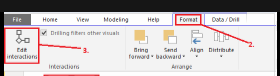
use edit interaction feature to achieve this. and turn of interaction of the visual with other visual

AnalyticPulse_0-1713434500136.png

My blog:
https://analyticpulse.blogspot.com/

https://analyticpulse.blogspot.com/2024/04/case-study-powerbi-dashboard-developer.html

See my Pins :
https://pin.it/5aoqgZUft
https://in.pinterest.com/AnalyticPulse/


thanks for your reply, I already edited the original message. I have 2 measures in the table and I want only one of them to ignore the calendar slicer.

Anonymous
Not applicable

Hi @bmz545 ,


You can try to use the HASONEVALUE function, you can refer to:HASONEVALUE function (DAX) - DAX | Microsoft Learn

Hope it helps!


Best regards,
Community Support Team_ Scott Chang


If this post helps then please consider Accept it as the solution to help the other members find it more quickly.

Thanks for your reply. Seems ALL measure was the answer for that task. 

Helpful resources

Announcements
Fabric Data Days is here Carousel

Fabric Data Days 2026

Don't miss out on Data Days, June 15 through August 7. Learn Fabric, Power BI, SQL, AI and more.

May Power BI Update Carousel

Power BI Monthly Update - May 2026

Check out the May 2026 Power BI update to learn about new features.

Power BI DataViz World Championships carousel

Power BI DataViz World Championships - June 2026

A new Power BI DataViz World Championship is coming this June! Don't miss out on submitting your entry.