Join us at FabCon Atlanta from March 16 - 20, 2026, for the ultimate Fabric, Power BI, AI and SQL community-led event. Save $200 with code FABCOMM.
Register now!The Power BI Data Visualization World Championships is back! Get ahead of the game and start preparing now! Learn more
Dear all,
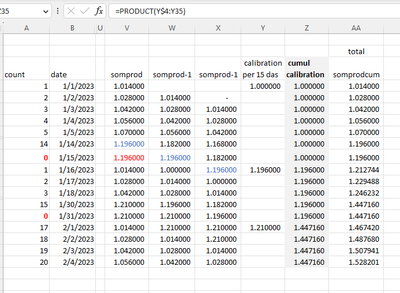
I have been tasked to create a PowerBI dashboard, in which there is a portfolio of holdings. All fine, but one requirement: calibrate the portfolio every 15 days. I figured all out in Excel, and came quite far in PowerBI DAX. That is: up to the column "cumul calibration" as shown below. In excel it´s a plain PRODUCT function, but I have no clue how to do this in DAX.
Would be great if anyone can help me out,
cheers
Dear Daniel, I would like to use this as a measure: the values in the [calibration per 15 days] are coming from a measure. However, if I do that, I am missing the row context; "EARLIER refers to an earlier row context which doesn´t exist". Any ways around this?
merci beaucoup Daniel! Works beautifully...
NewColun=PRODUCTX(FILTER(Table,Table[Date]<=EARLIER(Table[Date])),Table[calibration per 15 days])
The Power BI Data Visualization World Championships is back! Get ahead of the game and start preparing now!
Check out the November 2025 Power BI update to learn about new features.
| User | Count |
|---|---|
| 20 | |
| 11 | |
| 10 | |
| 4 | |
| 4 |
| User | Count |
|---|---|
| 33 | |
| 30 | |
| 19 | |
| 11 | |
| 10 |