Join us at FabCon Atlanta from March 16 - 20, 2026, for the ultimate Fabric, Power BI, AI and SQL community-led event. Save $200 with code FABCOMM.
Register now!The Power BI Data Visualization World Championships is back! Get ahead of the game and start preparing now! Learn more
let
Source = Table.Combine({
Table.FromRows(
{{
List.Dates( #date(2022,8, 1), Number.From(DateTime.Date(DateTime.LocalNow())- #date(2022, 7, 31)) , #duration(1, 0, 0, 0)),
Splitter.SplitByNothing(), {"Date"}, null, ExtraValues.Error,"Investor A",-10000,0.10}},
{"Date", "Investment Company","Initial Value","Percentage"}
),
Table.FromRows(
{{"8/1/2022","Investor B",-5000,0.05}},
{"Date", "Investment Company","Initial Value","Percentage"}
),
Table.FromRows(
{{"8/1/2022","Investor C",-15000,0.15}},
{"Date", "Investment Company","Initial Value","Percentage"}
),
Table.FromRows(
{{"8/1/2022","Investor D",-10000,0.10}},
{"Date", "Investment Company","Initial Value","Percentage"}
),
Table.FromRows(
{{"9/1/2022","Investor E",-20000,0.2}},
{"Date", "Investment Company","Initial Value","Percentage"}
)
}),
#"Changed Type" = Table.TransformColumnTypes(Source,{{"Date", type date}, {"Investment Company", type text}, {"Initial Value", Currency.Type}, {"Percentage", Percentage.Type}})
in
#"Changed Type"i tried to make a code that lists date and i want the same value so for example i nvestor A to always have 10,000 on initial value, 0.1 on percentage
because i want to createa relationship between table and date table
Solved! Go to Solution.
Hi @Anonymous ,
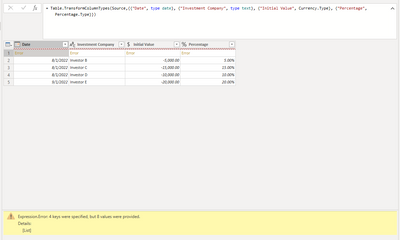
According to your M code, I think first part for investor A will return 8 values, however there are only four keys in your table.
{{
List.Dates( #date(2022,8, 1), Number.From(DateTime.Date(DateTime.LocalNow())- #date(2022, 7, 31)) , #duration(1, 0, 0, 0)),
Splitter.SplitByNothing(), {"Date"}, null, ExtraValues.Error,"Investor A",-10000,0.10}}
Here I suggest you to try this M code to achieve your goal.
let
Source = Table.Combine({
Table.FromRows(
{{
List.Dates( #date(2022,8, 1), Number.From(DateTime.Date(DateTime.LocalNow())- #date(2022, 7, 31)) , #duration(1, 0, 0, 0)),
"Investor A",-10000,0.10}},
{"Date", "Investment Company","Initial Value","Percentage"}
)
}),
#"Expanded Date" = Table.ExpandListColumn(Source, "Date"),
#"Combine" =
Table.Combine({
#"Expanded Date",
Table.FromRows(
{{"8/1/2022","Investor B",-5000,0.05}},
{"Date", "Investment Company","Initial Value","Percentage"}
),
Table.FromRows(
{{"8/1/2022","Investor C",-15000,0.15}},
{"Date", "Investment Company","Initial Value","Percentage"}
),
Table.FromRows(
{{"8/1/2022","Investor D",-10000,0.10}},
{"Date", "Investment Company","Initial Value","Percentage"}
),
Table.FromRows(
{{"9/1/2022","Investor E",-20000,0.2}},
{"Date", "Investment Company","Initial Value","Percentage"}
)
}),
#"Changed Type" = Table.TransformColumnTypes(Combine,{{"Date", type date}, {"Investment Company", type text}, {"Initial Value", Int64.Type}, {"Percentage", Percentage.Type}})
in
#"Changed Type"
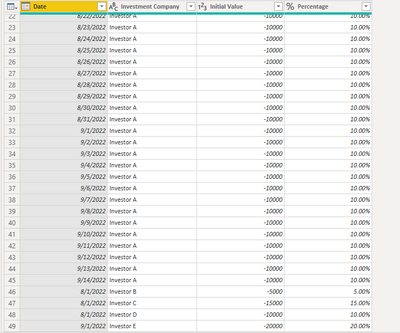
Result is as below.
Best Regards,
Rico Zhou
If this post helps, then please consider Accept it as the solution to help the other members find it more quickly.
Hi @Anonymous ,
According to your M code, I think first part for investor A will return 8 values, however there are only four keys in your table.
{{
List.Dates( #date(2022,8, 1), Number.From(DateTime.Date(DateTime.LocalNow())- #date(2022, 7, 31)) , #duration(1, 0, 0, 0)),
Splitter.SplitByNothing(), {"Date"}, null, ExtraValues.Error,"Investor A",-10000,0.10}}
Here I suggest you to try this M code to achieve your goal.
let
Source = Table.Combine({
Table.FromRows(
{{
List.Dates( #date(2022,8, 1), Number.From(DateTime.Date(DateTime.LocalNow())- #date(2022, 7, 31)) , #duration(1, 0, 0, 0)),
"Investor A",-10000,0.10}},
{"Date", "Investment Company","Initial Value","Percentage"}
)
}),
#"Expanded Date" = Table.ExpandListColumn(Source, "Date"),
#"Combine" =
Table.Combine({
#"Expanded Date",
Table.FromRows(
{{"8/1/2022","Investor B",-5000,0.05}},
{"Date", "Investment Company","Initial Value","Percentage"}
),
Table.FromRows(
{{"8/1/2022","Investor C",-15000,0.15}},
{"Date", "Investment Company","Initial Value","Percentage"}
),
Table.FromRows(
{{"8/1/2022","Investor D",-10000,0.10}},
{"Date", "Investment Company","Initial Value","Percentage"}
),
Table.FromRows(
{{"9/1/2022","Investor E",-20000,0.2}},
{"Date", "Investment Company","Initial Value","Percentage"}
)
}),
#"Changed Type" = Table.TransformColumnTypes(Combine,{{"Date", type date}, {"Investment Company", type text}, {"Initial Value", Int64.Type}, {"Percentage", Percentage.Type}})
in
#"Changed Type"
Result is as below.
Best Regards,
Rico Zhou
If this post helps, then please consider Accept it as the solution to help the other members find it more quickly.
The Power BI Data Visualization World Championships is back! Get ahead of the game and start preparing now!
Check out the November 2025 Power BI update to learn about new features.
| User | Count |
|---|---|
| 20 | |
| 11 | |
| 10 | |
| 4 | |
| 4 |
| User | Count |
|---|---|
| 34 | |
| 32 | |
| 19 | |
| 12 | |
| 10 |