This time we’re going bigger than ever. Fabric, Power BI, SQL, AI and more. We're covering it all. You won't want to miss it.
Learn moreLevel up your Power BI skills this month - build one visual each week and tell better stories with data! Get started
Hi,
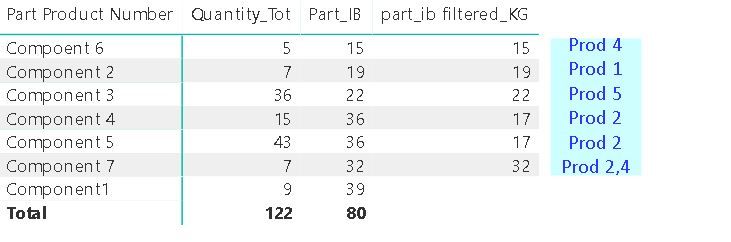
Following up on an earlier thread which was graciously resolved by @MFelix , I'd like to ask a different question. How does one report the top x number of customer names against a regional sale list. In my case it's about components and products consuming those. The associated model and data is here
https://drive.google.com/file/d/1K5PMiLYH3X5zZBWmb0JikgXEgbptZJZ2/view?usp=drivesdk
I'm looking to add a measure that reports the names of the products in the rows for each component indicating the top 2 (or less) products associated with each component's consumption.
Solved! Go to Solution.
Found a solution using this tip posted here
https://community.powerbi.com/t5/Quick-Measures-Gallery/Concatenated-list-of-top-items/td-p/237585
Found a solution using this tip posted here
https://community.powerbi.com/t5/Quick-Measures-Gallery/Concatenated-list-of-top-items/td-p/237585
Check out the April 2026 Power BI update to learn about new features.
Sign up to receive a private message when registration opens and key events begin.
If you have recently started exploring Fabric, we'd love to hear how it's going. Your feedback can help with product improvements.
| User | Count |
|---|---|
| 5 | |
| 4 | |
| 3 | |
| 3 | |
| 3 |