Join us at FabCon Atlanta from March 16 - 20, 2026, for the ultimate Fabric, Power BI, AI and SQL community-led event. Save $200 with code FABCOMM.
Register now!The Power BI Data Visualization World Championships is back! Get ahead of the game and start preparing now! Learn more
I am trying to calculate the revenue growth for stocks listed on the New York Stock Exchange but I'm having difficulty filtering the previous year it should pick as each stock listed has record for 4 years. This is a sample of the data.
I want to calculate revenue growth such that when I filter each stock, I'll get the revenue growth for each year.
| TickerSymbol | Years | PeriodEnding | TotalRevenue |
| AAL | Year1 | 12/31/2012 | $ 24,855,000,000.00 |
| AAL | Year2 | 12/31/2013 | $ 26,743,000,000.00 |
| AAL | Year3 | 12/31/2014 | $ 42,650,000,000.00 |
| AAL | Year4 | 12/31/2015 | $ 40,990,000,000.00 |
| AAP | Year1 | 12/29/2012 | $ 6,205,003,000.00 |
| AAP | Year2 | 12/28/2013 | $ 6,493,814,000.00 |
| AAP | Year3 | 1/3/2015 | $ 9,843,861,000.00 |
| AAP | Year4 | 1/2/2016 | $ 9,737,018,000.00 |
The Dax formular used I attempted is below:
Solved! Go to Solution.
A proper date table is required to use DATEADD (see: DATEADD – DAX Guide).
Without a date table, I would do something like this:
Revenue Growth % =
VAR CY = YEAR( MAX( 'projectdata-nyse'[PeriodEnding] ) )
VAR PY = CY - 1
VAR Ticker = MAX( 'projectdata-nyse'[TickerSymbol] )
VAR CYRevenue =
CALCULATE(
SUM( 'projectdata-nyse'[ TotalRevenue ] ),
FILTER(
ALL( 'projectdata-nyse' ),
YEAR( 'projectdata-nyse'[PeriodEnding] ) = CY
&& 'projectdata-nyse'[TickerSymbol] = Ticker
)
)
VAR PYRevenue =
CALCULATE(
SUM( 'projectdata-nyse'[ TotalRevenue ] ),
FILTER(
ALL( 'projectdata-nyse' ),
YEAR( 'projectdata-nyse'[PeriodEnding] ) = PY
&& 'projectdata-nyse'[TickerSymbol] = Ticker
)
)
VAR RevenueGrowth = DIVIDE( CYRevenue, PYRevenue ) - 1
VAR Result =
IF(
NOT ( ISBLANK( PYRevenue ) ) && HASONEVALUE( 'projectdata-nyse'[PeriodEnding] ),
RevenueGrowth
)
RETURN
Result
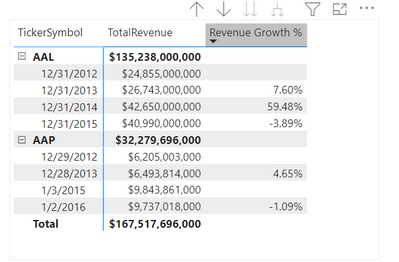
Here's a link to a .pbix file, if it helps.
-Steve
A proper date table is required to use DATEADD (see: DATEADD – DAX Guide).
Without a date table, I would do something like this:
Revenue Growth % =
VAR CY = YEAR( MAX( 'projectdata-nyse'[PeriodEnding] ) )
VAR PY = CY - 1
VAR Ticker = MAX( 'projectdata-nyse'[TickerSymbol] )
VAR CYRevenue =
CALCULATE(
SUM( 'projectdata-nyse'[ TotalRevenue ] ),
FILTER(
ALL( 'projectdata-nyse' ),
YEAR( 'projectdata-nyse'[PeriodEnding] ) = CY
&& 'projectdata-nyse'[TickerSymbol] = Ticker
)
)
VAR PYRevenue =
CALCULATE(
SUM( 'projectdata-nyse'[ TotalRevenue ] ),
FILTER(
ALL( 'projectdata-nyse' ),
YEAR( 'projectdata-nyse'[PeriodEnding] ) = PY
&& 'projectdata-nyse'[TickerSymbol] = Ticker
)
)
VAR RevenueGrowth = DIVIDE( CYRevenue, PYRevenue ) - 1
VAR Result =
IF(
NOT ( ISBLANK( PYRevenue ) ) && HASONEVALUE( 'projectdata-nyse'[PeriodEnding] ),
RevenueGrowth
)
RETURN
Result
Here's a link to a .pbix file, if it helps.
-Steve
Thank you for the .pbix file. The solution worked.
The Power BI Data Visualization World Championships is back! Get ahead of the game and start preparing now!
| User | Count |
|---|---|
| 13 | |
| 5 | |
| 5 | |
| 3 | |
| 3 |
| User | Count |
|---|---|
| 25 | |
| 10 | |
| 10 | |
| 6 | |
| 6 |