Strange, i've written a comment this night and i can't find it... Can't i share a PBIx file through Google drive?
So I've done some developments based on pattern Events in progress, from DAX Patterns.
In order to get this:
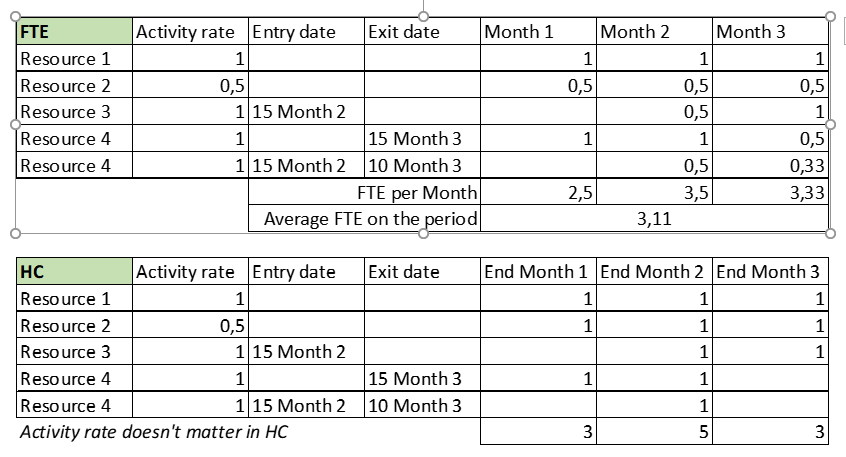
i created a sample factual with dimension client and date. Contents of factual:

The next 3 measures are related to Head count:
# Resources ALL =
VAR MinDate = MIN ( 'Date'[Date] )
VAR MaxDate = MAX ( 'Date'[Date] )
VAR Result =
    CALCULATE (                                 -- If any order can have several rows
        DISTINCTCOUNT ( factFce[id] ), -- use DISTINCTCOUNT instead of COUNTROWS
        factFce[entry date] <= MaxDate,
        factFce[exit date]> MinDate,
        REMOVEFILTERS ( 'Date' )
    )
RETURN
    Result

# Resources AVG =
AVERAGEX (
    'Date',
    [# Resources ALL]
)

# Resources EOP =
CALCULATE (
    [# Resources ALL],
    LASTDATE ( 'Date'[Date] )
)
# Resources AVG and #Resources EOP worked great, mainly the AVG one does the average without any issues.
But when i try to calculate at FTE level (HC * Activity Rate * day of leaving/nr days in the month), it didn't work.
So #Resources FTE ALL is (at least for now) equal to #Resources ALL, and the following 2 are calculated columns because i needed to place them on columns and also to try to get the right context.
# Resources FTE ALL =  -- equal to #Resources ALL
VAR MinDate = MIN ( 'Date'[Date] )
VAR MaxDate = MAX ( 'Date'[Date] )
VAR Result =
    CALCULATE (                                 -- If any order can have several rows
        DISTINCTCOUNT ( factFce[id]  ), -- use DISTINCTCOUNT instead of COUNTROWS
        factFce[entry date] <= MaxDate,
        factFce[exit date]> MinDate,
        REMOVEFILTERS ( 'Date' )
    )
RETURN
    Result

# Resources FTE AVG = [# Resources AVG] * factFce[activity rate]

# Resources FTE EOP = [# Resources EOP] * factFce[activity rate] * IF(ISBLANK(factFce[exit date]),1, DAY(factFce[exit date])/ DAY(ENDOFMONTH(factFce[exit date])))

So, thought HC works great, but on matrix FTE where i use # Resources FTE EOP results are bad:
1) March doesn't appear
2) values are wrong - for me it makes sense to use the EOP one here because if i use the average i don't know to what point i can control the calculation, that is, if a worker leaves on 15/3, working 14 days, if the final average with AVG is ok...
3) in that sense, it seemed to me that i only needed to multiply Activity Rate * day of leaving/nr days in the month to HC in the final AVG calculated column
4) if i had another dimensions, does the calculation work ok?
Thanks in advance. @amitchandak can i kindly ask you for your help?
I would like to know if i can upload or share the related PBIx file through google drive or other.
Regards and stay safe


