FabCon is coming to Atlanta
Join us at FabCon Atlanta from March 16 - 20, 2026, for the ultimate Fabric, Power BI, AI and SQL community-led event. Save $200 with code FABCOMM.
Register now!- Power BI forums
- Get Help with Power BI
- Desktop
- Service
- Report Server
- Power Query
- Mobile Apps
- Developer
- DAX Commands and Tips
- Custom Visuals Development Discussion
- Health and Life Sciences
- Power BI Spanish forums
- Translated Spanish Desktop
- Training and Consulting
- Instructor Led Training
- Dashboard in a Day for Women, by Women
- Galleries
- Data Stories Gallery
- Themes Gallery
- Contests Gallery
- QuickViz Gallery
- Quick Measures Gallery
- Visual Calculations Gallery
- Notebook Gallery
- Translytical Task Flow Gallery
- TMDL Gallery
- R Script Showcase
- Webinars and Video Gallery
- Ideas
- Custom Visuals Ideas (read-only)
- Issues
- Issues
- Events
- Upcoming Events
The Power BI Data Visualization World Championships is back! Get ahead of the game and start preparing now! Learn more
- Subscribe to RSS Feed
- Mark Topic as New
- Mark Topic as Read
- Float this Topic for Current User
- Bookmark
- Subscribe
- Printer Friendly Page

- Mark as New
- Bookmark
- Subscribe
- Mute
- Subscribe to RSS Feed
- Permalink
- Report Inappropriate Content
% Variation
Hey all,
I want to calculate the % variation of a stock, but I am having trouble to lock it's earliest and lastest value to perform my calculation.
| Stock | MaxDate | year-month | Value |
| A | 7/31/2022 | Jul-22 | 14 |
| A | 8/31/2022 | Aug-22 | 15 |
| A | 9/30/2022 | Sep-22 | 15 |
| A | 10/31/2022 | Oct-22 | 12 |
| A | 11/30/2022 | Nov-22 | 16 |
| B | 7/31/2022 | Jul-22 | 74 |
| B | 8/31/2022 | Aug-22 | 65 |
| B | 9/30/2022 | Sep-22 | 64 |
| B | 10/31/2022 | Oct-22 | 67 |
| B | 11/30/2022 | Nov-22 | 80 |
| C | 7/31/2022 | Jul-22 | 110 |
| C | 8/31/2022 | Aug-22 | 105 |
| C | 9/30/2022 | Sep-22 | 90 |
| C | 10/31/2022 | Oct-22 | 110 |
| C | 11/30/2022 | Nov-22 | 85 |
Besides this table, there is also a Calendar table that is connect by a Date column.
For Stock A I always want to Initial Value to be = 14. Then, as the months go by I want to:
- August % = (15-14)/14
- September = (15-14)/14
- October = (12-14)/14
- November = (16-14)/14
How can I do this? Thanks!
Solved! Go to Solution.


- Mark as New
- Bookmark
- Subscribe
- Mute
- Subscribe to RSS Feed
- Permalink
- Report Inappropriate Content
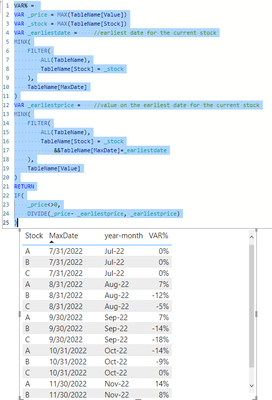
hi @Anonymous
try like:
VAR% =
VAR _price = MAX(TableName[Value])
VAR _stock = MAX(TableName[Stock])
VAR _earliestdate =     //earliest date for the current stock
MINX(
    FILTER(
        ALL(TableName),
        TableName[Stock] = _stock
    ),
    TableName[MaxDate]
)
VAR _earliestprice =    //value on the earliest date for the current stock
MINX(
    FILTER(
        ALL(TableName),
        TableName[Stock] = _stock
            &&TableName[MaxDate]=_earliestdate
    ),
    TableName[Value]
)
RETURN
IF(
    _price<>0,
    DIVIDE(_price- _earliestprice, _earliestprice)
)
- Mark as New
- Bookmark
- Subscribe
- Mute
- Subscribe to RSS Feed
- Permalink
- Report Inappropriate Content
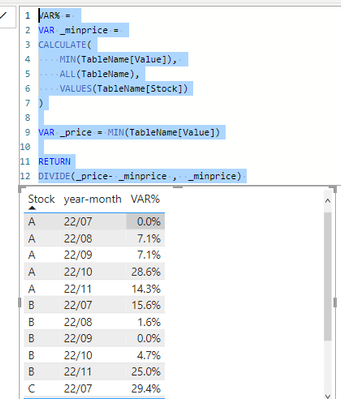
hi @Anonymous
try to plot a table with this:
VAR _minprice =
CALCULATE(
MIN(TableName[Value]),
ALL(TableName),
VALUES(TableName[Stock])
)
VAR _price = MIN(TableName[Value])
RETURN
DIVIDE(_price- _minprice , _minprice)
- Mark as New
- Bookmark
- Subscribe
- Mute
- Subscribe to RSS Feed
- Permalink
- Report Inappropriate Content
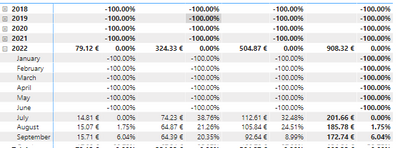
Hi @FreemanZ !
Thanks, that worked! Just need a small adjustment. How do I get rid of those date that don't have any values?
- Mark as New
- Bookmark
- Subscribe
- Mute
- Subscribe to RSS Feed
- Permalink
- Report Inappropriate Content
Hi try like:
@Anonymous
- Mark as New
- Bookmark
- Subscribe
- Mute
- Subscribe to RSS Feed
- Permalink
- Report Inappropriate Content
@FreemanZ I had to rephrase the problem.
The solution you present is fine, but it only takes in account that the values from the Value column are always growing. So, I changed the table and what I am looking for is the oldest value for a given Stock and not the minimum.
Cheers!
- Mark as New
- Bookmark
- Subscribe
- Mute
- Subscribe to RSS Feed
- Permalink
- Report Inappropriate Content
hi @Anonymous
try like:
VAR% =
VAR _price = MAX(TableName[Value])
VAR _stock = MAX(TableName[Stock])
VAR _earliestdate =     //earliest date for the current stock
MINX(
    FILTER(
        ALL(TableName),
        TableName[Stock] = _stock
    ),
    TableName[MaxDate]
)
VAR _earliestprice =    //value on the earliest date for the current stock
MINX(
    FILTER(
        ALL(TableName),
        TableName[Stock] = _stock
            &&TableName[MaxDate]=_earliestdate
    ),
    TableName[Value]
)
RETURN
IF(
    _price<>0,
    DIVIDE(_price- _earliestprice, _earliestprice)
)
- Mark as New
- Bookmark
- Subscribe
- Mute
- Subscribe to RSS Feed
- Permalink
- Report Inappropriate Content
Since the value of a stock can go to zero, I would just change _price <>0 to NOT(ISBLANK(_price))
- Mark as New
- Bookmark
- Subscribe
- Mute
- Subscribe to RSS Feed
- Permalink
- Report Inappropriate Content
this is with less codes and shall also work:
VAR%4 =
VAR _price = MAX(TableName[Value])
VAR _earliestprice =
CALCULATE(
    MIN( TableName[Value]),
    TOPN(
        1,
        CALCULATETABLE(TableName, ALLEXCEPT( TableName, TableName[Stock])),
        TableName[MaxDate],
        ASC
    )
)
RETURN
IF(
    _price<>0,
    DIVIDE(_price- _earliestprice, _earliestprice)
)
Helpful resources

Power BI Dataviz World Championships
The Power BI Data Visualization World Championships is back! Get ahead of the game and start preparing now!

Power BI Monthly Update - November 2025
Check out the November 2025 Power BI update to learn about new features.

FabCon Atlanta 2026
Join us at FabCon Atlanta, March 16-20, for the ultimate Fabric, Power BI, AI and SQL community-led event. Save $200 with code FABCOMM.

| User | Count |
|---|---|
| 20 | |
| 11 | |
| 10 | |
| 4 | |
| 4 |


| User | Count |
|---|---|
| 34 | |
| 32 | |
| 19 | |
| 12 | |
| 10 |


