cancel
Showing results for 
Search instead for 
Did you mean: 

The Power BI Data Visualization World Championships is back! Get ahead of the game and start preparing now! Learn more

Reply
dmmckelv
New Member

Value in 2 date ranges (aka retained account)

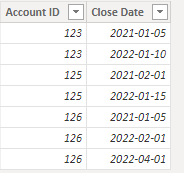
I have an opportunties table with an Account ID and a Close Date.  I want to know if the account id from the date range slicer also exists in the date range from 1 year after the date range selected.  The calcuation I've created is below but it is not right.  Basically if my slicer is set to 1/1/2021 - 1/31/2021 and account 123 had a close date of 1/5/2021 and another row in the table with a close date of 1/10/2022, the new column would return a 1 otherwise a 0.


is_retained =
VAR CurrentName = salesforce_opportunity[Account Id]
VAR nextYearEndDate = DATEADD(LASTDATE('date'[Date]), 1, Year)
VAR nextYearStartDate = DATEADD(FIRSTDATE('date'[Date]), 1, Year)
VAR FilterTable =
FILTER (
salesforce_opportunity,
salesforce_opportunity[Account ID] = CurrentName
&& salesforce_opportunity[Close Date] <= nextYearEndDate
&& salesforce_opportunity[Close Date] >= nextYearStartDate
)

VAR Result =
MAXX ( FilterTable, salesforce_opportunity[Account ID] )
RETURN
Result
1 ACCEPTED SOLUTION
Anonymous
Not applicable

Hi @dmmckelv ,


I think you can try this code to create a measure.

My Sample:

RicoZhou_0-1655962668139.png

Measure:

is_retained = 
VAR _ADDCOLUMN = 
ADDCOLUMNS (
    salesforce_opportunity,
    "IN THIS PERIOD", IF ( [Close Date] IN VALUES ( 'Date'[Date] ), 1, 0 ),
    "IN NEXT PERIOD", IF ( [Close Date] IN DATEADD ( 'Date'[Date], 1, YEAR ), 1, 0 )
)
VAR _Result = MAXX(_ADDCOLUMN,[IN THIS PERIOD])*MAXX(_ADDCOLUMN,[IN NEXT PERIOD])
RETURN
_Result

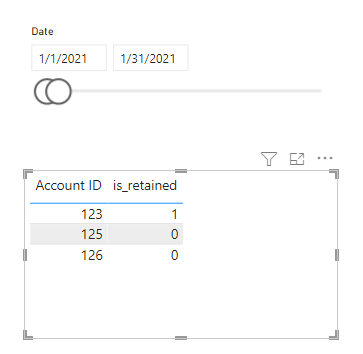
Result is as below.

RicoZhou_1-1655962685814.png


Best Regards,
Rico Zhou


If this post helps, then please consider Accept it as the solution to help the other members find it more quickly.

View solution in original post

3 REPLIES 3
amitchandak
Super User
Super User

@dmmckelv , Try a measure like


=
var _max1 = MAXX( allselected('Date'), 'Date'[Date]) )
var _min1 = MINX( allselected('Date'), 'Date'[Date]) )
var _max = date(Year(_max1)+1, Month(_max1), day(_max1))
var _min = date(Year(_min1)+1, Month(_min1), day(_min1))
return
CALCULATE(count(salesforce_opportunity[Account Id]) ,DATESBETWEEN('Date'[Date],_min,_max))

Share with Power BI Enthusiasts: Full Power BI Video (20 Hours) YouTube
Microsoft Fabric Series 60+ Videos YouTube
Microsoft Fabric Hindi End to End YouTube

Hey @amitchandak thanks for your response.  The solution you propose doesn't account for the account id existing in the selected date period as well as the future date period.  Under this definition, the retained customer would have a record where is_won is true in the period selected from the slider and in the same period 1 year in the future.

Anonymous
Not applicable

Hi @dmmckelv ,


I think you can try this code to create a measure.

My Sample:

RicoZhou_0-1655962668139.png

Measure:

is_retained = 
VAR _ADDCOLUMN = 
ADDCOLUMNS (
    salesforce_opportunity,
    "IN THIS PERIOD", IF ( [Close Date] IN VALUES ( 'Date'[Date] ), 1, 0 ),
    "IN NEXT PERIOD", IF ( [Close Date] IN DATEADD ( 'Date'[Date], 1, YEAR ), 1, 0 )
)
VAR _Result = MAXX(_ADDCOLUMN,[IN THIS PERIOD])*MAXX(_ADDCOLUMN,[IN NEXT PERIOD])
RETURN
_Result

Result is as below.

RicoZhou_1-1655962685814.png


Best Regards,
Rico Zhou


If this post helps, then please consider Accept it as the solution to help the other members find it more quickly.

Helpful resources

Announcements
Power BI DataViz World Championships

Power BI Dataviz World Championships

The Power BI Data Visualization World Championships is back! Get ahead of the game and start preparing now!

December 2025 Power BI Update Carousel

Power BI Monthly Update - December 2025

Check out the December 2025 Power BI Holiday Recap!

FabCon Atlanta 2026 carousel

FabCon Atlanta 2026

Join us at FabCon Atlanta, March 16-20, for the ultimate Fabric, Power BI, AI and SQL community-led event. Save $200 with code FABCOMM.