I've been at it for a few hours and searched around the forums - closest I have come to a similar problem/solution involves time intelligence and trying to find values via PREVIOUSYEAR().
I have a single table with names, values and column for previous name. I am trying to calculate the corresponding previous value.
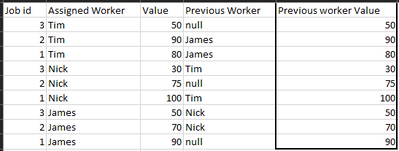
The table looks something like this:
Note the far right column is what I am trying to return.
My current code looks like this:
Previous Worker Value = VAR __prev_worker = 'Table'[Previous Worker]
VAR __jobid = 'Table'[Job id]
VAR __cur_val = CALCULATE(MAX('Table'[Value]))
VAR __prev_val = CALCULATE(__cur_val, ALLEXCEPT('Table', 'Table'[Job id]),
FILTER(
ALLNOBLANKROW ( 'Table'[Assigned Worker] ), 'Table'[Assigned Worker]=__prev_worker
)
)
RETURN
__prev_val
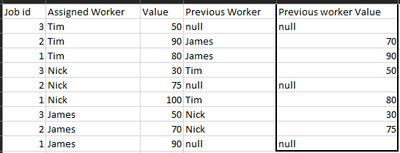
However, this is only returning values for me that are equal to the current value, not the previous worker's value for the corresponding job id. Like this: