Join us at FabCon Atlanta from March 16 - 20, 2026, for the ultimate Fabric, Power BI, AI and SQL community-led event. Save $200 with code FABCOMM.
Register now!The Power BI Data Visualization World Championships is back! Get ahead of the game and start preparing now! Learn more
Hello everyone,
I want to make a conditional calcul between 2 table the second table must be previously filtered with FILTER function.
The table must be filter with a SELECTEDVALUE function.
Someone can help me please.
Solved! Go to Solution.
Hi @Imad-R ,
I created some data:
Table1:
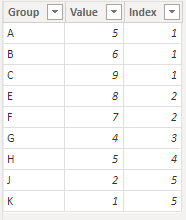
Table2:
If you want to make IF judgments by columns of two tables, you can use Selectcolumns().
SELECTCOLUMNS function (DAX) - DAX | Microsoft Learn
Custom rule.
First filter the data of Table2 with [Index] <=, after judging whether Table1's [Group] exists after filtering Table2's [Group].
Here are the steps you can follow:
1. Create calculated column.
Column =
var _table1=
FILTER(
'Table2','Table2'[Index]<=3)
var _column=
SELECTCOLUMNS(_table1,"1",[Group])
return
IF(
'Table1'[Group] in _column ,1,0)
2. Result:
Best Regards,
Liu Yang
If this post helps, then please consider Accept it as the solution to help the other members find it more quickly
Hi @Imad-R ,
I created some data:
Table1:
Table2:
If you want to make IF judgments by columns of two tables, you can use Selectcolumns().
SELECTCOLUMNS function (DAX) - DAX | Microsoft Learn
Custom rule.
First filter the data of Table2 with [Index] <=, after judging whether Table1's [Group] exists after filtering Table2's [Group].
Here are the steps you can follow:
1. Create calculated column.
Column =
var _table1=
FILTER(
'Table2','Table2'[Index]<=3)
var _column=
SELECTCOLUMNS(_table1,"1",[Group])
return
IF(
'Table1'[Group] in _column ,1,0)
2. Result:
Best Regards,
Liu Yang
If this post helps, then please consider Accept it as the solution to help the other members find it more quickly
The Power BI Data Visualization World Championships is back! Get ahead of the game and start preparing now!
| User | Count |
|---|---|
| 19 | |
| 13 | |
| 8 | |
| 4 | |
| 4 |
| User | Count |
|---|---|
| 29 | |
| 19 | |
| 18 | |
| 11 | |
| 10 |