Hi there,
I have been researching everywhere but I cannot find the same answer.
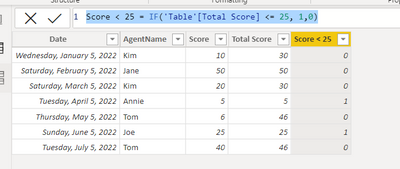
Raw data: I have a table where the agent received a score based each Date.
| Date | AgentName | Score |
| 1/05/2022 | Kim | 10 |
| 2/05/2022 | Jane | 50 |
| 3/05/2022 | Kim | 20 |
| 4/05/2022 | Annie | 5 |
| 5/05/2022 | Tom | 6 |
| 6/05/2022 | Joe | 25 |
| 7/05/2022 | Tom | 40 |
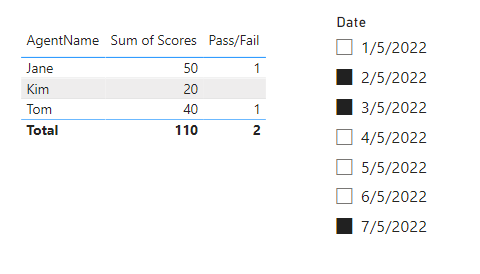
Visualisation 1: I sum the total score each agent received. I also add the [Date] as slicer.
PLUS I added a measure - if the score < 25 then 1 else 0
| AgentName | Sum of Score | Pass/Fail |
| Annie | 5 | 1 |
| Jane | 50 | 0 |
| Joe | 25 | 1 |
| Kim | 30 | 0 |
| Tom | 46 | 0 |
Now, what I want is to Distinctcount [AgentName] who received 1, subject to the [Date] filter in slicer.
Eg. without filter , I want to get a value of 2 (Discountcount on AgentName). Or if I want to filter [Date} between 06/05/2022 and 07/05/2022, I should get a value of 1.
Here is the formula I got stuck with :'(
Var StartDate = MIN(Table[Date])
Var EndDate = MAX(Table[Date])
Var RelativeValue = SWITCH(ISFILTERED(Table[Date]),
TRUE, CALCULATE(SUM([Score]), AND(Table[Date] >= StartDate, Table[Date] <= EndDate), FILTER(Table, [Score] <25)),
FALSE, CALCULATE(SUM([Score]), FILTER(Table, [Score] <25)))
RETURN
IF(RelativeValue = BLANK(), 0, RelativeValue)