Join us at FabCon Atlanta from March 16 - 20, 2026, for the ultimate Fabric, Power BI, AI and SQL community-led event. Save $200 with code FABCOMM.
Register now!The Power BI Data Visualization World Championships is back! Get ahead of the game and start preparing now! Learn more
Hi
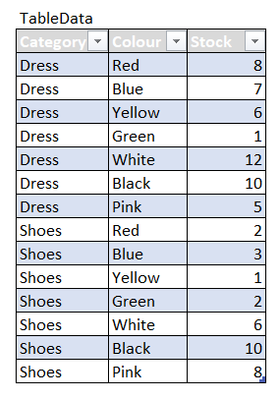
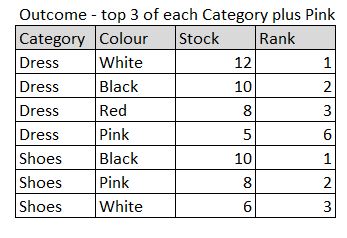
The data and desired outcome (top 3 in rank plus colour=pink if it is not in tope 3) are as below:
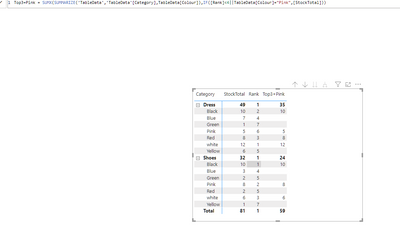
The measure Rank = RANKX(ALL(TableData[Colour]),CALCULATE(SUM(TableData[Stock]))) seems ok but the other measure
Top3+Pink = IF([Rank]<4 ||'TableData'[Colour] = "Pink",1,0) doesn't work. Any advice please. Thanks.
Solved! Go to Solution.
Hi @Totoro
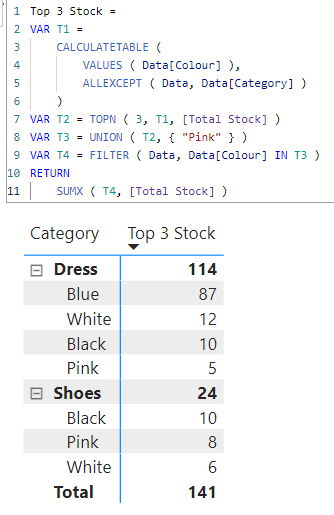
Please refer to attached sample file with the solution
Top 3 Stock =
VAR T1 =
CALCULATETABLE (
VALUES ( Data[Colour] ),
ALLEXCEPT ( Data, Data[Category] )
)
VAR T2 = TOPN ( 3, T1, [Total Stock] )
VAR T3 = UNION ( T2, { "Pink" } )
VAR T4 = FILTER ( Data, Data[Colour] IN T3 )
RETURN
SUMX ( T4, [Total Stock] )
Many thanks tamerj1 for the code and pbix file! Should have posted the question earlier I have been struggling with it for weeks.
It works! Brilliant! Thanks wdx223_Daniel.
Regards
Totoro
I think this can help you:
https://community.powerbi.com/t5/Desktop/Rankx-with-filter/m-p/63457
Proud to be a Super User!
Thanks andhiii079845 for the reference.
The Power BI Data Visualization World Championships is back! Get ahead of the game and start preparing now!
Check out the November 2025 Power BI update to learn about new features.
| User | Count |
|---|---|
| 20 | |
| 10 | |
| 9 | |
| 4 | |
| 4 |
| User | Count |
|---|---|
| 32 | |
| 31 | |
| 18 | |
| 12 | |
| 11 |