Join us at FabCon Atlanta from March 16 - 20, 2026, for the ultimate Fabric, Power BI, AI and SQL community-led event. Save $200 with code FABCOMM.
Register now!The Power BI Data Visualization World Championships is back! Get ahead of the game and start preparing now! Learn more
Hi Team,
I want to hide fact table , if user is not present in User Table. Please find example below
User
| Alias |
| user1@xyz.com |
| user2@xyz.com |
Fact Sales
| DateId | SalesAmount |
| 20220101 | 100 |
Implementation:
I have used tabular Editor and selected Fact Sales and Updated Object level Security to None
Roles:
I went to manage roles and created role with below dax code
RoleName: HideFactSales
IF(NOT ISEMPTY(FILTER(VALUES(User),User[User Alias] = USERPRINCIPALNAME())),FALSE(),TRUE())
Testing in local:
Consider my alias as user1@xyz.com
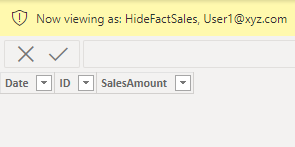
I have selected role as HideFactSales but table is hidden for me. I expect the FactSales to show because I'm valid user
Please let me if I'm missing anything.
I have published report to PowerBI Service and added my alias to Security section but it shows same behaviour. Please assist
Note: I have been assigned as contributor role to workspace.
Thanks,
Abhiram
Solved! Go to Solution.
Hi @abhiram342 ,
According to your description, I create a sample, and apply your code, got the opposite result you expected.
The meaning of "NOT ISEMPTY(FILTER(VALUES(User),User[User Alias] = USERPRINCIPALNAME()))" is that user is in User Table, so you should remove NOT here, modify to:
IF (
ISEMPTY ( FILTER ( VALUES ( User ), User[Alias] = USERPRINCIPALNAME () ) ),
FALSE (),
TRUE ()
)
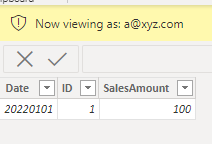
Get the correct result.
I attach my sample below for reference.
Best Regards,
Community Support Team _ kalyj
If this post helps, then please consider Accept it as the solution to help the other members find it more quickly.
Hi @abhiram342 ,
According to your description, I create a sample, and apply your code, got the opposite result you expected.
The meaning of "NOT ISEMPTY(FILTER(VALUES(User),User[User Alias] = USERPRINCIPALNAME()))" is that user is in User Table, so you should remove NOT here, modify to:
IF (
ISEMPTY ( FILTER ( VALUES ( User ), User[Alias] = USERPRINCIPALNAME () ) ),
FALSE (),
TRUE ()
)
Get the correct result.
I attach my sample below for reference.
Best Regards,
Community Support Team _ kalyj
If this post helps, then please consider Accept it as the solution to help the other members find it more quickly.
Check out the November 2025 Power BI update to learn about new features.
Advance your Data & AI career with 50 days of live learning, contests, hands-on challenges, study groups & certifications and more!
| User | Count |
|---|---|
| 19 | |
| 10 | |
| 9 | |
| 4 | |
| 4 |
| User | Count |
|---|---|
| 31 | |
| 31 | |
| 20 | |
| 12 | |
| 12 |