cancel
Showing results for 
Search instead for 
Did you mean: 

The Power BI Data Visualization World Championships is back! Get ahead of the game and start preparing now! Learn more

Reply
ismail95
Frequent Visitor

Summing a Column by Grouping by another column and creating conditions

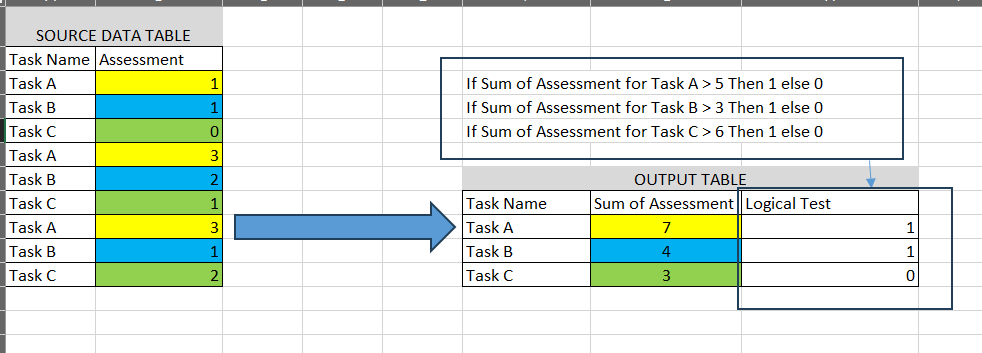
Hi, I try to create the meausure/ table below, and need your help. I want to sum Assessment column grouping by Task Name. After that I will compare Sum of Assessments with the tasks threshold ( logic provided below)
123.PNG
1 ACCEPTED SOLUTION
Dangar332
Super User
Super User

Hi, @ismail95 

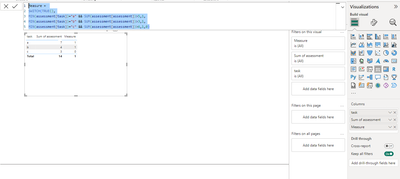
try below measure for logical test

drag your task and assessment column to table visual and add below measure


Measure = 
SWITCH(TRUE(),
MIN(assessment[task])="a" && SUM(assessment[assessment])>5,1,
MIN(assessment[task])="b" && SUM(assessment[assessment])>3,1,
MIN(assessment[task])="c" && SUM(assessment[assessment])>6,1,0)


Dangar332_1-1712657851133.png


View solution in original post

1 REPLY 1
Dangar332
Super User
Super User

Hi, @ismail95 

try below measure for logical test

drag your task and assessment column to table visual and add below measure


Measure = 
SWITCH(TRUE(),
MIN(assessment[task])="a" && SUM(assessment[assessment])>5,1,
MIN(assessment[task])="b" && SUM(assessment[assessment])>3,1,
MIN(assessment[task])="c" && SUM(assessment[assessment])>6,1,0)


Dangar332_1-1712657851133.png


Helpful resources

Announcements
Power BI DataViz World Championships

Power BI Dataviz World Championships

The Power BI Data Visualization World Championships is back! Get ahead of the game and start preparing now!

November Power BI Update Carousel

Power BI Monthly Update - November 2025

Check out the November 2025 Power BI update to learn about new features.

FabCon Atlanta 2026 carousel

FabCon Atlanta 2026

Join us at FabCon Atlanta, March 16-20, for the ultimate Fabric, Power BI, AI and SQL community-led event. Save $200 with code FABCOMM.