cancel
Showing results for 
Search instead for 
Did you mean: 

The Power BI Data Visualization World Championships is back! Get ahead of the game and start preparing now! Learn more

Reply
bmk
Helper II
Helper II

Summation - TOP N Scenario

Hello,


I wish to perform a SUM operation based on a specific scenario. I'd tried TOPN but I belive this could be the wrong approach. Also, the 'Comments' column for each row of the serial number will always be unique.


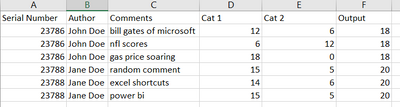
Below is the sample table :

bmk_2-1646853806821.png


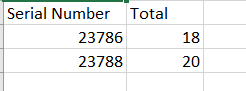
I want an output like this :

bmk_1-1646853581116.png


Would appreciate any guidance around this, thanks.

1 ACCEPTED SOLUTION
Anonymous
Not applicable

Hi @bmk ,


Please try

Output =
CALCULATE (
    SUM ( 'Table'[Cat1] ),
    FILTER ( ALLSELECTED ( 'Table' ), [Comments] = MAX ( 'Table'[Comments] ) )
)
    + CALCULATE (
        SUM ( 'Table'[Cat2] ),
        FILTER ( ALLSELECTED ( 'Table' ), [Comments] = MAX ( 'Table'[Comments] ) )
    )

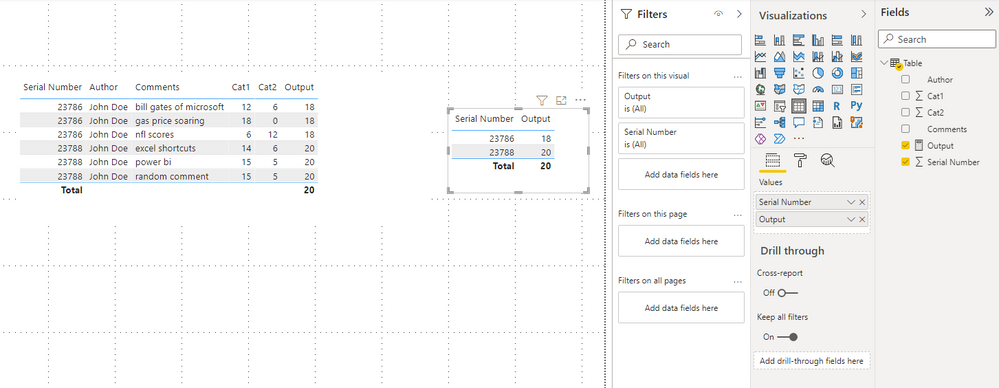
vstephenmsft_0-1648448100362.png


Best Regards,

Stephen Tao


If this post helps, then please consider Accept it as the solution to help the other members find it more quickly.

View solution in original post

4 REPLIES 4
Anonymous
Not applicable

Hi @bmk ,


Please try

Output =
CALCULATE (
    SUM ( 'Table'[Cat1] ),
    FILTER ( ALLSELECTED ( 'Table' ), [Comments] = MAX ( 'Table'[Comments] ) )
)
    + CALCULATE (
        SUM ( 'Table'[Cat2] ),
        FILTER ( ALLSELECTED ( 'Table' ), [Comments] = MAX ( 'Table'[Comments] ) )
    )

vstephenmsft_0-1648448100362.png


Best Regards,

Stephen Tao


If this post helps, then please consider Accept it as the solution to help the other members find it more quickly.

Syk
Super User
Super User

From what you want your output to be, it seems like you just want a maximum for each serial number. Is this correct? You can create a measure = max(table[output]) and get what you're looking for I believe

This should work I believe. Would ALLEXCEPT be required at all?

That would depend on what context filters you are using and if you want them to affect the final value!

Helpful resources

Announcements
Power BI DataViz World Championships

Power BI Dataviz World Championships

The Power BI Data Visualization World Championships is back! Get ahead of the game and start preparing now!

November Power BI Update Carousel

Power BI Monthly Update - November 2025

Check out the November 2025 Power BI update to learn about new features.

FabCon Atlanta 2026 carousel

FabCon Atlanta 2026

Join us at FabCon Atlanta, March 16-20, for the ultimate Fabric, Power BI, AI and SQL community-led event. Save $200 with code FABCOMM.