Join us at FabCon Atlanta from March 16 - 20, 2026, for the ultimate Fabric, Power BI, AI and SQL community-led event. Save $200 with code FABCOMM.
Register now!The Power BI Data Visualization World Championships is back! Get ahead of the game and start preparing now! Learn more
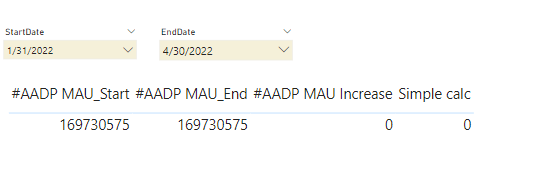
@johnt75 has hinted at what the problem was. The two values are start and end values that are set by filters.
The Dax formulas are the same but the filters set different results. So the calculation is treating both as equal therefore returning 0. The solution is to use something like the below
Are there different filters being applied to the visuals showing the results ?
Try running the below in DAX Studio
EVALUATE
ROW (
"#AADP MAU_Start", [#AADP MAU_Start],
"#AADP MAU_End", [#AADP MAU_End],
"#AADP MAU Increase", [#AADP MAU Increase],
"Simple calc", [#AADP MAU_End] - [#AADP MAU_Start]
)
The start and end values come from filters. The Dax formulas are the same but the filters set different results
So it appears that is the issue then.
Do you have any idea how I may trick it into retaining the displayed filter results so that I can get the substraction to be valid?
Check out the November 2025 Power BI update to learn about new features.
Advance your Data & AI career with 50 days of live learning, contests, hands-on challenges, study groups & certifications and more!
| User | Count |
|---|---|
| 20 | |
| 10 | |
| 9 | |
| 4 | |
| 4 |
| User | Count |
|---|---|
| 33 | |
| 31 | |
| 19 | |
| 12 | |
| 11 |