cancel
Showing results for 
Search instead for 
Did you mean: 

The Power BI Data Visualization World Championships is back! Get ahead of the game and start preparing now! Learn more

Reply
Karthik50
Frequent Visitor

Slicer - Based on first slicer, show related values (meeting criteria) in second slicer

Hi,

I have a table, for illustration purpose, as below:

ProductColorSalesDate
TruckBlue30-12-2023
CarGreen31-12-2023
CarRed01-01-2024
CarBlue02-01-2024
ScooterBlue03-01-2024
ScooterGreen04-01-2024


My first slicer, "Product" has products that are sold in current month. So, for Jan '24, the values are 'Car' and 'Scooter'.

My second slicer, 'Color', should include the color specific for the selected product and date criteria. So, for product 'Car' and current month, my second slicer should show only 'red' and 'blue'. For product 'Scooter' and current month, my second slicer should show 'blue' and 'green'.
If there is no date criteria, my second slicer filters, based on value of the product from first slicer. How can I, using Dax, make the second slicer values, dependent on selected product from first slicer and 'date' criteria?


1 ACCEPTED SOLUTION
Jihwan_Kim
Super User
Super User

Hi,

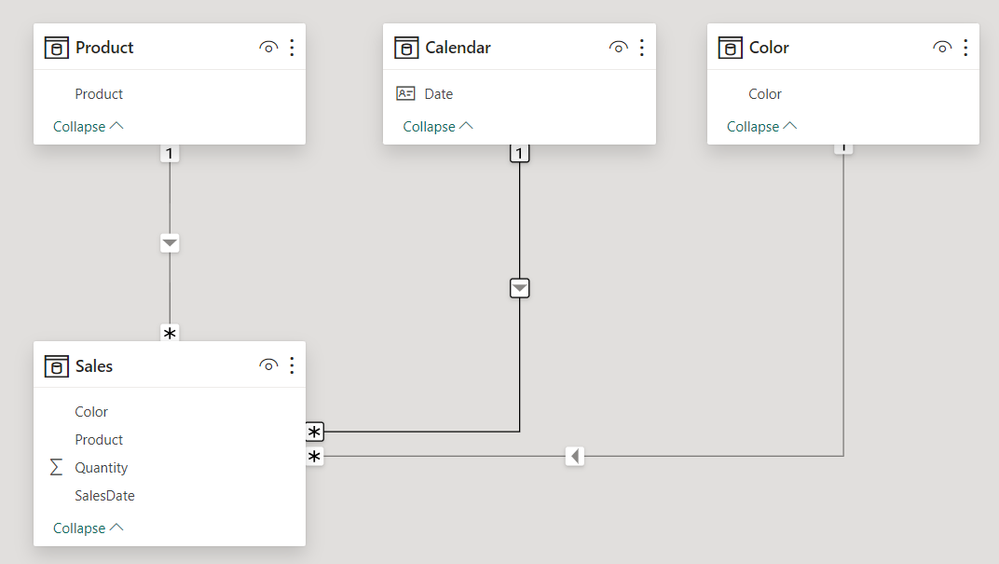
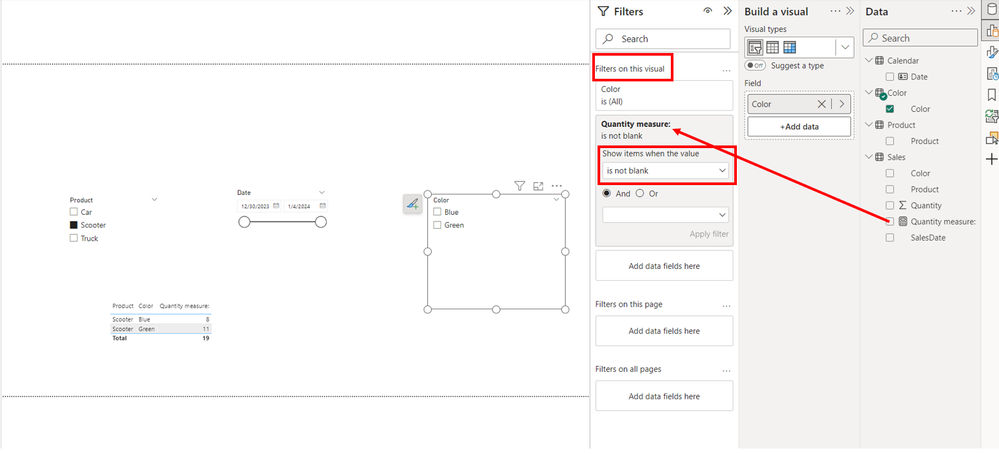
I am not sure how your semantic model looks like, but I tried to create a sample pbix file like below.

Please check the below picture and the attached pbix file whether it suits your requirement.


Jihwan_Kim_0-1706344309098.png


Jihwan_Kim_1-1706344550679.png


If this post helps, then please consider accepting it as the solution to help other members find it faster, and give a big thumbs up.


Click here to visit my LinkedIn page

Click here to schedule a short Teams meeting to discuss your question.

View solution in original post

1 REPLY 1
Jihwan_Kim
Super User
Super User

Hi,

I am not sure how your semantic model looks like, but I tried to create a sample pbix file like below.

Please check the below picture and the attached pbix file whether it suits your requirement.


Jihwan_Kim_0-1706344309098.png


Jihwan_Kim_1-1706344550679.png


If this post helps, then please consider accepting it as the solution to help other members find it faster, and give a big thumbs up.


Click here to visit my LinkedIn page

Click here to schedule a short Teams meeting to discuss your question.

Helpful resources

Announcements
November Power BI Update Carousel

Power BI Monthly Update - November 2025

Check out the November 2025 Power BI update to learn about new features.

Fabric Data Days Carousel

Fabric Data Days

Advance your Data & AI career with 50 days of live learning, contests, hands-on challenges, study groups & certifications and more!

FabCon Atlanta 2026 carousel

FabCon Atlanta 2026

Join us at FabCon Atlanta, March 16-20, for the ultimate Fabric, Power BI, AI and SQL community-led event. Save $200 with code FABCOMM.