
cancel
Showing results for 
Search instead for 
Did you mean: 

The Power BI Data Visualization World Championships is back! Get ahead of the game and start preparing now! Learn more

Reply
Jumper
Helper I
Helper I

Short date via DAX?

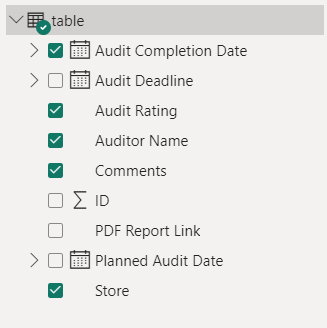
Hi.  I've got a report that is built from a Microsoft List import.  This is a very simple dataset that captures workshop auditting results - only 9 fields in the dataset. 

Jumper_0-1686880106952.png


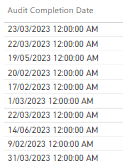
I work for a bigger company, and IT has locked down any ability to transform data, post import.  And I can't seem to change any settings on the Sharepoint side either.   Unfortunately the date is landing in with a full timestamp on the end - instead of 16/06/2023 12:00AM, I am hoping just to see 16 June - much easier to interpret for the intended user.


Jumper_1-1686880171908.png


I don't appear to have many options.  Is there any way I can modify the date format via a DAX measure?  I've tried a few things (my dax skills are basic), but can't seem to make anything work.

3 REPLIES 3
Jumper
Helper I
Helper I

I can't transform the data :/.  Option is greyed out.  I can only change the source. 

Looking for a DAX solution / measure, as it's the only seeming option I have at my disposal.

Oh ok @Jumper , use "DATEVALUE" DAX function, it might solve your issue

https://learn.microsoft.com/en-us/dax/datevalue-function-dax


If this post helps, please consider accepting it as the solution to help the other members find it more quickly.

Appreciate your Kudos!! 

Badges.jpg

LinkedIn | Twitter | Blog | YouTube 

VahidDM
Super User
Super User

Hi @Jumper 

Just change the Column data Type to Date and don't use Date-Time 


If this post helps, please consider accepting it as the solution to help the other members find it more quickly.

Appreciate your Kudos!! 

Badges.jpg

LinkedIn | Twitter | Blog | YouTube 

Helpful resources

Announcements
Power BI DataViz World Championships

Power BI Dataviz World Championships

The Power BI Data Visualization World Championships is back! Get ahead of the game and start preparing now!

November Power BI Update Carousel

Power BI Monthly Update - November 2025

Check out the November 2025 Power BI update to learn about new features.

FabCon Atlanta 2026 carousel

FabCon Atlanta 2026

Join us at FabCon Atlanta, March 16-20, for the ultimate Fabric, Power BI, AI and SQL community-led event. Save $200 with code FABCOMM.