cancel
Showing results for 
Search instead for 
Did you mean: 

The Power BI Data Visualization World Championships is back! Get ahead of the game and start preparing now! Learn more

Reply
analyst85
Helper I
Helper I

Separate DAX measures for time periods or can it be combined?

Hi


I've got multiple measures that are counting operations from the REST API based on dates.


- Operations total

- Operations in last 30 days

- Operations in last 90 days etc


Is there a more efficient way to do this without having 5 measures covering up to operations in the last 12 months?

2 ACCEPTED SOLUTIONS
Anonymous
Not applicable

Hi @analyst85 ,

Based on my testing, please try the following methods:

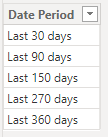
1.Create the simple table.
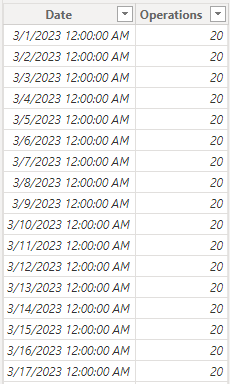
vjiewumsft_0-1713489746354.png

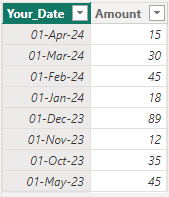
2.Create the new table.

vjiewumsft_1-1713489758674.png

3.Create the new measure to calculate operations for time periods.


Operations Count = 
SWITCH(
    TRUE(),
    SELECTEDVALUE('Table Period'[Date Period]) = "Last 30 days", CALCULATE(SUM('Table'[Operations]), DATESINPERIOD('Table'[Date], LASTDATE('Table'[Date]), -30, DAY)),
    SELECTEDVALUE('Table Period'[Date Period]) = "Last 90 days", CALCULATE(SUM('Table'[Operations]), DATESINPERIOD('Table'[Date], LASTDATE('Table'[Date]), -90, DAY)),
    SELECTEDVALUE('Table Period'[Date Period]) = "Last 150 days", CALCULATE(SUM('Table'[Operations]), DATESINPERIOD('Table'[Date], LASTDATE('Table'[Date]), -150, DAY)),
    SELECTEDVALUE('Table Period'[Date Period]) = "Last 270 days", CALCULATE(SUM('Table'[Operations]), DATESINPERIOD('Table'[Date], LASTDATE('Table'[Date]), -270, DAY)),
    SELECTEDVALUE('Table Period'[Date Period]) = "Last 360 days", CALCULATE(SUM('Table'[Operations]), DATESINPERIOD('Table'[Date], LASTDATE('Table'[Date]), -360, DAY))
)


4.Drag the measure into the column visual.
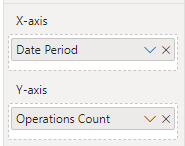
vjiewumsft_2-1713489790715.png

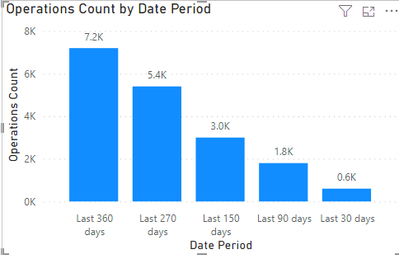
5.The result is shown below.

vjiewumsft_3-1713489799373.png


Best Regards,

Wisdom Wu

If this post helps, then please consider Accept it as the solution to help the other members find it more quickly.

View solution in original post

aduguid
Super User
Super User

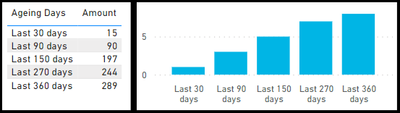
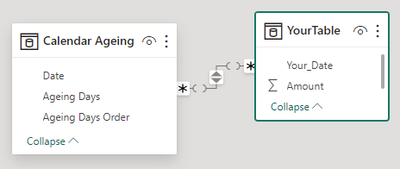
You could create this DAX table and link it your date. 

aduguid_0-1713578783792.png

aduguid_1-1713578813152.png

aduguid_2-1713578870368.png


Calendar Ageing = 
VAR _today_date = TODAY()
 
VAR _result = 
UNION (
      ADDCOLUMNS (CALENDAR ( _today_date - 30, _today_date),    "Ageing Days", "Last 30 days",   "Ageing Days Order", 1)
    , ADDCOLUMNS (CALENDAR ( _today_date - 90, _today_date),    "Ageing Days", "Last 90 days",   "Ageing Days Order", 2)
    , ADDCOLUMNS (CALENDAR ( _today_date - 150, _today_date),   "Ageing Days", "Last 150 days",  "Ageing Days Order", 3)
    , ADDCOLUMNS (CALENDAR ( _today_date - 270, _today_date),   "Ageing Days", "Last 270 days",  "Ageing Days Order", 4)
    , ADDCOLUMNS (CALENDAR ( _today_date - 360, _today_date),   "Ageing Days", "Last 360 days",  "Ageing Days Order", 5)
)

RETURN
_result


View solution in original post

2 REPLIES 2
aduguid
Super User
Super User

You could create this DAX table and link it your date. 

aduguid_0-1713578783792.png

aduguid_1-1713578813152.png

aduguid_2-1713578870368.png


Calendar Ageing = 
VAR _today_date = TODAY()
 
VAR _result = 
UNION (
      ADDCOLUMNS (CALENDAR ( _today_date - 30, _today_date),    "Ageing Days", "Last 30 days",   "Ageing Days Order", 1)
    , ADDCOLUMNS (CALENDAR ( _today_date - 90, _today_date),    "Ageing Days", "Last 90 days",   "Ageing Days Order", 2)
    , ADDCOLUMNS (CALENDAR ( _today_date - 150, _today_date),   "Ageing Days", "Last 150 days",  "Ageing Days Order", 3)
    , ADDCOLUMNS (CALENDAR ( _today_date - 270, _today_date),   "Ageing Days", "Last 270 days",  "Ageing Days Order", 4)
    , ADDCOLUMNS (CALENDAR ( _today_date - 360, _today_date),   "Ageing Days", "Last 360 days",  "Ageing Days Order", 5)
)

RETURN
_result


Anonymous
Not applicable

Hi @analyst85 ,

Based on my testing, please try the following methods:

1.Create the simple table.

vjiewumsft_0-1713489746354.png

2.Create the new table.

vjiewumsft_1-1713489758674.png

3.Create the new measure to calculate operations for time periods.


Operations Count = 
SWITCH(
    TRUE(),
    SELECTEDVALUE('Table Period'[Date Period]) = "Last 30 days", CALCULATE(SUM('Table'[Operations]), DATESINPERIOD('Table'[Date], LASTDATE('Table'[Date]), -30, DAY)),
    SELECTEDVALUE('Table Period'[Date Period]) = "Last 90 days", CALCULATE(SUM('Table'[Operations]), DATESINPERIOD('Table'[Date], LASTDATE('Table'[Date]), -90, DAY)),
    SELECTEDVALUE('Table Period'[Date Period]) = "Last 150 days", CALCULATE(SUM('Table'[Operations]), DATESINPERIOD('Table'[Date], LASTDATE('Table'[Date]), -150, DAY)),
    SELECTEDVALUE('Table Period'[Date Period]) = "Last 270 days", CALCULATE(SUM('Table'[Operations]), DATESINPERIOD('Table'[Date], LASTDATE('Table'[Date]), -270, DAY)),
    SELECTEDVALUE('Table Period'[Date Period]) = "Last 360 days", CALCULATE(SUM('Table'[Operations]), DATESINPERIOD('Table'[Date], LASTDATE('Table'[Date]), -360, DAY))
)


4.Drag the measure into the column visual.

vjiewumsft_2-1713489790715.png

5.The result is shown below.

vjiewumsft_3-1713489799373.png


Best Regards,

Wisdom Wu

If this post helps, then please consider Accept it as the solution to help the other members find it more quickly.

Helpful resources

Announcements
Power BI DataViz World Championships

Power BI Dataviz World Championships

The Power BI Data Visualization World Championships is back! Get ahead of the game and start preparing now!

December 2025 Power BI Update Carousel

Power BI Monthly Update - December 2025

Check out the December 2025 Power BI Holiday Recap!

FabCon Atlanta 2026 carousel

FabCon Atlanta 2026

Join us at FabCon Atlanta, March 16-20, for the ultimate Fabric, Power BI, AI and SQL community-led event. Save $200 with code FABCOMM.