cancel
Showing results for 
Search instead for 
Did you mean: 

The Power BI Data Visualization World Championships is back! Get ahead of the game and start preparing now! Learn more

Reply
DBNN
Frequent Visitor

SUMX and MAXX for grouped results

Hi,

I have a simple table which is getting the better of me 😉.  Its here below, called TEST:

Relevancyorder IDProduct groupProductDelivered qtyMinimum qty

Relevant5622A250800
Relevant5622B300800
Relevant5621C35004000
Not Relevant5632X15001600
Not Relevant5631C36883000
Relevant5642X10001600
Relevant5641C20003000
Relevant5642B150800
Relevant5642A700800


The table shows 3 ordernumbers selling products from a specific product group. For each line there is a quantity delivered and a required minimum order quantity. One ordernumber is not relevant for this exercise and should be filtered out.


Aim of the game is to drop tolerance of the limit by 3%. I have added a calculated column for that:

called Tolerance qty :   Tolerance qty = TEST[Minimum qty]/1.03


Then I need to calculate the minimum order quantity (MOQ) score.   This is each time the grouped delivery qty reaches over the max limit of the group. Group limits can only be maxxed not summed.  In the example above the order score will depend on delivery quantity sum per group reaching over the group limit for that order.  So not the case for order 562.


To calculate the minimum order qty score I created follwing measure:

MOQ score =
var _MOQlimit = calculate(maxx(TEST,TEST[Tolerance qty]),filter(TEST,TEST[Relevancy]="Relevant"))
var _MOQdel = calculate(sumx(TEST,TEST[Delivered qty]),filter(TEST,TEST[Relevancy]="Relevant"))
RETURN
calculate( sumx(TEST,IF(_MOQlimit>_MOQdel,0,1)),filter(TEST,TEST[Relevancy]="Relevant"))


That seems to look ok except for the total showing me per order a crazy result for the 2 relevant orders:
562 gets a 300% score and 564 a 400%.    
Can anybody correctly calculate the MOQ score per order? and also the correct total score for all orders ?  
Would be great !   Thanks for help
 
 
1 ACCEPTED SOLUTION
CNENFRNL
Community Champion
Community Champion

Hi, @DBNN , you might want to try

MOQ_score =
SUMX (
    DISTINCT ( Test[Order ID] ),
    VAR __limit =
        CALCULATE ( MAX ( Test[Minimum qty] ), Test[Relevancy] = "Relevant" ) / 1.03
    VAR __del =
        CALCULATE ( SUM ( Test[Delivered qty] ), Test[Relevancy] = "Relevant" )
    RETURN
        IF ( __limit > 0, ( __del >= __limit ) + 0 )
)

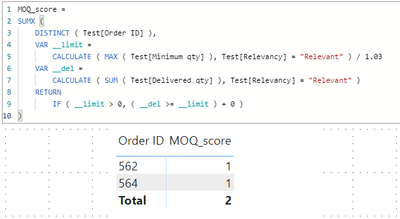
which returns the following result

Screenshot 2020-12-01 210123.png

Apropos, my suggestion on the calculated column [Tolerance qty] = TEST[Minimum qty]/1.03 is that it isn't that necessary given it's logic is fairly simple so that it can apply to a measure on the fly.


Thanks to the great efforts by MS engineers to simplify syntax of DAX! Most beginners are SUCCESSFULLY MISLED to think that they could easily master DAX; but it turns out that the intricacy of the most frequently used RANKX() is still way beyond their comprehension!

DAX is simple, but NOT EASY!

View solution in original post

1 REPLY 1
CNENFRNL
Community Champion
Community Champion

Hi, @DBNN , you might want to try

MOQ_score =
SUMX (
    DISTINCT ( Test[Order ID] ),
    VAR __limit =
        CALCULATE ( MAX ( Test[Minimum qty] ), Test[Relevancy] = "Relevant" ) / 1.03
    VAR __del =
        CALCULATE ( SUM ( Test[Delivered qty] ), Test[Relevancy] = "Relevant" )
    RETURN
        IF ( __limit > 0, ( __del >= __limit ) + 0 )
)

which returns the following result

Screenshot 2020-12-01 210123.png

Apropos, my suggestion on the calculated column [Tolerance qty] = TEST[Minimum qty]/1.03 is that it isn't that necessary given it's logic is fairly simple so that it can apply to a measure on the fly.


Thanks to the great efforts by MS engineers to simplify syntax of DAX! Most beginners are SUCCESSFULLY MISLED to think that they could easily master DAX; but it turns out that the intricacy of the most frequently used RANKX() is still way beyond their comprehension!

DAX is simple, but NOT EASY!

Helpful resources

Announcements
Power BI DataViz World Championships

Power BI Dataviz World Championships

The Power BI Data Visualization World Championships is back! Get ahead of the game and start preparing now!

December 2025 Power BI Update Carousel

Power BI Monthly Update - December 2025

Check out the December 2025 Power BI Holiday Recap!

FabCon Atlanta 2026 carousel

FabCon Atlanta 2026

Join us at FabCon Atlanta, March 16-20, for the ultimate Fabric, Power BI, AI and SQL community-led event. Save $200 with code FABCOMM.