cancel
Showing results for 
Search instead for 
Did you mean: 

Learn from the best! Meet the four finalists headed to the FINALS of the Power BI Dataviz World Championships! Register now

Reply
Anonymous
Not applicable

SUMIF in DAX with filter - new measure

Hello!

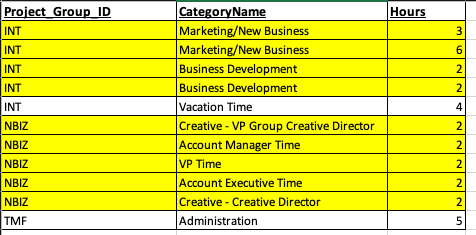
I'm creating a measure called Adj New Biz and I would like it to function as such:

SUMIF (Project_Group_ID = NBIZ) OR ((Project_Group_ID = INT) AND CategoryName = "Marketing/New Business" or "Business Development"


So you see I'm just making sure all of INT's hours that were related to new business and business development are added into everything that is under project group ID NBIZ.


Not sure of an easier way to do this. I do not want to make a table, but would rather have a measure.  Still pretty new to DAX.  Any advice? Am I asking for two much from a measure? Should I try and code a table instead?


Screen Shot 2020-10-29 at 11.18.04 AM.png

1 ACCEPTED SOLUTION
mahoneypat
Microsoft Employee
Microsoft Employee

You are right to try to this as a measure.  Here is an expression that should work.


Sum Measure =
CALCULATE (
    SUM ( Table[Hours] ),
    FILTER (
        ALLSELECTED (
            Table[Project_Group_Id],
            [CategoryName]
        ),
        OR (
            Table[Project_Group_Id] = "NBIZ",
            AND (
                Table[Project_Group_Id] = "INT",
                Table[CategoryName]
                    IN {
                    "Marketing/New Business",
                    "Business Development"
                }
            )
        )
    )
)


Regards,

Pat


Did I answer your question? Mark my post as a solution! Kudos are also appreciated!

To learn more about Power BI, follow me on Twitter or subscribe on YouTube.


@mahoneypa HoosierBI on YouTube


View solution in original post

1 REPLY 1
mahoneypat
Microsoft Employee
Microsoft Employee

You are right to try to this as a measure.  Here is an expression that should work.


Sum Measure =
CALCULATE (
    SUM ( Table[Hours] ),
    FILTER (
        ALLSELECTED (
            Table[Project_Group_Id],
            [CategoryName]
        ),
        OR (
            Table[Project_Group_Id] = "NBIZ",
            AND (
                Table[Project_Group_Id] = "INT",
                Table[CategoryName]
                    IN {
                    "Marketing/New Business",
                    "Business Development"
                }
            )
        )
    )
)


Regards,

Pat


Did I answer your question? Mark my post as a solution! Kudos are also appreciated!

To learn more about Power BI, follow me on Twitter or subscribe on YouTube.


@mahoneypa HoosierBI on YouTube


Helpful resources

Announcements
Join our Fabric User Panel

Join our Fabric User Panel

Share feedback directly with Fabric product managers, participate in targeted research studies and influence the Fabric roadmap.

February Power BI Update Carousel

Power BI Monthly Update - February 2026

Check out the February 2026 Power BI update to learn about new features.

FabCon Atlanta 2026 carousel

FabCon Atlanta 2026

Join us at FabCon Atlanta, March 16-20, for the ultimate Fabric, Power BI, AI and SQL community-led event. Save $200 with code FABCOMM.