cancel
Showing results for 
Search instead for 
Did you mean: 

The Power BI Data Visualization World Championships is back! It's time to submit your entry. Live now!

Reply
Anonymous
Not applicable

Running Total Used with Slicer and 2 Tables

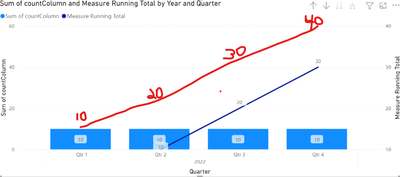
I have 2 tables. A date_table and a data_table. I use the date_table for a slicer and the x-axis below. I use the data_table for the bars of the bar chart below. There is a 1:* relationship between date_table[date] and data_table[countColumn]. I created a running total measure(dark blue line below) that I want to show like the red line drawn below and the slicer to work with it as well. Thanks so much for your time.


work22_0-1672444611786.png

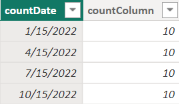
Sample Data for data_table:

work22_1-1672444741681.png

The date_table is simply each day of the year in short form.


1 ACCEPTED SOLUTION
amitchandak
Super User
Super User

@Anonymous , With help from Date table,new measure


Cumm Sales = CALCULATE(SUM(Sales[Sales Amount]),filter(all('Date'),'Date'[date] <=max('Date'[date])))


or


Cumm Sales = CALCULATE(SUM(Sales[Sales Amount]),filter(allselected(date),date[date] <=max(date[Date])))


You can explore Power BI Window function too for:  Rolling, Cumulative/Running Total, WTD, MTD, QTD, YTD, FYTD: https://youtu.be/nxc_IWl-tTc


Running Total/ Cumulative: https://www.youtube.com/watch?v=h2wsO332LUo&list=PLPaNVDMhUXGaaqV92SBD5X2hk3TMNlHhb&index=41

Share with Power BI Enthusiasts: Full Power BI Video (20 Hours) YouTube
Microsoft Fabric Series 60+ Videos YouTube
Microsoft Fabric Hindi End to End YouTube

View solution in original post

1 REPLY 1
amitchandak
Super User
Super User

@Anonymous , With help from Date table,new measure


Cumm Sales = CALCULATE(SUM(Sales[Sales Amount]),filter(all('Date'),'Date'[date] <=max('Date'[date])))


or


Cumm Sales = CALCULATE(SUM(Sales[Sales Amount]),filter(allselected(date),date[date] <=max(date[Date])))


You can explore Power BI Window function too for:  Rolling, Cumulative/Running Total, WTD, MTD, QTD, YTD, FYTD: https://youtu.be/nxc_IWl-tTc


Running Total/ Cumulative: https://www.youtube.com/watch?v=h2wsO332LUo&list=PLPaNVDMhUXGaaqV92SBD5X2hk3TMNlHhb&index=41

Share with Power BI Enthusiasts: Full Power BI Video (20 Hours) YouTube
Microsoft Fabric Series 60+ Videos YouTube
Microsoft Fabric Hindi End to End YouTube

Helpful resources

Announcements
Power BI DataViz World Championships

Power BI Dataviz World Championships

The Power BI Data Visualization World Championships is back! It's time to submit your entry.

January Power BI Update Carousel

Power BI Monthly Update - January 2026

Check out the January 2026 Power BI update to learn about new features.

FabCon Atlanta 2026 carousel

FabCon Atlanta 2026

Join us at FabCon Atlanta, March 16-20, for the ultimate Fabric, Power BI, AI and SQL community-led event. Save $200 with code FABCOMM.