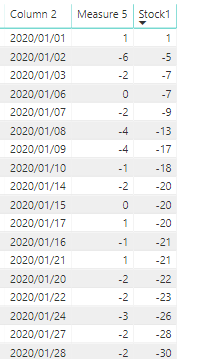
Not having your data model, it was tricky to come up with a DAX expression that included your [Measure 5] measure. So here are two versions that should help.
The first shows the approach you could take if Measure 5 was a column in your table (I called it Stock).
Rolling Since Last 1 =
VAR __thisdate =
    SELECTEDVALUE ( Stock[Date] )
VAR __latest1value =
    CALCULATE (
        MAX ( Stock[Date] ),
        ALL ( Stock[Date] ),
        Stock[Measure 5] = 1,
        Stock[Date] <= __thisdate
    )
RETURN
    CALCULATE (
        SUM ( Stock[Measure 5] ),
        ALL ( Stock[Date] ),
        Stock[Date] <= __thisdate,
        Stock[Date] >= __latest1value
    )
Here is the version that uses [Measure 5] as a measure. You will have to test if it works for you.
Rolling Since Last 1 with Measure 5 =
VAR __thisdate =
    SELECTEDVALUE ( Stock[Date] )
VAR __latest1value =
    CALCULATE (
        MAX ( Stock[Date] ),
        ALL ( Stock[Date] ),
        FILTER ( VALUES ( Stock[Date] ), [Measure 5] = 1 ),
        Stock[Date] <= __thisdate
    )
RETURN
    CALCULATE (
        SUMX ( VALUES ( Stock[Date] ), [Measure 5] ),
        ALL ( Stock[Date] ),
        Stock[Date] <= __thisdate,
        Stock[Date] >= __latest1value
    )
If this works for you, please mark it as the solution. Kudos are appreciated too. Please let me know if not.
Regards,
Pat
Did I answer your question? Mark my post as a solution! Kudos are also appreciated! To learn more about Power BI, follow me on Twitter or subscribe on YouTube.
@mahoneypa HoosierBI on YouTube