New Offer! Become a Certified Fabric Data Engineer
Check your eligibility for this 50% exam voucher offer and join us for free live learning sessions to get prepared for Exam DP-700.
Get Started- Power BI forums
- Get Help with Power BI
- Desktop
- Service
- Report Server
- Power Query
- Mobile Apps
- Developer
- DAX Commands and Tips
- Custom Visuals Development Discussion
- Health and Life Sciences
- Power BI Spanish forums
- Translated Spanish Desktop
- Training and Consulting
- Instructor Led Training
- Dashboard in a Day for Women, by Women
- Galleries
- Community Connections & How-To Videos
- COVID-19 Data Stories Gallery
- Themes Gallery
- Data Stories Gallery
- R Script Showcase
- Webinars and Video Gallery
- Quick Measures Gallery
- 2021 MSBizAppsSummit Gallery
- 2020 MSBizAppsSummit Gallery
- 2019 MSBizAppsSummit Gallery
- Events
- Ideas
- Custom Visuals Ideas
- Issues
- Issues
- Events
- Upcoming Events
Don't miss out! 2025 Microsoft Fabric Community Conference, March 31 - April 2, Las Vegas, Nevada. Use code MSCUST for a $150 discount. Prices go up February 11th. Register now.
- Power BI forums
- Forums
- Get Help with Power BI
- DAX Commands and Tips
- Re: Return a Count only if the person is an approv...
- Subscribe to RSS Feed
- Mark Topic as New
- Mark Topic as Read
- Float this Topic for Current User
- Bookmark
- Subscribe
- Printer Friendly Page

- Mark as New
- Bookmark
- Subscribe
- Mute
- Subscribe to RSS Feed
- Permalink
- Report Inappropriate Content
Return a Count only if the person is an approver
I need help adjusting my dax code. I have a measure created to return the number of cardholders an approver oversees. The problem is that the measure is returning a count for cardholders who aren't approvers. This is an example of what my data looks like:
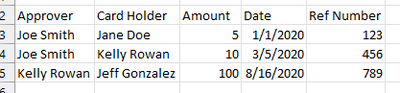
I have my data plugged into a nested table, but when you expand it all of the card holders under the approver are returning a count of 1.
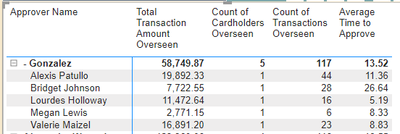
My dax code for the count is:


- Mark as New
- Bookmark
- Subscribe
- Mute
- Subscribe to RSS Feed
- Permalink
- Report Inappropriate Content
Hi @bmoon
Have you solved this problem? If so, kindly accept an appropriate reply as the solution or provide your own solution. If you are still confused about it, please provide some sample data or screenshot about the problem. Thanks.
Regards,
Community Support Team _ Jing


- Mark as New
- Bookmark
- Subscribe
- Mute
- Subscribe to RSS Feed
- Permalink
- Report Inappropriate Content
I douot but worth trying
VAR CardCount =COUNTROWS(VALUES(table[Card Holder]))
VAR Result =
IF ( CardCount=1, 0, CardCount)
RETURN
Result
- Mark as New
- Bookmark
- Subscribe
- Mute
- Subscribe to RSS Feed
- Permalink
- Report Inappropriate Content
That almost works. It returns a 0 for all cardholders, but occassionally there is a cardholder who is an approver.
- Mark as New
- Bookmark
- Subscribe
- Mute
- Subscribe to RSS Feed
- Permalink
- Report Inappropriate Content
Under another approver?
- Mark as New
- Bookmark
- Subscribe
- Mute
- Subscribe to RSS Feed
- Permalink
- Report Inappropriate Content
Hi @bmoon
Try this
Approver =
VAR CardCount =
    COUNTROWS ( VALUES ( table[Card Holder] ) )
VAR CardHolder =
    VALUES ( table[Card Holder] )
VAR Result =
    IF (
        CardCount = 1,
        IF ( CONTAINS ( table, table[Approver], CardHolder ), CardCount, 0 ),
        CardCount
    )
RETURN
Result- Mark as New
- Bookmark
- Subscribe
- Mute
- Subscribe to RSS Feed
- Permalink
- Report Inappropriate Content
It still seems to be populating the 1's

- Mark as New
- Bookmark
- Subscribe
- Mute
- Subscribe to RSS Feed
- Permalink
- Report Inappropriate Content
Hi @bmoon
What do you want it to return? To return for example 5 for all cardholders unde Gonzalez? Also any cardholder having more than one card or only one card per cardholder?
- Mark as New
- Bookmark
- Subscribe
- Mute
- Subscribe to RSS Feed
- Permalink
- Report Inappropriate Content
Hi
Any luck? Can tou please send sample data?
- Mark as New
- Bookmark
- Subscribe
- Mute
- Subscribe to RSS Feed
- Permalink
- Report Inappropriate Content
Sorry for my unclear question. I want it to return the count of cardholders overseen. So in the example with Gonzalez, his count (5) is correct. However, all of the individuals under him are cardholders and not approvers. So I want them to show 0 rather than 1. Occasionally an approver and cardholder can be the same person so I need to also account for that.
- Mark as New
- Bookmark
- Subscribe
- Mute
- Subscribe to RSS Feed
- Permalink
- Report Inappropriate Content
Hi @bmoon
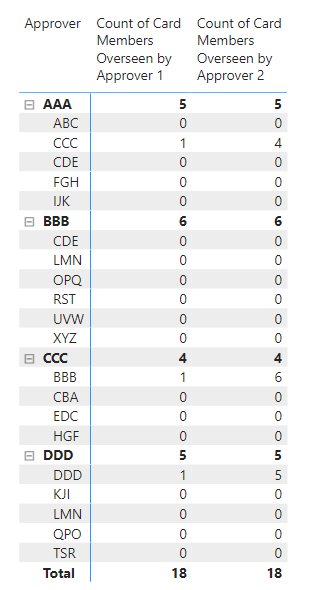
I was going through open posts and noticed that for some reason I missed to reply to your last comment. I hope you already found a solution for this issue, if not please refer to the sample file with the solution. https://www.dropbox.com/t/JapcKP84iEDhZXx9
I don't know which number would you like to show next to the approver who is also a card holder therefore, I proposed two solutions hopefully one of them will satisfy your requirement.
Count of Card Members Overseen by Approver 1 =
VAR CardCount =
    COUNTROWS ( VALUES ( 'Table'[Card Holder] ) )
VAR CardHolder =
    ALL ( 'Table'[Approver] )
VAR Result =
    IF (
        CardCount = 1,
        IF ( SELECTEDVALUE ( 'Table'[Card Holder] ) IN CardHolder, 1, 0 ),
        CardCount
    )
RETURN
    Result
Count of Card Members Overseen by Approver 2 =
VAR CurrentCardHolder =
SELECTEDVALUE ( 'Table'[Card Holder] )
VAR CardCount =
COUNTROWS ( VALUES ( 'Table'[Card Holder] ) )
VAR CardApprovers =
ALL ( 'Table'[Approver] )
VAR Result =
IF (
CardCount = 1,
IF (
CurrentCardHolder IN CardApprovers,
CALCULATE (
COUNTROWS ( VALUES ( 'Table'[Card Holder] ) ),
'Table'[Approver] = CurrentCardHolder,
REMOVEFILTERS ( 'Table' )
),
0
),
CardCount
)
RETURN
Result
- Mark as New
- Bookmark
- Subscribe
- Mute
- Subscribe to RSS Feed
- Permalink
- Report Inappropriate Content
Hi,
Whatever your reason is you can try
Approver =
IF (
ISINSCOPE ( table[Approver] ),
COUNTROWS ( VALUES ( table[Card Holder] ) ),
0
)
but this will return all cardholder values to zero regardless whether they are also approvers or not. I'll let you know if I found a solution for that. First please try this code and let me know if it works.

Helpful resources

Join us at the Microsoft Fabric Community Conference
March 31 - April 2, 2025, in Las Vegas, Nevada. Use code MSCUST for a $150 discount! Prices go up Feb. 11th.

Power BI Monthly Update - January 2025
Check out the January 2025 Power BI update to learn about new features in Reporting, Modeling, and Data Connectivity.

Fabric Community Update - January 2025
Find out what's new and trending in the Fabric community.

| User | Count |
|---|---|
| 18 | |
| 15 | |
| 11 | |
| 11 | |
| 8 |


| User | Count |
|---|---|
| 24 | |
| 18 | |
| 12 | |
| 11 | |
| 10 |


