Join us at FabCon Atlanta from March 16 - 20, 2026, for the ultimate Fabric, Power BI, AI and SQL community-led event. Save $200 with code FABCOMM.
Register now!The Power BI Data Visualization World Championships is back! Get ahead of the game and start preparing now! Learn more
Hi,
I have seen a lots of topics talking about it, but every time, it was about creating new tables or calculated columns ; I cannot.
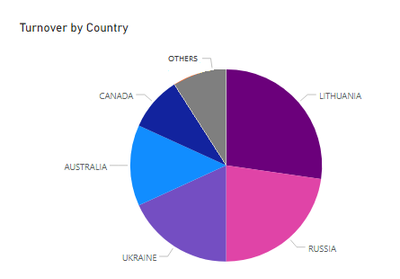
I use DirectQuery mode, and I want to have a pie chart with Top 5 turnover and "Others" category represented.
I hope to have not missed the right topic, but here is this one.
I already have a rank measure which ranks the cities by turnover.
Thank you.
Try below measure,
Thank you for your answer @Anonymous.
Will it gives me the "others" category?
share your sample dataset.
sorry it will not show others. let me try for others
I can't add an attachment to the message.
But here is some data:
| Country | Turnover |
| USA | 100 |
| CANADA | 200 |
| AUSTRALIA | 300 |
| GERMANY | 100 |
| RUSSIA | 500 |
| LITHUANIA | 600 |
| UKRAINE | 400 |
The result should be:
without column in not possible. you need to create calculated column.
Ok so no solution for me 😔 as I cannot create calculated columns.
The Power BI Data Visualization World Championships is back! Get ahead of the game and start preparing now!
| User | Count |
|---|---|
| 14 | |
| 7 | |
| 4 | |
| 4 | |
| 3 |
| User | Count |
|---|---|
| 23 | |
| 10 | |
| 10 | |
| 6 | |
| 5 |