Share feedback directly with Fabric product managers, participate in targeted research studies and influence the Fabric roadmap.
Sign up nowGet Fabric certified for FREE! Don't miss your chance! Learn more
Dimension =if(GetSelectedCount(Themes)>0,
if(match(Permalink,$(vCRP)) and not match(Themes,$(vCRT)),Themes),
if(match(Permalink,$(vCRP)) and not match(Themes,'$(vTh)'),Themes))
Solved! Go to Solution.
Hi @Anonymous ,
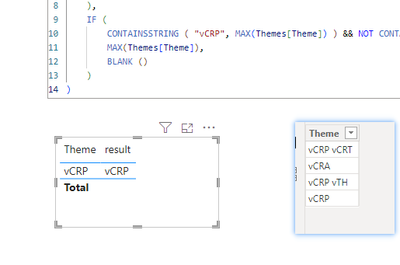
You can try formula like below:
result =
IF (
COUNTROWS ( VALUES ( 'Themes'[Theme] ) ) > 0,
IF (
CONTAINSSTRING ( "vCRP", MAX(Themes[Theme]) ) && NOT CONTAINSSTRING ( "vCRT", MAX(Themes[Theme])),
MAX(Themes[Theme]),
BLANK ()
),
IF (
CONTAINSSTRING ( "vCRP", MAX(Themes[Theme]) ) && NOT CONTAINSSTRING ( "vTh", MAX(Themes[Theme])),
MAX(Themes[Theme]),
BLANK ()
)
)
Best Regards,
Adamk Kong
If this post helps, then please consider Accept it as the solution to help the other members find it more quickly.
Hi @Anonymous ,
You can try formula like below:
result =
IF (
COUNTROWS ( VALUES ( 'Themes'[Theme] ) ) > 0,
IF (
CONTAINSSTRING ( "vCRP", MAX(Themes[Theme]) ) && NOT CONTAINSSTRING ( "vCRT", MAX(Themes[Theme])),
MAX(Themes[Theme]),
BLANK ()
),
IF (
CONTAINSSTRING ( "vCRP", MAX(Themes[Theme]) ) && NOT CONTAINSSTRING ( "vTh", MAX(Themes[Theme])),
MAX(Themes[Theme]),
BLANK ()
)
)
Best Regards,
Adamk Kong
If this post helps, then please consider Accept it as the solution to help the other members find it more quickly.
Hi @Anonymous,
Can you try this:
MEASURE =
VAR __vCRP = "" //I don't know how this variable is populated in QlikSense
VAR __vCRT = "" //Same as above
VAR __vTH = "" //Same as above
VAR __Permalink = "" //Same as above
RETURN
IF (
HASONEVALUE ( Themes ),
IF (
OR (
AND (
CONTAINSSTRING ( __Permalink, __vCRP ),
NOT ( CONTAINSSTRING ( __Permalink, vCRT ) )
),
AND (
CONTAINSSTRING ( __Permalink, __vCRP ),
NOT ( CONTAINSSTRING ( __Permalink, vTH ) )
)
),
SELECTEDVALUE ( Themes ),
BLANK ()
),
BLANK ()
)
If you love stickers, then you will definitely want to check out our Community Sticker Challenge!
Check out the January 2026 Power BI update to learn about new features.
| User | Count |
|---|---|
| 7 | |
| 4 | |
| 4 | |
| 3 | |
| 2 |
| User | Count |
|---|---|
| 15 | |
| 9 | |
| 9 | |
| 7 | |
| 5 |