cancel
Showing results for 
Search instead for 
Did you mean: 

The Power BI Data Visualization World Championships is back! Get ahead of the game and start preparing now! Learn more

Reply
ALC9816
Frequent Visitor

Percent Return for last 5 trading days (Base Price as of Earliest Date)

How can I make PxBase (base price) the same for all cells (according to earliest day price)
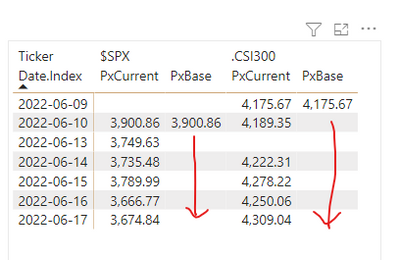
ALC9816_0-1656474068754.png

In Tableau, I would do this.  How do I do it in Power Bi?
 { FIXED [Ticker] : SUM( IF [Date.Index] = [MinDate] THEN SUM([Close) END) }  


My current measure formula are as below.  The raw date range is from 2020 to 2022, thus I created an index column in the table to calculate the last 5 trading days for each ticker (dates are non-continious due to weekends and holidays in different stock markets). 

PxCurrent = 
VAR MaxIndex = CALCULATE( MAX(IndexETF_L2Y[Index]), ALLEXCEPT(IndexETF_L2Y,IndexETF_L2Y[Ticker]) ) 
VAR CurIndex = CALCULATE( MIN(IndexETF_L2Y[Index]), ALLEXCEPT(IndexETF_L2Y, IndexETF_L2Y[Ticker], IndexETF_L2Y[Date.Index]) ) 
VAR Period = 5
VAR Counter = MaxIndex - CurIndex 
VAR CurPx     = CALCULATE( SUM(IndexETF_L2Y[Close]), FILTER(IndexETF_L2Y, Counter <= Period) ) 
RETURN
    CurPx


PxBase = 
VAR MaxIndex = CALCULATE( MAX(IndexETF_L2Y[Index]), ALLEXCEPT(IndexETF_L2Y,IndexETF_L2Y[Ticker]) ) 
VAR CurIndex = CALCULATE( MIN(IndexETF_L2Y[Index]), ALLEXCEPT(IndexETF_L2Y, IndexETF_L2Y[Ticker], IndexETF_L2Y[Date.Index]) ) 
VAR Period = 5
VAR Counter = (MaxIndex - CurIndex)
VAR StartPx   = CALCULATE( SUM(IndexETF_L2Y[Close]), FILTER(IndexETF_L2Y, Counter = Period) )
RETURN
    StartPx


Ultimately, I want to divide PxCurrent / PxBase - 1 in order to get to the last 5 days percent change (pegged to starting date) chart like this:

ALC9816_1-1656474627304.png


Grateful for any Power Bi Master's help. 
  

1 ACCEPTED SOLUTION
amitchandak
Super User
Super User

@ALC9816 , if 5 days data is already filtered and PX base is a measure


calculate(firstnonblankvalue(Table[Date], [PxBase]), allselected(Table))

Share with Power BI Enthusiasts: Full Power BI Video (20 Hours) YouTube
Microsoft Fabric Series 60+ Videos YouTube
Microsoft Fabric Hindi End to End YouTube

View solution in original post

2 REPLIES 2
amitchandak
Super User
Super User

@ALC9816 , if 5 days data is already filtered and PX base is a measure


calculate(firstnonblankvalue(Table[Date], [PxBase]), allselected(Table))

Share with Power BI Enthusiasts: Full Power BI Video (20 Hours) YouTube
Microsoft Fabric Series 60+ Videos YouTube
Microsoft Fabric Hindi End to End YouTube

Thank you for the quick reponse, and the good idea on FirstNonBlankValue.  I tweaked the solution a bit to accomodate to my data layout as follow:


calculate(firstnonblankvalue(Table[Date], [PxCurrent]), allexcept(Table,[Ticker]))
 

The resulting table looks like this: 

Pic.jpg

For any one out there looking for this solution, please see code below:


PxChg.L5d = 
VAR MaxIndex = CALCULATE( MAX(IndexETF_L2Y[Index]), ALLEXCEPT(IndexETF_L2Y,IndexETF_L2Y[Ticker]) ) 
VAR CurIndex = CALCULATE( MIN(IndexETF_L2Y[Index]), ALLEXCEPT(IndexETF_L2Y, IndexETF_L2Y[Ticker], IndexETF_L2Y[Date.Index]) ) 
VAR Period = 5  //Adjust for different lookback period
VAR Counter = MaxIndex - Period
VAR CurPx = CALCULATE( SUM(IndexETF_L2Y[Close]), FILTER(IndexETF_L2Y, MIN(IndexETF_L2Y[Index]) >= Counter) ) 
VAR BasePx = CALCULATE( FIRSTNONBLANKVALUE(IndexETF_L2Y[Date.Index], 
                IF(MIN(IndexETF_L2Y[Index]) >= Counter, SUM(IndexETF_L2Y[Close]))), 
                ALLEXCEPT(IndexETF_L2Y,IndexETF_L2Y[Ticker])
            ) 
RETURN   
IF( MIN(IndexETF_L2Y[Index]) >= Counter,
    DIVIDE( CurPx, BasePx ) - 1
)    


Thanks again, amitchandak.  Will subscribed and like your youtube channel.  Grateful! 

Helpful resources

Announcements
Power BI DataViz World Championships

Power BI Dataviz World Championships

The Power BI Data Visualization World Championships is back! Get ahead of the game and start preparing now!

December 2025 Power BI Update Carousel

Power BI Monthly Update - December 2025

Check out the December 2025 Power BI Holiday Recap!

FabCon Atlanta 2026 carousel

FabCon Atlanta 2026

Join us at FabCon Atlanta, March 16-20, for the ultimate Fabric, Power BI, AI and SQL community-led event. Save $200 with code FABCOMM.