Join us at FabCon Atlanta from March 16 - 20, 2026, for the ultimate Fabric, Power BI, AI and SQL community-led event. Save $200 with code FABCOMM.
Register now!The Power BI Data Visualization World Championships is back! Get ahead of the game and start preparing now! Learn more
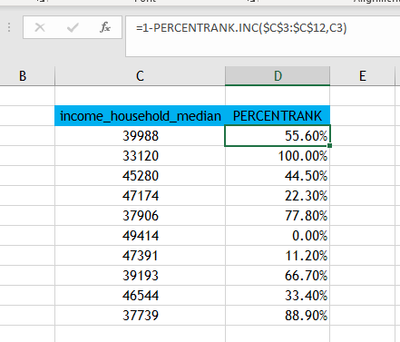
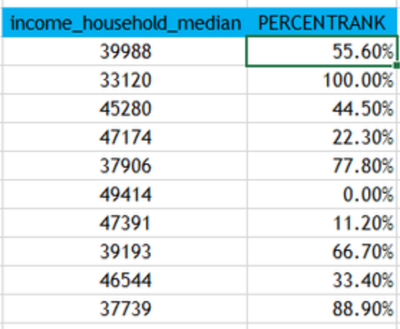
Hi Everyone, Need your help on this. How to create dax codes equivalent to percentrank.inc. Kindly refer to the image, desired output that i'm trying to achieve in dax. Any help will be much appreciated.
You can use the RANKX and COUNTROWS functions. Here's how you can create a DAX measure equivalent to PERCENTRANK.INC:
PercentRankInc =
VAR CurrentValue = [YourValueToRank]
RETURN
DIVIDE(
COUNTROWS(FILTER(ALL('YourTable'), 'YourTable'[YourColumn] <= CurrentValue)),
COUNTROWS(ALL('YourTable')),
0
)
Replace the following placeholders:
This DAX measure calculates the rank of the CurrentValue in the column specified by 'YourColumn' as a percentage of the entire data set in 'YourTable'. It uses the FILTER function to count the number of rows with values less than or equal to CurrentValue, and then divides this count by the total number of rows in the table to get the percentile rank.
@_elbpower ,
i'm trying to achieve this percentrank formula:
PERCENTRANK = lowernumber/(lowernumber + uppernumber)
Can you please define what is lowernumber and uppernumber
If you refer to the below image, in column income_household_median, if I want to get the percentrank of each value, I need to compare each value from the rest. For example, the first value is 39988, i'm going to compare 39988 from the rest of the values and get the count how many of them are lesser(lowernumber) from 39988, and getting as well the count of greater than (uppernumber) 39988. From there, I can compute the percentrank which is lowernumber/(lowernumber+uppernumber).
Here's a rewritten version of your DAX measure with some added comments for clarity:
PercentRankInc =
VAR CurrentValue = [income_household_median] // Get the current value to rank
RETURN
DIVIDE(
COUNTROWS(
FILTER(
ALL('YourTable'), // Consider all rows in the table
'YourTable'[income_household_median] < CurrentValue // Filter rows where the value is less to the current value
)
),
COUNTROWS(ALL('YourTable')), // Calculate the total number of rows in the table
0 // Handle division by zero (to avoid errors)
)
This measure effectively computes the percentile rank for each value in the "income_household_median" column, as you described.
The Power BI Data Visualization World Championships is back! Get ahead of the game and start preparing now!
| User | Count |
|---|---|
| 15 | |
| 8 | |
| 4 | |
| 4 | |
| 3 |
| User | Count |
|---|---|
| 24 | |
| 12 | |
| 12 | |
| 10 | |
| 5 |