Join us at FabCon Atlanta from March 16 - 20, 2026, for the ultimate Fabric, Power BI, AI and SQL community-led event. Save $200 with code FABCOMM.
Register now!The Power BI Data Visualization World Championships is back! Get ahead of the game and start preparing now! Learn more
Hello,
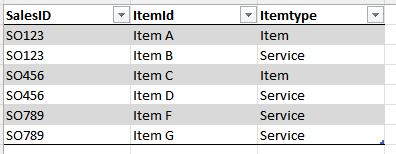
I have a table containing data of this structure:
I have put these three columns in a table visual. I want to create a slicer called "Only service items" that contains value TRUE/FALSE. If TRUE is picked in the slicer then I would like the visual to only show SalesID's that only contains rows of ItemType = Service.
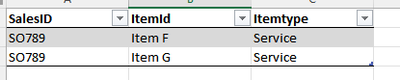
Expected result:
Would anyone be so kind as to point me in the right direction.
Thanks!
Solved! Go to Solution.
hi @Hedan ,
not sure if i fully get you, try to
1) plot a slicer with a calculated table like:
Slicer =
SELECTCOLUMNS(
{TRUE, FALSE},
"OnlyServiceItem", [Value]
)
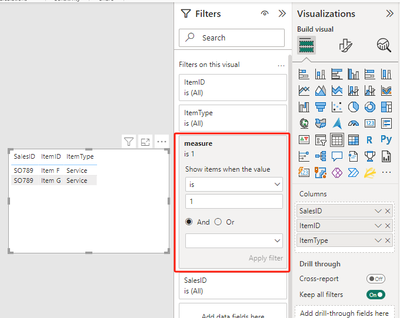
2) plot a table visual with all three columns and pull a measure like below to the filter pane of the visual and choose 1:
measure =
VAR _selection = SELECTEDVALUE(Slicer[OnlyServiceItem])
VAR _salesid = MAX(data[salesid])
VAR _list =
CALCULATETABLE(
VALUES(data[itemtype]),
ALL(data),
data[salesid] = _salesid
)
VAR _result =
IF(
_selection=FALSE(),
1,
IF(
_selection=TRUE
&& "Service" IN _list
&& COUNTROWS(_list)=1,
1,0
)
)
RETURN _result
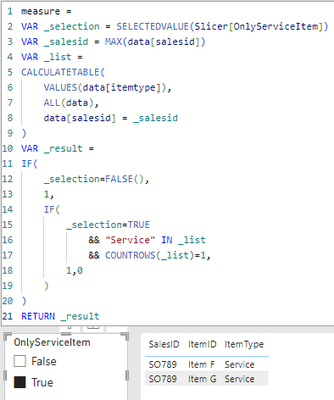
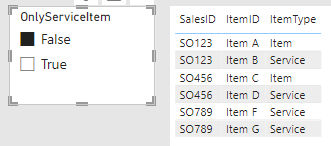
it worked like:
hi @Hedan ,
not sure if i fully get you, try to
1) plot a slicer with a calculated table like:
Slicer =
SELECTCOLUMNS(
{TRUE, FALSE},
"OnlyServiceItem", [Value]
)
2) plot a table visual with all three columns and pull a measure like below to the filter pane of the visual and choose 1:
measure =
VAR _selection = SELECTEDVALUE(Slicer[OnlyServiceItem])
VAR _salesid = MAX(data[salesid])
VAR _list =
CALCULATETABLE(
VALUES(data[itemtype]),
ALL(data),
data[salesid] = _salesid
)
VAR _result =
IF(
_selection=FALSE(),
1,
IF(
_selection=TRUE
&& "Service" IN _list
&& COUNTROWS(_list)=1,
1,0
)
)
RETURN _result
it worked like:
This worked, thank you!
The Power BI Data Visualization World Championships is back! Get ahead of the game and start preparing now!
Check out the November 2025 Power BI update to learn about new features.
| User | Count |
|---|---|
| 20 | |
| 10 | |
| 9 | |
| 4 | |
| 4 |
| User | Count |
|---|---|
| 33 | |
| 31 | |
| 19 | |
| 12 | |
| 11 |