Join us at FabCon Atlanta from March 16 - 20, 2026, for the ultimate Fabric, Power BI, AI and SQL community-led event. Save $200 with code FABCOMM.
Register now!The Power BI Data Visualization World Championships is back! Get ahead of the game and start preparing now! Learn more
Hi Team,
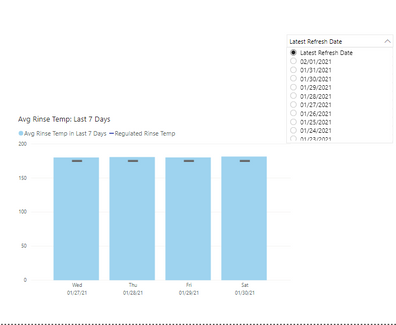
We need to show the data of last one week for below graph based on the date of user selection.
And also if the date is not aviabale particluar day also need to show in graphs as blank.
Measure we are using:
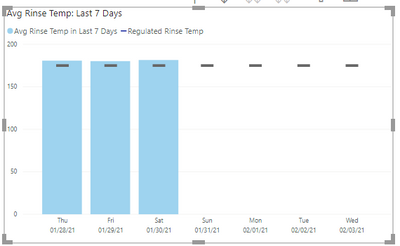
Expected o/p: i want to show date of Jan 31st and 1st Feb and 2nd feb also in that grpah.(blank also fine for these dates).
Kindly anyone suggest this scenario?
Hello @Samba777ravuri
You can try this.
Avg_Rinse_Temp_7_Days =
VAR selected_date =
SELECTEDVALUE ( dimDate[DayDate] )
VAR _Avg =
CALCULATE (
DIVIDE (
SUM ( factWareWashEvents[RinseTempSum] ),
SUM ( factWareWashEvents[RackCount] )
),
CROSSFILTER ( dimDate[DateKey], factWareWashEvents[DateKey], NONE ),
FILTER (
Date_Table,
Date_Table[DayDate] >= selected_date - 7
&& Date_Table[DayDate] <= selected_date
)
)
RETURN
IF( ISBLANK( _Avg ), 0, _Avg )
yes, tried your logic...Same issue exists.
Expected o/p :
Hello @Samba777ravuri
Can you please share your pbix file after removing the sensitive data?
Thanks for your Response, I have 100 MB file, lt me share some dummy file...please share your email here
The Power BI Data Visualization World Championships is back! Get ahead of the game and start preparing now!
Check out the November 2025 Power BI update to learn about new features.
| User | Count |
|---|---|
| 19 | |
| 11 | |
| 9 | |
| 4 | |
| 4 |
| User | Count |
|---|---|
| 35 | |
| 32 | |
| 20 | |
| 12 | |
| 10 |