cancel
Showing results for 
Search instead for 
Did you mean: 

View all the Fabric Data Days sessions on demand. View schedule

Reply
MBreden
Helper I
Helper I

Need help with the calculation of averages

Hi all,
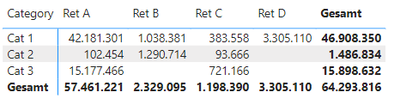
I have a table with retailers, categories and values.

MBreden_4-1685025942923.png

To calculate the percentage of categories per retailer, I am using a measure from this forum.

MBreden_5-1685026000889.png

Ret % =

Var _N1=[TT Sum]

Var _N2=CALCULATE(SUM(Data[Value]),FILTER(ALL(Data),[Retailer]=SELECTEDVALUE(DimRetailer[Retailer])))

Return

DIVIDE(_N1,_N2)


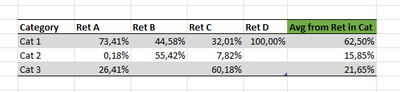
Now I am still at a loss how to calculate the average of all retailers per category from the result of the measure.

MBreden_3-1685025933016.png 

Any help is appreciated!

1 ACCEPTED SOLUTION

Hi @Anonymous ,

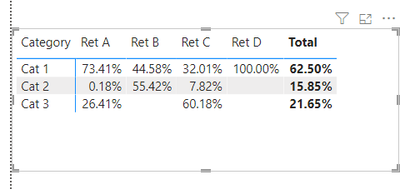
This is exactly what I was looking for, thank you so much!
I have adjusted the formula with AVERAGEX and the results are perfect.


Measure = 

VAR _1 =

    SUMMARIZE ( DimRetailer, DimRetailer[Retailer], "aaa", [Ret %] )

RETURN

    IF ( ISINSCOPE ( DimRetailer[Retailer] ), [Ret %], AVERAGEX( _1, [aaa] ) )

View solution in original post

2 REPLIES 2
Anonymous
Not applicable

Hi @MBreden ,

Please have a try.

Create another measure.

Measure =
VAR _1 =
    SUMMARIZE ( DimRetailer, DimRetailer[Retailer], "aaa", [Ret %] )
RETURN
    IF ( ISINSCOPE ( DimRetailer[Retailer] ), [Ret %], SUMX ( _1, [aaa] ) / 4 )

vrongtiepmsft_0-1685328059552.png

How to Get Your Question Answered Quickly 


If it does not help, please provide more details with your desired output and pbix file without privacy information (or some sample data) .


Best Regards
Community Support Team _ Rongtie

If this post helps, then please consider Accept it as the solution to help the other members find it more quickly.

Hi @Anonymous ,

This is exactly what I was looking for, thank you so much!
I have adjusted the formula with AVERAGEX and the results are perfect.


Measure = 

VAR _1 =

    SUMMARIZE ( DimRetailer, DimRetailer[Retailer], "aaa", [Ret %] )

RETURN

    IF ( ISINSCOPE ( DimRetailer[Retailer] ), [Ret %], AVERAGEX( _1, [aaa] ) )

Helpful resources

Announcements
November Power BI Update Carousel

Power BI Monthly Update - November 2025

Check out the November 2025 Power BI update to learn about new features.

Fabric Data Days Carousel

Fabric Data Days

Advance your Data & AI career with 50 days of live learning, contests, hands-on challenges, study groups & certifications and more!

FabCon Atlanta 2026 carousel

FabCon Atlanta 2026

Join us at FabCon Atlanta, March 16-20, for the ultimate Fabric, Power BI, AI and SQL community-led event. Save $200 with code FABCOMM.